Leveraging Local LLMs for Zero-Shot Text Classification: A Deep Dive into Scikit-Ollama Integration

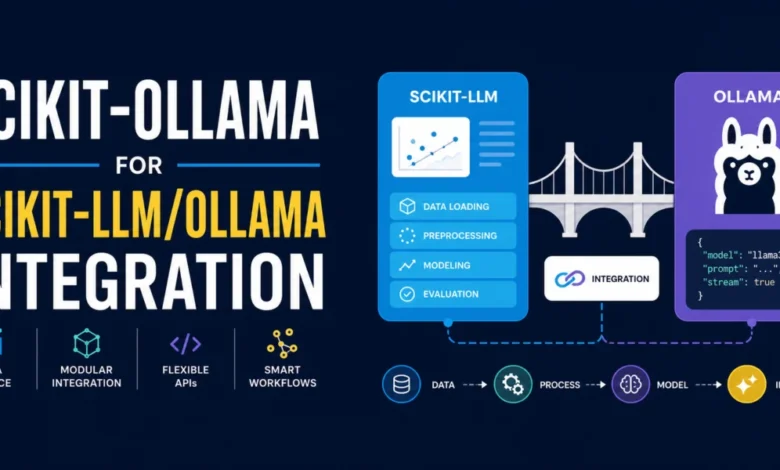
The landscape of machine learning is undergoing a profound transformation, driven by the increasing integration of Large Language Models (LLMs). Traditionally, accessing the power of these advanced models often necessitated reliance on commercial cloud APIs, presenting challenges related to cost, usage quotas, network bottlenecks, and crucially, data privacy. However, a new wave of innovation is democratizing LLM capabilities, bringing them directly to the user’s machine. The recently highlighted scikit-ollama library, building upon the foundation of scikit-llm, is at the forefront of this movement, bridging the familiar scikit-learn interface with locally running Ollama models. This integration empowers developers to perform sophisticated inference tasks, such as zero-shot text classification, without ever needing to send sensitive data to the cloud.
This comprehensive exploration delves into the practical implementation of scikit-ollama, demonstrating how to harness the power of a locally deployed Llama 3 model for sentiment analysis on movie reviews. By providing a step-by-step walkthrough, this article aims to demystify the process of integrating powerful LLMs into traditional machine learning workflows, emphasizing the cost-effectiveness, enhanced security, and increased control that local deployment offers.
The Rise of Local LLMs: Addressing Cloud API Limitations
For years, the accessibility of state-of-the-art LLMs was largely confined to cloud-based services. Platforms like OpenAI’s GPT series, Google’s Gemini, and Anthropic’s Claude offered unparalleled natural language processing capabilities, but their use came with inherent drawbacks. Businesses and individual developers alike grappled with managing API costs, adhering to strict usage limits, and navigating the complexities of data transfer and privacy regulations. The notion of sensitive customer feedback or proprietary textual data being processed on external servers raised significant security concerns for many organizations.
This context has fueled a growing demand for on-premise or locally executable AI solutions. The Ollama project has emerged as a pivotal player in this domain, simplifying the process of downloading, running, and managing LLMs directly on a user’s hardware. Ollama’s commitment to open-source models and ease of use has made it an attractive option for those seeking greater control over their AI deployments.
The introduction of scikit-ollama represents a significant step forward in making these locally hosted LLMs more accessible to the vast community familiar with the scikit-learn ecosystem. By abstracting the complexities of LLM interaction and mapping them to the intuitive API of scikit-learn, scikit-ollama democratizes advanced AI capabilities, making them as straightforward to use as traditional machine learning algorithms.
Bridging Scikit-Learn and Ollama: A Practical Implementation
The core of scikit-ollama‘s utility lies in its ability to translate the established scikit-learn paradigm into commands that can be executed by a local Ollama instance. This process involves a clever reformulation of the inference task into a text-generation prompt that is syntactically constrained. The LLM, even when a general-purpose model like Llama 3, is guided by scikit-ollama to produce outputs that adhere to the expected format of a classical machine learning model, effectively acting as a zero-shot classifier.
Step 1: Environment Setup and Installation
Before diving into the code, ensuring a compatible development environment is crucial. scikit-ollama requires Python version 3.9 or higher. Users can verify their current Python version and, if necessary, install or switch to a newer version. A virtual environment, such as one managed within Visual Studio Code, is recommended for isolating project dependencies.
Once the Python environment is confirmed, installing scikit-ollama is as simple as executing the following command in the terminal:
pip install scikit-ollamaThis command fetches and installs the library and its dependencies, making its functionalities readily available for use.
Step 2: Loading a Sample Dataset
For demonstration purposes, scikit-llm provides a convenient dataset catalog. The library’s datasets module offers pre-loaded text-based datasets, ideal for showcasing classification tasks. The article utilizes a sentiment analysis dataset specifically curated for movie reviews, which includes labels such as "positive," "negative," and "neutral."
The following Python code snippet illustrates how to load this dataset and display an example review with its corresponding sentiment label:
from skllm.datasets import get_classification_dataset

# Loading a demo sentiment analysis dataset containing movie reviews
# The expected labels are: "positive", "negative", "neutral"
X, y = get_classification_dataset()

print(f"Sample text: X[0] nLabel: y[0]")
The output of this code provides a clear example of the data format:
Sample text: I was absolutely blown away by the performances in 'Summer's End'. The acting was top-notch, and the plot had me gripped from start to finish. A truly captivating cinematic experience that I would highly recommend.
Label: positive
This initial step validates the data source and familiarizes the user with the type of textual input and categorical output they will be working with.
Step 3: Setting Up the Local Ollama Model
The cornerstone of this integration is a locally running Ollama model. Users must first ensure Ollama is installed on their machine. Detailed instructions for Ollama installation are readily available, typically through their official website. Once Ollama is operational, a specific model needs to be downloaded. For this guide, the llama3:latest model is chosen. This can be pulled from the Ollama model repository via the terminal using the command:
ollama pull llama3:latestThis action downloads the necessary model weights and configurations, making llama3:latest available for local inference.
Step 4: Instantiating the Zero-Shot Classifier
With Ollama and the model set up, the scikit-ollama library can be employed to create a zero-shot classifier. The ZeroShotOllamaClassifier class is imported from skollama.models.ollama.classification.zero_shot. This class acts as a wrapper, enabling the use of the specified local Ollama model for classification tasks.
The instantiation process is straightforward:
from skollama.models.ollama.classification.zero_shot import ZeroShotOllamaClassifier

# Initializing the classifier with our local Ollama model: llama3:latest
clf = ZeroShotOllamaClassifier(model="llama3:latest")
This code initializes the classifier, explicitly linking it to the llama3:latest model running via Ollama. The significance of this step lies in how scikit-ollama handles general-purpose LLMs. By configuring llama3:latest as a classifier, the library, in conjunction with scikit-llm, dynamically constructs text-generation prompts. These prompts are carefully designed to elicit responses that are semantically relevant to the classification task while strictly adhering to a predefined output format. This effectively transforms the LLM into a specialized zero-shot classifier, capable of performing predictive tasks with the same output predictability as traditional machine learning models.
Step 5: "Fitting" the Model with Candidate Labels
In the realm of zero-shot LLM-driven classification, the concept of "fitting" differs from traditional machine learning. Instead of updating model weights based on a labeled dataset, the fit() method in scikit-ollama serves to register the set of possible classification labels. This provides the LLM with the necessary context to understand the scope of potential outcomes during inference.
The candidate labels for sentiment analysis are provided as a list:
# "Fitting" the model boils down to just providing the list of candidate labels
clf.fit(None, ["positive", "negative", "neutral"])
Here, None is passed as the first argument because there’s no dataset to train on in the traditional sense. The second argument, ["positive", "negative", "neutral"], informs the classifier about the possible sentiment categories it should predict. This contextual information is crucial for the LLM to perform its zero-shot classification effectively.
Step 6: Generating Predictions
The final stage involves using the trained classifier to make predictions on new, unseen text data. The predict() method takes a list of text inputs and returns a list of predicted labels. When this method is invoked, the local Ollama instance processes each input text by formulating a prompt that incorporates the text and the registered classification labels. The LLM then generates a response, which scikit-ollama parses to extract the predicted label.
The following code demonstrates how to generate predictions on the movie review dataset and display the results for the first three entries:
# Generating and showing predictions on our dataset
predictions = clf.predict(X)

for text, prediction in zip(X[:3], predictions[:3]):
    print(f"Text: 'text'")
    print(f"Predicted Sentiment: predictionn")
The output showcases the classifier’s performance:
Text: 'I was absolutely blown away by the performances in 'Summer's End'. The acting was top-notch, and the plot had me gripped from start to finish. A truly captivating cinematic experience that I would highly recommend.'
Predicted Sentiment: positive

Text: 'The special effects in 'Star Battles: Nebula Conflict' were out of this world. I felt like I was actually in space. The storyline was incredibly engaging and left me wanting more. Excellent film.'
Predicted Sentiment: positive

Text: ''The Lost Symphony' was a masterclass in character development and storytelling. The score was hauntingly beautiful and complemented the intense, emotional scenes perfectly. Kudos to the director and cast for creating such a masterpiece.'
Predicted Sentiment: positive
The successful prediction of "positive" sentiment for all three reviews highlights the capability of the locally run Llama 3 model, guided by scikit-ollama, to accurately perform text classification tasks. This demonstrates that even without explicit fine-tuning on a sentiment analysis dataset, the LLM can leverage its vast pre-trained knowledge to infer sentiment based on the provided candidate labels.
Implications and Broader Impact
The successful implementation of scikit-ollama for zero-shot text classification has several significant implications for the machine learning community:
- Democratization of LLM Capabilities: By enabling the use of free, locally installed models,
scikit-ollamalowers the barrier to entry for leveraging advanced LLMs. This empowers individual developers, researchers, and smaller organizations who may not have the budget for expensive cloud API subscriptions. - Enhanced Data Privacy and Security: The ability to process sensitive textual data entirely on local machines addresses critical privacy and security concerns. This is particularly relevant for industries dealing with confidential information, such as healthcare, finance, and legal services.
- Cost-Effectiveness: Eliminating recurring cloud API fees can lead to substantial cost savings, especially for projects involving large volumes of inference or continuous model usage.
- Reduced Latency and Improved Control: Local deployment can result in lower inference latency compared to network-bound cloud services. Furthermore, users gain complete control over their models, including version management and deployment configurations, without external dependencies.
- Simplified Workflow Integration: The scikit-learn-like interface significantly simplifies the integration of LLMs into existing machine learning pipelines. Developers familiar with scikit-learn can readily adopt
scikit-ollamawithout a steep learning curve.
While this article focuses on zero-shot text classification, the underlying principles of scikit-ollama and its integration with Ollama suggest broader applicability. Future developments could extend this local integration to other LLM tasks, such as text summarization, question answering, and content generation, all while maintaining the advantages of local deployment.
The trend towards decentralized AI and on-device processing is gaining momentum. Libraries like scikit-ollama are instrumental in this shift, providing the tools necessary to harness the power of LLMs responsibly, securely, and efficiently, directly on the user’s hardware. This marks a pivotal moment in making advanced AI more accessible and practical for a wider range of applications and users.