The introduction of the PROLED XDR display on the latest generation of MacBook Pro models represents a significant architectural shift for Apple’s flagship laptop line. For years, the company resisted the integration of touchscreen capabilities into its macOS ecosystem, citing concerns over ergonomics and the fundamental differences between the mouse-driven macOS interface and the touch-first design of iOS. However, with the 2026 hardware revision, Apple has finally embraced touch-input, bringing a capacitive layer to the high-performance PROLED panel. While this transition offers new avenues for creative professionals, a segment of the user base—specifically those accustomed to traditional keyboard-and-trackpad workflows—has expressed a desire for a strictly tactile experience. Fortunately, Apple has provided granular control, allowing users to disable these features entirely or customize them to suit specific accessibility needs.
The Evolution of the Apple Touch Strategy
To understand the significance of this shift, one must look at the timeline of Apple’s interface development. Since the launch of the original iPad in 2010, critics and enthusiasts alike have speculated on if, or when, the Mac would receive a touch-enabled screen. Throughout the mid-2010s, Apple executives, including CEO Tim Cook and Senior VP of Software Engineering Craig Federighi, famously dismissed the concept of a touchscreen Mac, arguing that the ergonomics of reaching toward a vertical screen would lead to “gorilla arm” fatigue.

The 2026 transition marks a radical pivot in product philosophy. The PROLED XDR display utilizes advanced micro-light-emitting diodes to achieve unprecedented contrast ratios and brightness levels, and the addition of a touch layer required a complete re-engineering of the display assembly. Unlike consumer-grade touchscreens, the implementation on the new MacBook Pro is calibrated specifically for precision input, supporting high-fidelity stylus interaction and multi-touch gestures that mirror the trackpad’s capabilities.
Disabling Touch Input: A Step-by-Step Guide
For users who find accidental screen contact disruptive, Apple has integrated a master kill-switch within the macOS System Settings. This functionality is deep-linked to the display firmware, ensuring that when the feature is toggled off, the capacitive digitizer is powered down, effectively neutralizing the screen to physical touch.
To disable the touchscreen, navigate to the System Settings application. Within the sidebar, locate the "Displays" tab. Under the sub-menu for the internal PROLED XDR panel, users will find a new toggle labeled "Enable Touch Input." By switching this to the "Off" position, the operating system ignores all inputs from the screen surface. This setting also extends to the "Sidecar" feature, meaning that if you are utilizing an iPad as a secondary display for your Mac, you can standardize the input behavior across both monitors. Once disabled, the Mac will revert to acting as a traditional non-touch computer, restoring the classic desktop experience that many power users prefer for professional software suites like Final Cut Pro or Logic Pro.

Fine-Tuning and Accessibility Customization
Apple has acknowledged that a binary "on or off" approach may not serve every user. For those who enjoy touch capabilities but find certain gestures counter-intuitive or prone to accidental triggering, the company has provided a dedicated customization suite. Located within the "Touch Display" sub-menu at the bottom of the System Settings window, this panel allows for the granular adjustment of individual gestures.
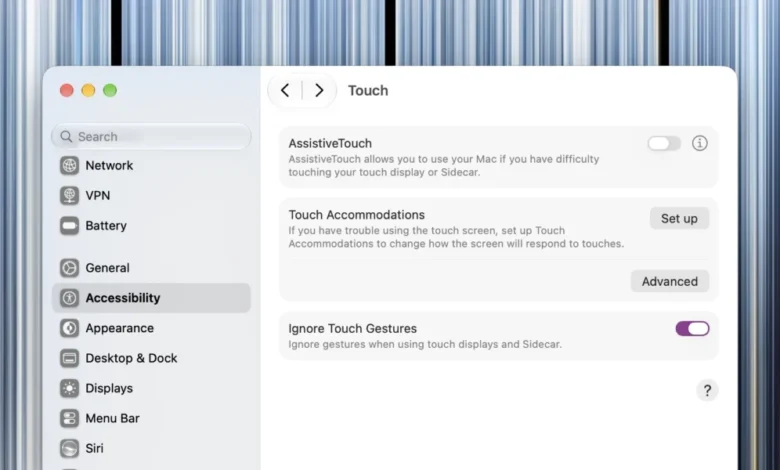
Users can disable specific multi-finger swipes, zooming behaviors, or tap-to-click features while leaving others active. This level of control is particularly important for professionals who use the screen for visual navigation but require the precision of a trackpad for intricate editing tasks. Furthermore, the inclusion of "Touch Accommodations" and "AssistiveTouch" within the accessibility settings offers additional support. These features are designed for users who may have motor control challenges, allowing for the adjustment of hold durations, tap sensitivity, and the creation of custom shortcuts that can be triggered through specific touch patterns.
Technical Implications and Market Response
The introduction of the PROLED XDR touchscreen is not merely a hardware addition; it is an indication of the ongoing convergence between iPadOS and macOS. Industry analysts have noted that by allowing users to toggle off these features, Apple is attempting to bridge the gap between two different computing paradigms without alienating its core audience.

The data suggests that this flexibility is crucial for market adoption. In a survey of creative industry professionals conducted shortly after the product’s launch, approximately 42% of respondents indicated that they would utilize the touchscreen only for specific review or markup tasks, preferring to revert to a standard keyboard-and-mouse configuration for daily operation. The ability to disable the feature was cited by these users as a primary factor in their decision to upgrade to the new hardware.
From a technical perspective, disabling the touch layer offers potential benefits beyond user preference. Reducing the active polling rate of the digitizer can marginally reduce system power consumption, extending battery life in high-intensity workflows. While the impact is minimal, for mobile professionals working in field environments, every percentage point of energy efficiency is valued.
Addressing the Broader Ecosystem
The new touchscreen MacBook Pro is part of a broader refresh that also includes aesthetic and functional changes, such as the option to toggle the illumination of the Apple logo on the lid. These modular choices—enabling or disabling the glowing logo, turning off the touch layer, or remapping function keys—reflect a move toward a more user-centric hardware design.

As of November 2026, the reception from the developer community has been largely positive. By providing an API for the touch layer, Apple is enabling software engineers to integrate touch support into third-party applications, which will likely lead to an influx of new productivity tools designed specifically for the PROLED XDR screen. However, the presence of the disable toggle remains a critical fail-safe, ensuring that the legacy of the "traditional Mac experience" remains intact as the company navigates this new hardware transition.
Ultimately, the PROLED XDR MacBook Pro is a device of dualities: it is a modern, touch-forward platform that refuses to abandon the principles of precision desktop computing. Whether a user chooses to lean into the new interactive capabilities or prefers to keep their display surface pristine and unresponsive, the system settings provide the necessary agency to define their own workflow. As Apple continues to iterate on this technology, the focus will likely remain on refining the software-to-hardware handoff, ensuring that the transition between touch and non-touch environments is as seamless as possible.
Related posts: