Pumpkin Lights brings festive interactive design to the macOS menu bar

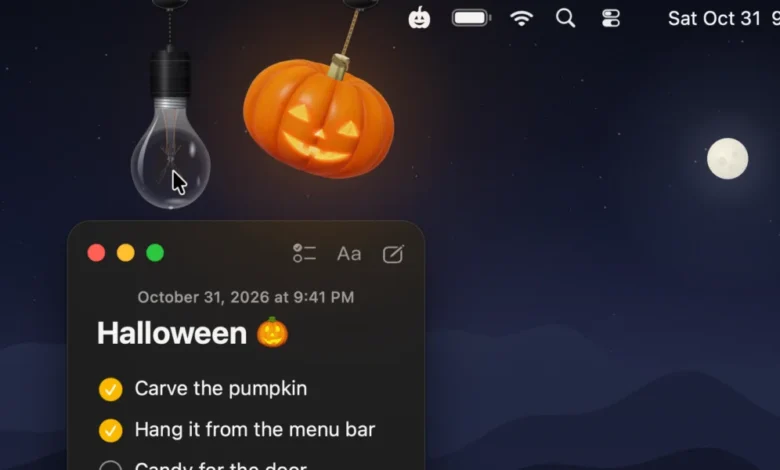
The arrival of the autumn season often coincides with a shift in digital aesthetics, as users seek to align their desktop environments with the changing atmosphere of the year. In a novel intersection of utility and holiday-themed design, developer Boyu Cheng has released Pumpkin Lights, a free macOS utility that transforms the standard system-wide appearance toggle into an interactive, physics-based experience. By replacing the static buttons found within the macOS Control Center or System Settings with a ray-traced, three-dimensional jack-o-lantern, the application provides a tangible interface for one of the most common daily computing tasks: switching between Light and Dark Mode.
The Evolution of Menu Bar Utility Design
The history of menu bar applications on macOS has transitioned from simple status indicators—such as battery life, time, and network connectivity—to highly expressive, functional tools. Over the past decade, the "Indie App" ecosystem has thrived by addressing gaps in the native operating system’s interface, often providing whimsical or highly specific functionality that Apple itself has not prioritized.
Pumpkin Lights draws conceptual inspiration from earlier seasonal experiments, such as the 2024 Festivitas app, which introduced holiday-themed lights to the Mac menu bar. These applications represent a broader trend in software development known as "digital decoration," where utility is secondary to the "delight factor." While the primary function of the application is to toggle system appearance, its architectural foundation—built on real-time ray tracing—signals a shift in how developers are utilizing modern macOS hardware capabilities to create more immersive UI elements.
Technical Architecture and Physics Implementation
Unlike standard menu bar items, which rely on static 2D vector icons, Pumpkin Lights utilizes 3D modeling to create a dynamic visual presence. The application operates by rendering a jack-o-lantern or an optional hanging light bulb that resides just beneath the menu bar.
From a technical standpoint, the developer has integrated a physics engine that allows the object to swing, spin, and react to cursor movement. This is not merely an aesthetic choice; it represents an attempt to bridge the gap between abstract digital commands and physical interaction. When a user interacts with the object, the underlying logic triggers a system-level change in the macOS interface style.

The developer, Boyu Cheng, emphasized that the project was born out of a desire to make the mundane task of toggling appearance settings feel more satisfying. "The idea came from something most of us do every day without thinking," Cheng noted in a technical brief regarding the app’s development. "It’s always a toggle buried in Control Center or System Settings, and it never feels like anything. I wanted it to feel like touching a real object."
Functional Versatility Beyond Appearance Toggling
While the app’s marketing focuses on the seasonal jack-o-lantern theme, the software offers a surprising degree of utility for power users. Beyond the default Light and Dark Mode toggle, users can configure the interactive object to execute a variety of system-level operations, including:
- Custom App/Website Launchers: Enabling quick access to frequently used software or specific browser URLs.
- System Maintenance: Functionality to keep the Mac awake, effectively acting as an alternative to "Caffeinate" or "Amphetamine" utilities.
- Audio Control: The ability to mute system sound through interaction with the object.
- Advanced Automation: Integration with macOS Shortcuts, allowing users to trigger complex workflows with a single "tug" on the pumpkin.
- Command Line Execution: A feature that allows advanced users to run custom shell scripts directly from the menu bar object.
This modularity suggests that while the initial appeal is seasonal, the underlying code base is robust enough to serve as a permanent fixture for users who appreciate unconventional input methods.
The Rise of Indie Development in the macOS Ecosystem
The release of Pumpkin Lights highlights a period of significant growth for the independent macOS development community. According to data from the Mac App Store and various independent distribution platforms, the demand for "micro-utilities"—small, highly focused apps that perform one specific task exceptionally well—has reached an all-time high. This trend is driven by two factors: the increasing power of Apple Silicon, which allows for complex, real-time rendering in background processes without impacting system performance, and a shift in user preference toward highly personalized desktop environments.
In the past, system-level modifications were often associated with "hacks" or complex third-party software suites that could impact system stability. Today, thanks to the APIs provided by Apple in recent iterations of macOS (from macOS 14 Sonoma onward), developers can create highly interactive, lightweight applications that run within the system’s sandbox. This provides a safer environment for users to experiment with desktop customization without risking system integrity.
Analysis: The Psychological Impact of Digital Interaction
The design philosophy behind Pumpkin Lights aligns with a growing body of research into "affective computing," which examines how human-computer interaction can be improved by incorporating sensory and tactile-like feedback. By introducing physics, movement, and light, the application seeks to evoke a sense of playfulness.

Psychologists have long noted that "micro-interactions"—the small, subtle animations and responses within a UI—play a critical role in user satisfaction. When an interface responds to a user’s action with a realistic, physics-based reaction, the brain perceives the software as more responsive and "alive." This is a significant departure from the utilitarian, flat design language that has dominated the tech industry for the last decade. As users spend more time in front of their screens, these small, delightful interactions serve as a form of "digital ergonomics," potentially reducing the mental fatigue associated with repetitive, sterile UI navigation.
Implementation and Compatibility
For users interested in integrating Pumpkin Lights into their daily workflow, the installation process is straightforward. The app is distributed as a standalone binary from the developer’s website, bypassing the traditional App Store review process for immediate deployment.
The system requirements are relatively modern, necessitating macOS 14 Sonoma or later. This requirement is likely due to the app’s use of newer rendering frameworks that take advantage of the GPU acceleration found in Apple Silicon (M-series) chips. For users on older hardware, the rendering of ray-traced, 3D physics-based models in the menu bar might prove too resource-intensive; however, on modern systems, the performance impact is reportedly negligible.
Broader Implications for User Experience Design
The popularity of applications like Pumpkin Lights poses an interesting question for companies like Apple regarding the future of UI design. While Apple has consistently pushed for a uniform, clean, and minimalist aesthetic in macOS, the indie community continues to demonstrate a strong consumer desire for customization and personality.
If major operating system developers continue to ignore the demand for expressive, interactive UI elements, they may find that users turn increasingly to third-party developers to fill that void. Pumpkin Lights is a testament to the fact that even a simple system setting, like a theme toggle, can be reimagined to provide a more engaging and delightful experience. Whether this trend toward "expressive utility" becomes a standard feature of future OS updates remains to be seen, but for now, it provides a unique way for users to celebrate the season while managing their digital workspace.
As the tech industry continues to iterate on the concept of the desktop, it is likely that we will see more applications that blur the line between a productivity tool and an interactive, virtual object. For now, Pumpkin Lights stands as a high-water mark for what can be achieved when a developer prioritizes "delight" alongside core functionality.
Related posts: