Gmail rolls out new one-tap 2FA copy code feature for Android and iOS devices

Google has officially introduced a significant quality-of-life update to its Gmail mobile application, streamlining the process of verifying identity through two-factor authentication (2FA). Users on both Android and iOS platforms are now seeing a new, pill-shaped "Copy code" button displayed directly within their inbox view. This feature eliminates the traditional, multi-step requirement of opening an email, manually selecting the numerical sequence, and copying it to the system clipboard. Instead, the application intelligently parses authentication emails, extracts the temporary security code, and presents it as an interactive shortcut situated conveniently below the subject line.
This rollout follows a series of recent enhancements to the Gmail ecosystem, including the deployment of "Live search" and improved chat integration earlier this month. As cybersecurity threats continue to evolve, the reliance on 2FA as a primary defense mechanism has become ubiquitous across banking, retail, and enterprise platforms. By reducing friction in the authentication workflow, Google aims to improve user security posture by making it easier for individuals to utilize robust security protocols without sacrificing convenience.
Evolution of Two-Factor Authentication and User Friction
For the past decade, 2FA has been the standard for securing online accounts. Whether through SMS-based verification or email-based codes, the mechanism is designed to add a secondary layer of protection that requires something the user "knows" (a password) and something the user "has" (a mobile device or email access). However, the "email-based code" method has long been plagued by user interface hurdles. Typically, a user must navigate away from their primary application—such as a banking portal or an e-commerce checkout page—open Gmail, locate the verification message, open the message, highlight the code, copy it, and then switch back to the original application.
This process is not only time-consuming but also prone to errors, particularly on smaller mobile screens where text selection can be imprecise. By introducing the "Copy code" button, Google is essentially applying a layer of semantic understanding to the email body. The Gmail application now identifies specific patterns that correspond to one-time passcodes (OTP), extracting the value and surfacing it to the top level of the interface. This shift represents a broader trend in mobile operating systems toward "context-aware" computing, where the software anticipates the user’s immediate need based on incoming data.
Chronology of Recent Gmail Enhancements
The implementation of the copy-code feature is the latest in a series of updates aimed at consolidating Google’s communication and workspace tools.
- Early 2026: Google began experimenting with advanced AI-driven search capabilities within the Gmail mobile app, allowing for more natural language queries and contextual discovery of files and messages.
- Early September 2026: The company rolled out "Live search" and expanded chat functionality, allowing users to engage in real-time collaboration without leaving their inbox.
- September 7, 2026: Reports confirmed the global rollout of the "Copy code" feature across Android (version 2026.09.07.x) and iOS (version 6.0.260907).
These updates are part of a strategic initiative to keep Gmail competitive against modern communication platforms that emphasize speed and integrated workflows. While the web interface has not yet received this specific button, industry observers suggest that the mobile-first approach is logical, given that the majority of 2FA verification happens on smartphones where users are juggling multiple applications simultaneously.
Technical Implications and Security Analysis
From a security perspective, this feature is a double-edged sword. While it significantly improves the user experience, it also relies on the application’s ability to correctly identify and extract sensitive information. Google’s implementation uses sophisticated pattern recognition to isolate the code. In testing, the feature has proven effective for automated emails from major financial institutions and retailers.
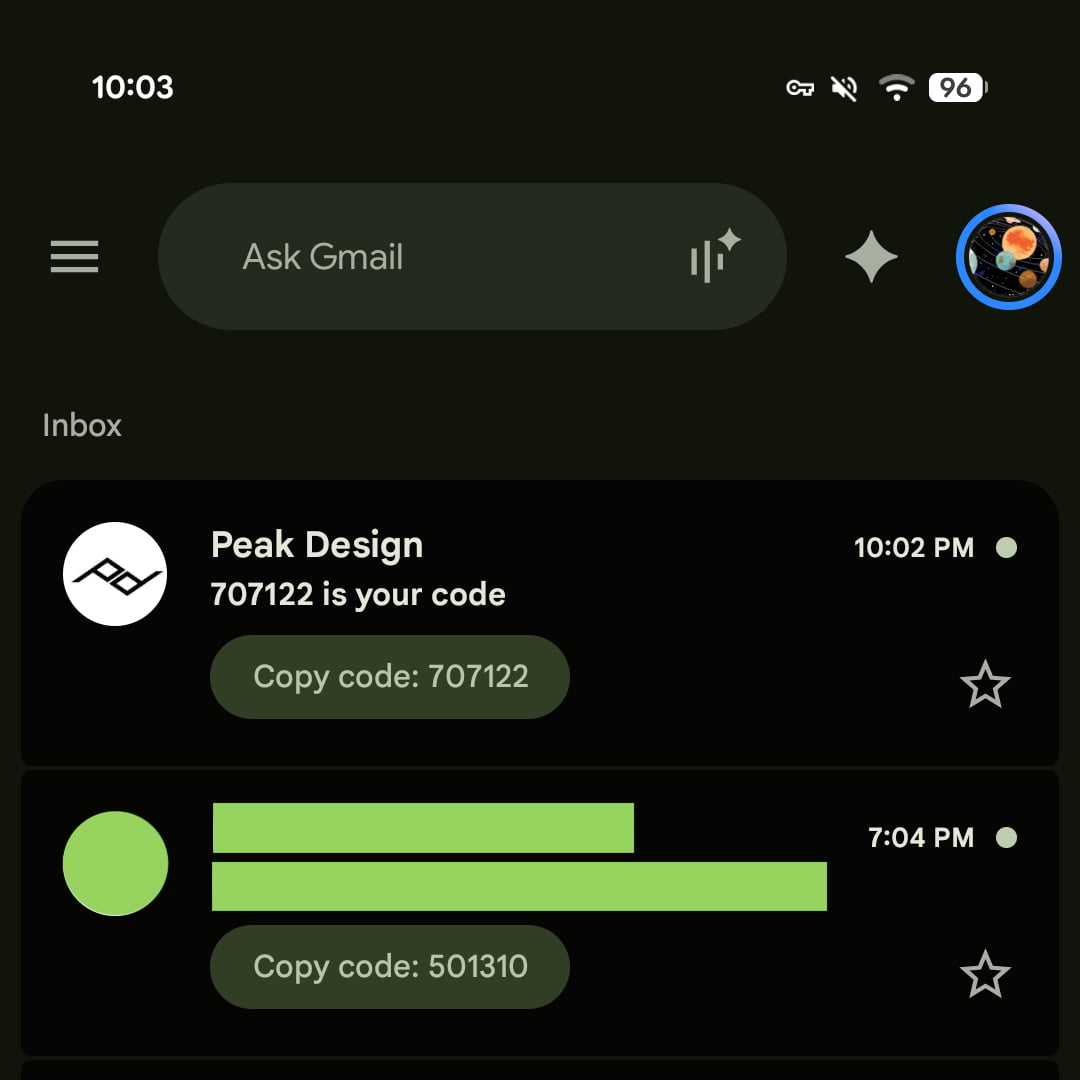
However, security researchers often caution against "shortcut" features that might inadvertently expose information. In this instance, the code is only copied to the clipboard after the user actively taps the button. Because the code is still contained within an email, the security risk remains tethered to the security of the Gmail account itself. If an unauthorized user gains access to the email account, they would still have access to these codes. Nevertheless, for the average user, the primary benefit is the reduction in "login fatigue," which often leads people to disable 2FA entirely if the process becomes too cumbersome.
The Broader Impact on Digital Identity
The move toward more integrated verification shortcuts highlights the ongoing tension between security and usability. According to recent data from the FIDO Alliance and other cybersecurity monitoring firms, user adoption of 2FA increases by nearly 30% when the process takes less than five seconds to complete. By turning a five-step process into a two-tap interaction, Google is actively encouraging better security hygiene among its millions of active users.
Moreover, the limitation of this feature to the Gmail mobile app—at least for now—suggests that Google is prioritizing the "mobile-as-primary-device" paradigm. As more users conduct banking, shopping, and professional operations via smartphone, the inbox is no longer just a place to read messages; it is an active utility hub. Integrating the code directly into the inbox interface transforms the email app from a passive reader into an active participant in the authentication handshake.
Limitations and Future Outlook
While the update is a welcome addition, there are notable limitations. Currently, the "Copy code" button is absent from the web-based version of Gmail. Furthermore, the functionality is not yet present in standard Android notification shades. If a user receives a 2FA email, they currently must unlock their phone and open the Gmail app to see the shortcut. Integrating these "copy" actions into the rich notifications of Android and iOS would represent the next logical step in this evolution.

Industry experts also note that this feature reinforces the dominance of Google’s proprietary ecosystem. By streamlining the 2FA process within Gmail, Google makes it more difficult for users to migrate to competing email clients that lack these deep, intelligent integrations. As the company continues to refine its AI-powered features, it is likely that Gmail will become even more adept at identifying not just codes, but also tracking numbers, flight information, and meeting schedules, surfacing these as actionable buttons in the same manner as the new 2FA shortcut.
Conclusion: A Step Toward Seamless Authentication
The introduction of the "Copy code" button in Gmail is a textbook example of how minor UX adjustments can have a profound impact on security compliance. By acknowledging that modern users demand instant results, Google has managed to integrate a complex security layer into a frictionless interface.
As of mid-September 2026, users on supported Android and iOS versions should begin seeing these shortcuts on their verification-heavy emails. While it is not a radical change, it is an essential one that reflects the current demands of the digital landscape. As the technology matures, it will be interesting to observe whether this feature expands to include more complex authentication methods or if it remains strictly for simple numerical OTPs. For now, it stands as a testament to Google’s ongoing commitment to optimizing the Gmail interface for a high-speed, mobile-centric world.
For security-conscious users, the primary takeaway remains the same: 2FA is only as strong as the account protecting it. While the new button makes verification easier, users should continue to practice good password management and monitor their account activity logs regularly. The convenience provided by this update is designed to make security easier to use, not to replace the fundamental necessity of vigilance in the digital age.