New Modding Tool Called NvpwrControl Unleashes Up to 40W Extra Power for Nvidia Laptop GPUs at User Risk

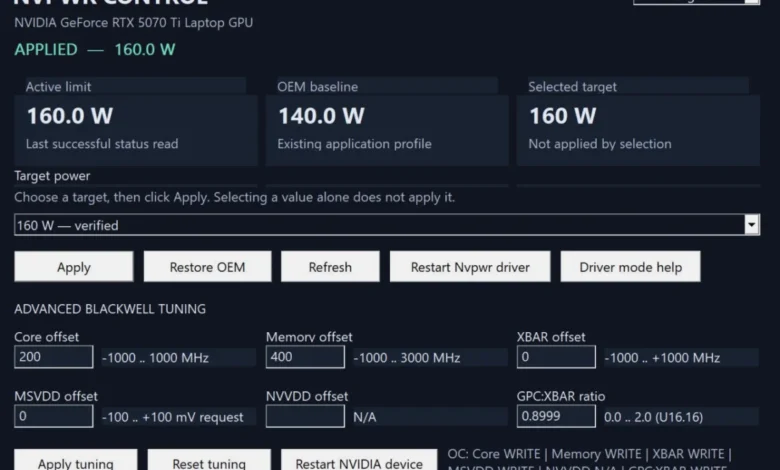
The landscape of mobile graphics performance has traditionally been defined by strict thermal and electrical envelopes imposed by hardware manufacturers. Laptops, by their very nature, are constrained by finite physical dimensions, cooling capacities, and power delivery systems. However, a newly developed utility has emerged that challenges these fundamental design parameters. A specialized software tool designated as NvpwrControl has been released to the public, offering enthusiasts the capability to bypass standard factory power limits on Nvidia-based gaming laptops. Originally highlighted by hardware monitoring outlets such as VideoCardz and hosted on the developer platform GitHub under version 1.8.0, the utility allows users to elevate mobile graphics processing unit (GPU) power ceilings by as much as 40 watts. This development opens up new avenues for performance enthusiasts seeking desktop-class output from portable systems, albeit accompanied by substantial hardware risks.
The introduction of NvpwrControl arrives at a time when the performance gap between desktop and mobile graphics solutions has narrowed architecturally, yet remained constrained by power delivery in practice. Laptop GPUs share the same foundational silicon as their desktop counterparts, but are crippled—or rather, balanced—by TGP (Total Graphics Power) targets configured by system integrators and Nvidia. By granting end-users direct software-level control over these hard-coded limits, NvpwrControl acts as an unofficial bridge, allowing mobile chips to draw significantly more electrical current than intended by the OEM (Original Equipment Manufacturer).
Understanding the Mechanics of NvpwrControl
To comprehend the significance of NvpwrControl, one must examine how mobile GPUs manage energy consumption. Modern Nvidia laptop GPUs utilize dynamic power management algorithms, such as Nvidia Dynamic Boost, which allocate power between the central processing unit (CPU) and the GPU based on workload demands within a predefined thermal and electrical ceiling. Manufacturers like ASUS, MSI, Lenovo, and Razer configure these ceilings based on their specific laptop chassis designs, VRM (Voltage Regulator Module) layouts, and heatsink capacities.
NvpwrControl operates by interfacing directly with the lower-level system controls that dictate these maximum power thresholds. According to early documentation and user reports surrounding the tool, the utility targets high-end mobile architectures, enabling substantial headroom increases. For instance, modified configurations have demonstrated the capacity to push specific mobile variants—such as the hypothetical or newly emerging RTX 50-series laptop configurations—to unprecedented heights. Reports indicate that mobile GPUs like the RTX 5070 Ti laptop variant can be driven up to 180 watts, while higher-tier configurations like the RTX 5090 laptop GPU can reach upwards of 225 watts.
These figures represent a dramatic departure from standard mobile specifications. Typical mobile GPUs operate within a range of 80W to 150W depending on the laptop’s form factor (thin-and-light versus bulky desktop replacements). Injecting an additional 40 watts into the silicon core and memory subsystems requires the surrounding electrical components to handle current loads they were never officially specified to endure.
Chronology of Mobile GPU Power Modification
The practice of modifying laptop GPU power limits is not entirely new, but the methods and accessibility have evolved significantly over the past decade. A chronological review of mobile graphics overclocking and power modification reveals a persistent cat-and-mouse game between enthusiasts and manufacturers.
In the early eras of mobile gaming, performance tuning was largely restricted to software like MSI Afterburner or Nvidia Inspector, which allowed for core and memory clock offsets but strictly respected the VBIOS (Video BIOS) power limits enforced by the manufacturer. If a GPU hit its designated wattage cap, the hardware would automatically throttle its clock speeds to maintain compliance, regardless of the thermal headroom available.
By the Pascal generation (GeForce GTX 10-series), mobile GPUs achieved parity with desktop silicon architecture, prompting advanced users to begin flashing custom VBIOS files onto their laptop cards. This process involved extracting the VBIOS, modifying the power tables using specialized hex editors or software like NiBiTor (NVIDIA BIOS Editor), and forcing the modified firmware onto the laptop’s EEPROM chip via command-line flashing tools. While effective, VBIOS flashing carried a severe risk of bricking the display adapter, rendering the laptop inoperable without a hardware programmer or integrated graphics fallback.
During the RTX 20-series and RTX 30-series eras, manufacturers introduced Max-Q and Max-P designators, complicating power limits further. OEMs began utilizing dynamic firmware locks, making unauthorized VBIOS flashing increasingly difficult due to digital signatures and stricter security measures implemented by Nvidia. Consequently, the modding community shifted toward registry tweaks, modified system control software (such as custom versions of ASUS Armoury Crate or Lenovo Legion Toolkit), and hardware shunts—a physical modification where microscopic resistors on the GPU’s power delivery circuit are soldered over to trick current sensors into reporting lower power draws than actual usage.
The release of NvpwrControl marks a modern evolution in this timeline. Rather than requiring risky firmware flashing or irreversible hardware modifications (shunting), NvpwrControl provides a software-level interface to manipulate power states directly within the operating system environment. Released as an experimental open-source project on GitHub, the tool democratizes extreme mobile overclocking, making it accessible to a broader audience of hardware enthusiasts who possess the technical aptitude to download and execute repository releases.
Supporting Data and Technical Implications
The decision to increase a laptop GPU’s power limit by 40 watts has quantifiable implications for thermal dynamics, electrical engineering, and hardware longevity. To contextualize this change, it is helpful to analyze the power-to-performance curves of modern semiconductor nodes.
| GPU Tier / Model | Standard Mobile TGP Range | Modified TGP with NvpwrControl | Estimated Power Increase | Primary Associated Risk |
|---|---|---|---|---|
| Mid-Range Mobile (e.g., xx60/xx70) | 85W – 115W | Up to 145W – 160W | +30W to +45W | VRM Overheating, Thermal Throttling |
| High-End Mobile (e.g., RTX 5070 Ti) | 140W | Up to 180W | +40W | Component Degradation, Power Supply Strain |
| Flagship Mobile (e.g., RTX 5090) | 175W – 185W | Up to 225W | +40W | Extreme Thermal Stress, Power Brick Overload |
When a graphics processor is fed an additional 40 watts of electrical power, that energy does not vanish; it is converted almost entirely into heat. In a desktop environment, dissipating an extra 40W is trivial, usually requiring only a slightly larger heatsink fin stack or a marginal increase in fan speed. In a laptop chassis, however, thermal margins are razor-thin. Copper heat pipes are already operating near their transport capacity, and cooling fans are often spinning at maximum acoustic thresholds just to maintain baseline operating temperatures under stock conditions.
Pushing an extra 40W through the GPU typically results in core temperatures rising sharply toward TJMax (maximum junction temperature), triggering thermal throttling that can negate the performance gains the user sought to achieve in the first place. More critically, the voltage regulator modules (VRMs) and MOSFETs responsible for stepping down power from the laptop’s main adapter to the GPU core are subjected to sustained thermal and electrical stress. If these components exceed their design temperature thresholds, premature failure, component degradation, or catastrophic electrical short circuits can occur.
Furthermore, the power brick supplied with the laptop is engineered to deliver a specific maximum wattage to the system (for example, 280W or 330W). When both the CPU and GPU are operating at maximum load—with the GPU drawing an unauthorized 40W surplus—the total system draw can exceed the rated capacity of the external power adapter. This can cause the power brick to shut down automatically to prevent a fire hazard, or worse, degrade over time due to sustained over-current operation.
Official Responses and Industry Perspective
As of the current release of NvpwrControl, major hardware manufacturers and Nvidia have not issued direct public statements addressing this specific third-party utility. However, industry norms and standard warranty policies provide a clear framework regarding how such software modifications are viewed by corporate entities.
Hardware manufacturers uniformly include clauses in their end-user license agreements (EULAs) and limited hardware warranties stating that damage resulting from unauthorized overclocking, overvoltage, or firmware/software modification voids the warranty coverage. Because NvpwrControl is explicitly labeled as ‘experimental’ by its developer and requires users to explicitly accept the risks associated with hardware degradation, any thermal damage, fried VRMs, or unstable silicon behavior resulting from its use falls squarely on the end-user.
From a design perspective, laptop engineers intentionally restrict mobile GPU power limits to protect their brand reputation and ensure product reliability over a typical three-to-five-year consumer lifecycle. Laptops are subjected to physical movement, dust accumulation, and variable ambient temperatures—factors that make high-power operation significantly riskier in a portable form factor than in a stationary desktop tower. By overriding these safety margins, users are operating outside the tested parameters established by safety certification bodies (such as UL, CE, and FCC) and OEM engineering divisions.
Broader Impact and Implications for the PC Hardware Community
The emergence of NvpwrControl highlights a persistent philosophical divide within the PC gaming community: the desire for maximum user control versus the manufacturer’s imperative for stability and safety.
For the enthusiast community, tools like NvpwrControl represent the spirit of PC customization. The ability to extract desktop-tier frame rates from a machine that fits inside a backpack is a compelling proposition, particularly for mobile professionals and gamers who travel frequently. Enthusiast forums and communities on platforms like GitHub and Reddit have increasingly embraced software workarounds as hardware locking becomes more prevalent. Manufacturers have steadily locked down VBIOS signatures and hardware registers to prevent user modification, making independent utilities like NvpwrControl vital for those who view hardware ownership as absolute rather than conditional.
Conversely, the mainstream implications point toward potential consumer hazards. Unsuspecting consumers who purchase used gaming laptops may inadvertently acquire hardware that has been subjected to prolonged high-wattage stress via tools like NvpwrControl. This hidden degradation can lead to sudden hardware failure long after the initial purchase, complicating the secondary hardware market.
Ultimately, NvpwrControl serves as a powerful reminder of the physical engineering compromises inherent in modern mobile computing. While the software successfully achieves its technical objective of lifting power ceilings by up to 40 watts, it acts as a stark illustration of the adage that there is no free lunch in hardware design. Users who choose to deploy the utility must weigh the allure of marginal frame rate improvements against the very real risks of shortening the operational lifespan of expensive gaming hardware.