IOS 27.2 introduces a seamless system-managed migration feature for retiring legacy applications

The release of iOS 27.2 beta 1 has unveiled a significant infrastructure change designed to simplify the lifecycle management of mobile applications. Apple is introducing a new, system-integrated framework that allows developers to facilitate the migration of user data and specific system settings from a legacy application to a designated successor. This development addresses a long-standing friction point in the mobile ecosystem, where developers transitioning users to new software often faced difficulties in ensuring a seamless continuity of user experience.
Historically, the retirement of an application—often necessitated by shifts in architecture, branding, or the introduction of a complete feature-set overhaul—has been a manual and often cumbersome process for the end user. When an application does not rely exclusively on cloud-based synchronization, moving local database files, user preferences, and permission sets has traditionally required users to manually reconfigure settings or lose historical data entirely. With the upcoming rollout of iOS 27.2, Apple is formalizing this process at the operating system level, providing a native, secure, and user-friendly mechanism to bridge the gap between two applications.
The Mechanics of the Migration Flow
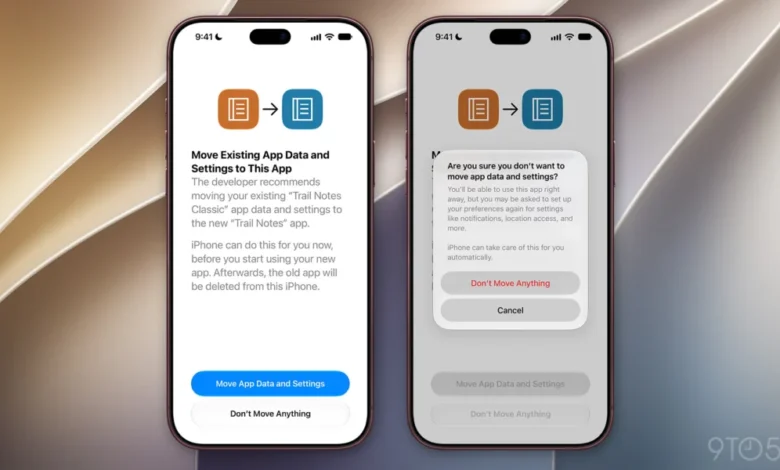
According to the documentation identified within the iOS 27.2 beta, the migration process is initiated by the system upon the detection of a designated successor app. When a user attempts to open a legacy application that has been marked for retirement, the operating system will trigger a standardized prompt. This notification serves as an explicit bridge, informing the user that the developer has recommended a move to the new application.
The prompt explicitly states: "The developer recommends moving your existing app data and settings to the new app. iPhone can do this for you now, before you start using your new app. Afterwards, the old app will be deleted from this iPhone." This language indicates that the process is designed to be destructive to the legacy app—effectively a "clean sweep" that ensures users do not keep redundant, non-functional software on their devices after a transition is complete.
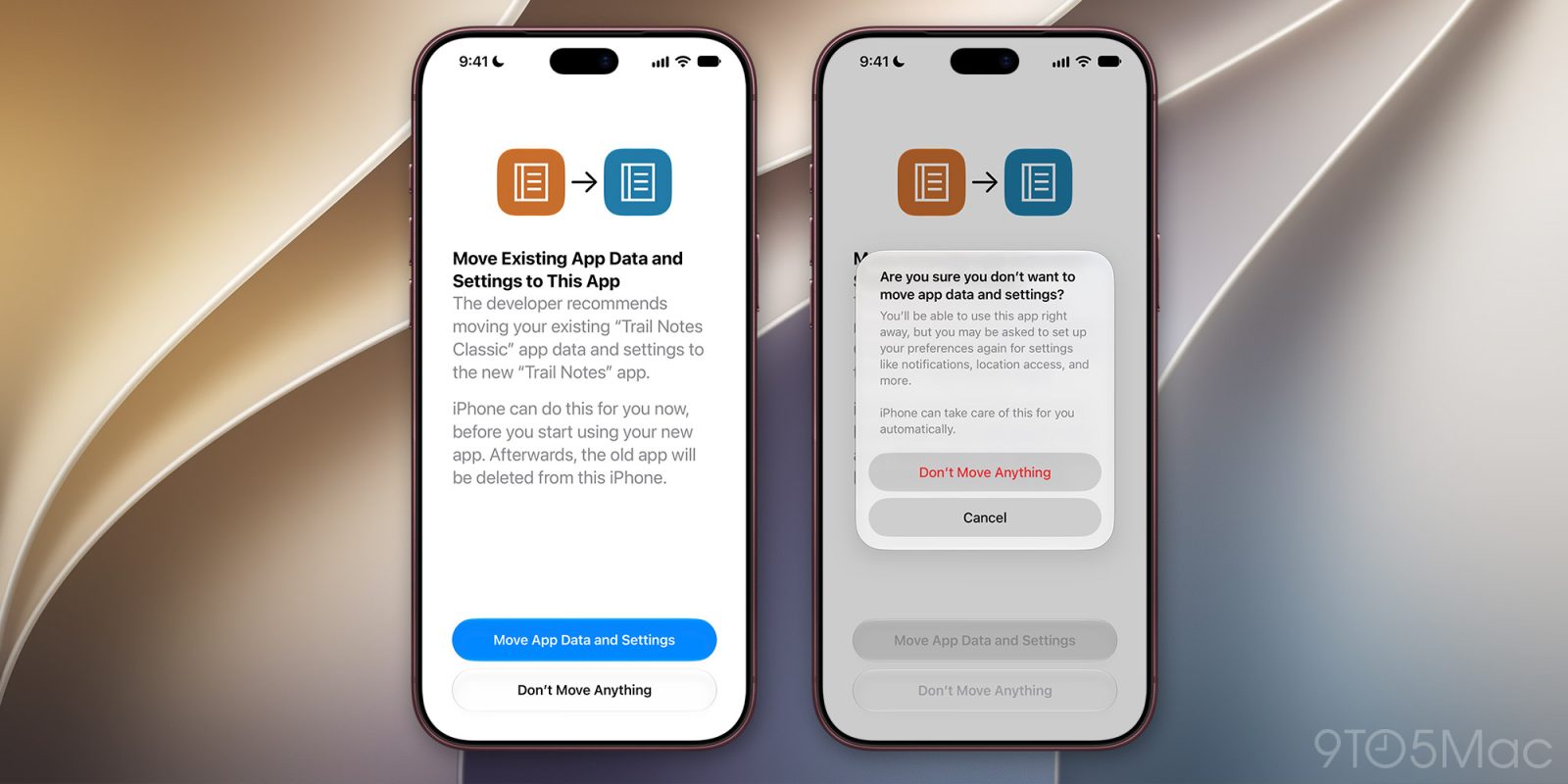
The user is presented with two clear choices: "Move App Data and Settings" or "Don’t Move Anything." If the user opts to move forward, the OS handles the background transfer of local files and system-level configurations. If the user declines, a secondary confirmation warning is triggered, which acts as a safeguard to ensure the user understands that by rejecting the migration, they will lose access to existing preferences, including critical system-level permissions like notification alerts and location access, which will revert to their default states in the new application.
Contextualizing the Need for Better App Transitions
In the broader context of software development, application replacement is a standard, albeit infrequent, event. Many developers reach a point where the underlying codebase of a "Version 1.0" app becomes technically debt-ridden, making it impossible to implement modern features or comply with updated security standards. Launching a "Version 2.0" as a separate app—rather than an update—is a common strategy used to clean up internal architecture, change branding, or pivot a business model.
However, this strategy has historically been criticized for its impact on user retention. When users are forced to log in again, re-grant permissions, or lose their local history, the churn rate for these "successor" apps can be high. By standardizing this transition, Apple is essentially providing developers with a tool to maintain their user base during these pivotal shifts. This initiative aligns with Apple’s broader strategy of emphasizing privacy and system-wide consistency, ensuring that permissions and preferences are handled in a way that remains transparent to the user.
Analysis of Technical and Strategic Implications
The introduction of this migration framework has significant implications for both app developers and the iOS user experience. From a technical standpoint, this feature likely leverages existing secure sandbox APIs, ensuring that data is transferred directly between the two applications without exposing it to the rest of the file system. This maintains the "sandbox" security model that has long been a hallmark of iOS.
For developers, this reduces the "onboarding tax." Currently, developers must often build custom, complex import/export tools or rely on third-party cloud services to ensure user data survives a transition. By offloading this responsibility to the iOS kernel, Apple is lowering the barrier to entry for developers who need to iterate on their product. It is worth noting that this feature is currently limited to transitions between apps from the same developer. This is a critical security boundary: the OS will not facilitate data migration between disparate developers, which prevents potential privacy exploits or unauthorized data scraping.

From an ecosystem perspective, this move signals a more mature phase in the lifecycle of the App Store. As the library of available apps continues to expand, the frequency with which apps are replaced or retired will likely increase. Providing a standardized "exit ramp" for legacy apps helps keep the App Store ecosystem clean and prevents the accumulation of "zombie" apps—applications that are no longer supported or updated but remain on user devices, potentially posing security or performance risks.
The Role of System-Level Settings
The framework’s ability to migrate system-level permissions is arguably its most important component. Users often find it frustrating to manually re-grant location, camera, microphone, and notification permissions when switching to a new app. By automating these settings, Apple is reducing the "cognitive load" on the user. If an app was previously authorized to access a user’s location, the migration flow can theoretically carry over that permission token to the new application, provided the successor app has the same bundle identifiers or is cryptographically verified as a legitimate replacement.
This level of integration is only possible because Apple controls the entire stack, from the operating system to the App Store’s distribution pipeline. While the current beta only hints at the scope of these settings, it is highly probable that as the beta cycle progresses, we will see further refinements regarding how permissions are audited and re-verified during the move.
Industry Reactions and Future Outlook
While official comments from third-party developers are pending, industry analysts generally view this move as a positive, albeit long-overdue, improvement. Smaller development shops, which may lack the resources to build robust, multi-platform migration tools, are expected to benefit the most. Conversely, larger enterprises with extensive user-account databases already utilize cloud-based syncing, but even they will likely benefit from the ability to migrate local, device-specific data that is often too heavy or sensitive to store in the cloud.
The beta cycle for iOS 27.2 will be closely monitored for additional details on the technical implementation of this feature. Developers are looking for specific documentation regarding the "designated successor" metadata that will need to be added to their App Store Connect profiles. This will likely involve a new field in the developer portal where an outgoing app is linked to an incoming one, creating a verifiable chain of custody for the user’s data.

As we move toward the final release of iOS 27.2, the focus will shift to how effectively this system handles edge cases. For instance, how will the migration handle apps that are currently offline? What happens if the device storage is full during the transfer? These are the types of scenarios that Apple will be stress-testing during the coming months.
Conclusion: A Smarter Ecosystem
The introduction of a system-managed migration flow is a clear indicator of Apple’s commitment to refining the user experience of its platform. By tackling the friction associated with application transitions, Apple is ensuring that the transition from old to new software is as smooth as possible, thereby encouraging users to adopt newer, more secure, and more feature-rich versions of their favorite apps.
This development also reinforces the importance of the iOS ecosystem’s "walled garden." Because Apple maintains tight control over both the hardware and the software, it can implement features that would be nearly impossible to standardize on more fragmented operating systems. As the digital landscape evolves, tools that prioritize data integrity and user convenience, such as this new migration framework, will become increasingly essential for maintaining the health and longevity of the application economy. The beta cycle for iOS 27.2 serves as a precursor to what will likely be a standard, expected feature for all future application transitions on the platform.
Related posts: