The Unseen Cost of Free: Unpacking Windows 11’s Aggressive Advertising Strategy and How Users Can Opt Out.

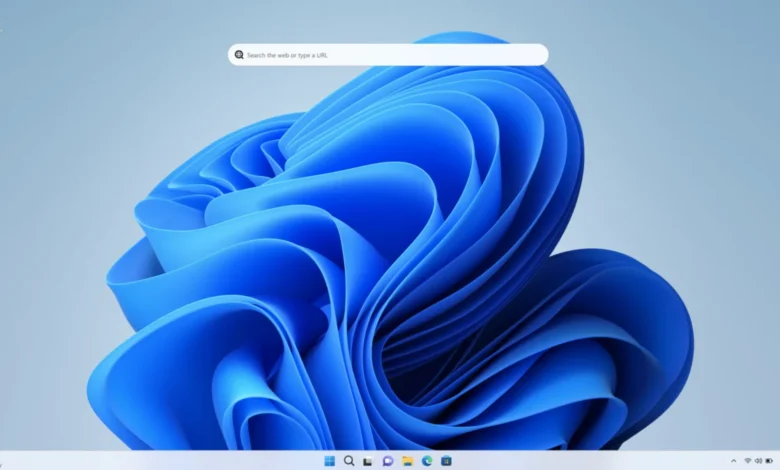
Microsoft’s decision to offer a free upgrade to Windows 11 for eligible Windows 10 users, initially perceived as a gesture of goodwill, has increasingly revealed itself as a strategic maneuver to broaden the company’s monetization avenues through pervasive advertising and "recommendations" embedded directly into the operating system. This shift marks a significant departure from traditional software revenue models, raising questions about user experience, privacy, and the evolving nature of consumer-grade operating systems. As the latest builds of Windows 11 roll out, users are reporting an escalation in these promotional elements, prompting a widespread desire to reclaim control over their digital environment.
The Evolution of Monetization in Windows

The journey towards an ad-supported Windows environment is not entirely new. Windows 10, released in 2015, began experimenting with "suggestions" in the Start Menu, lock screen, and notifications. These early forays were often dismissed as minor annoyances, but they laid the groundwork for the more integrated and frequent advertisements now observed in Windows 11. The underlying philosophy appears to be a pivot from a pure product-centric revenue model, where users pay for a software license, to a service-oriented model that leverages user engagement and data for sustained income. This aligns with broader industry trends where "free" platforms often recoup costs through advertising, data analytics, and premium feature upsells.
Windows 11, launched in October 2021, arrived with a promise of a refreshed interface and enhanced productivity. However, beneath the polished exterior, Microsoft has systematically expanded the footprint of promotional content. This includes not just traditional ads for Microsoft products like OneDrive and Copilot but also recommendations for third-party apps, tips disguised as marketing, and even full-screen prompts encouraging further setup, often leading to Microsoft services. This strategy reflects a broader trend in the technology sector, sometimes dubbed "en-shittification," where platforms, once established, begin to degrade user experience by prioritizing monetization over user satisfaction. For Microsoft, a company with a market capitalization exceeding $3 trillion, diversifying revenue streams beyond traditional software licenses and cloud services (Azure) is a continuous objective. Advertising revenue, even if incremental per user, can collectively represent a substantial financial gain across Windows’ billions of active devices.
Microsoft’s Rationale and User Perception
From Microsoft’s perspective, these "recommendations" are often framed as ways to "enhance user experience," "discover new features," or "get the most out of Windows." For instance, promoting Copilot, the AI assistant, or OneDrive cloud storage within the OS could be seen as helpful nudges for users who might otherwise be unaware of these integrated services. The company’s official statements often emphasize personalization and feature discovery. However, user reactions frequently contradict this narrative. Online forums, social media, and tech reviews are rife with complaints about the intrusive nature of these ads. Users often perceive them as interruptions, a degradation of the operating system’s core functionality, and an unwelcome erosion of privacy, particularly when ads are personalized based on device usage data. Privacy advocates, such as the Electronic Frontier Foundation, have long expressed concerns about the extent of data collection by major operating systems, highlighting how such data can fuel targeted advertising. A 2023 survey by Statista indicated that over 60% of consumers globally found personalized ads intrusive, a sentiment that undoubtedly extends to operating system-level promotions.
The "free upgrade" narrative, therefore, becomes critical. By making Windows 11 readily available, Microsoft expands its user base, creating a larger platform for these monetization strategies. The perceived generosity of a free upgrade can subtly shift user expectations, making the subsequent introduction of ads seem less egregious, or at least a trade-off for not paying for the OS directly. However, for many users who have invested in their hardware and rely on Windows for work and personal use, the expectation is a clean, efficient, and ad-free experience.
A Comprehensive Guide to Reclaiming Your Windows 11 Experience
Fortunately, for now, Windows 11 provides a series of settings that allow users to disable most of these integrated advertisements and suggestions. This requires navigating through various sections of the Settings app and File Explorer, a process that can be somewhat fragmented but ultimately offers a significant degree of control. Below is a detailed, step-by-step guide to mitigate the presence of ads in Windows 11.
1. Start Menu Recommendations:
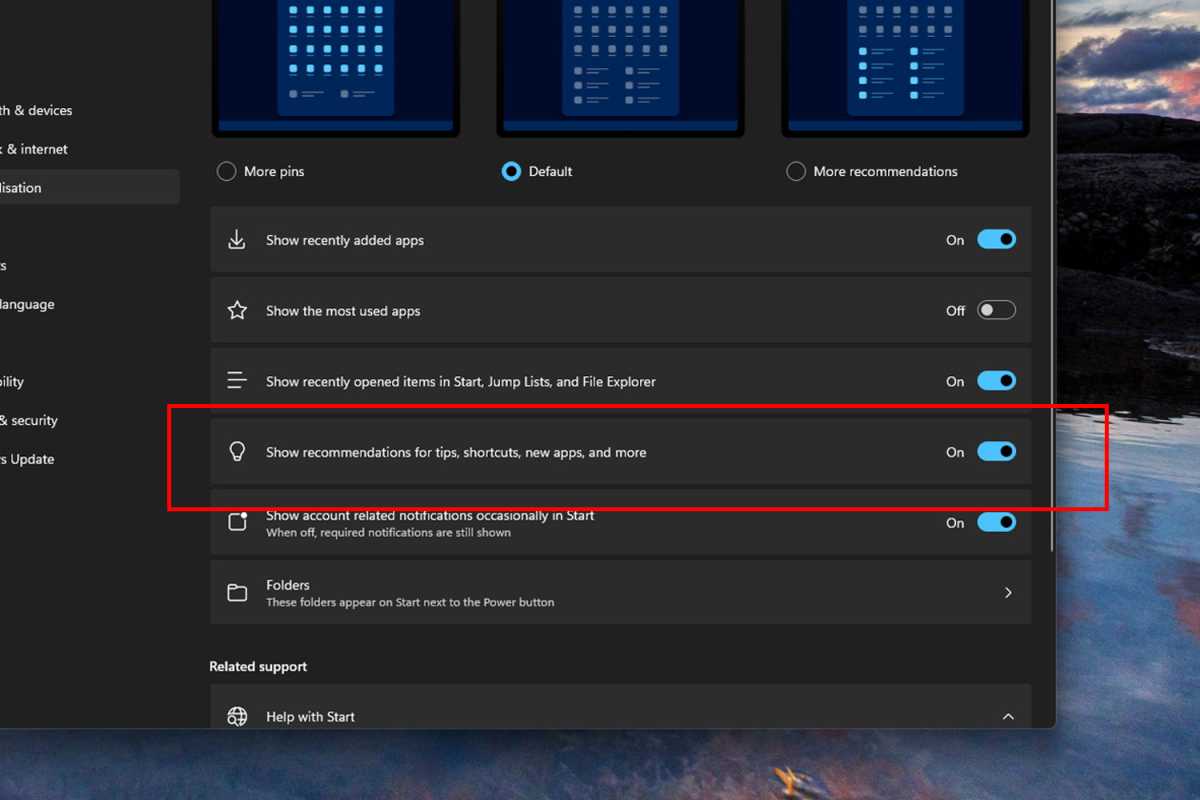
The Start Menu has been a primary canvas for Microsoft’s "Recommended" apps and tips since Windows 10. These often include promotional links to apps in the Microsoft Store or suggestions for features.
- Action: Navigate to Settings > Personalization > Start.
- Toggle: Locate the option titled "Show recommendations for tips, shortcuts, new apps, and more" and switch it to Off.
2. Ditching Intrusive Notifications:
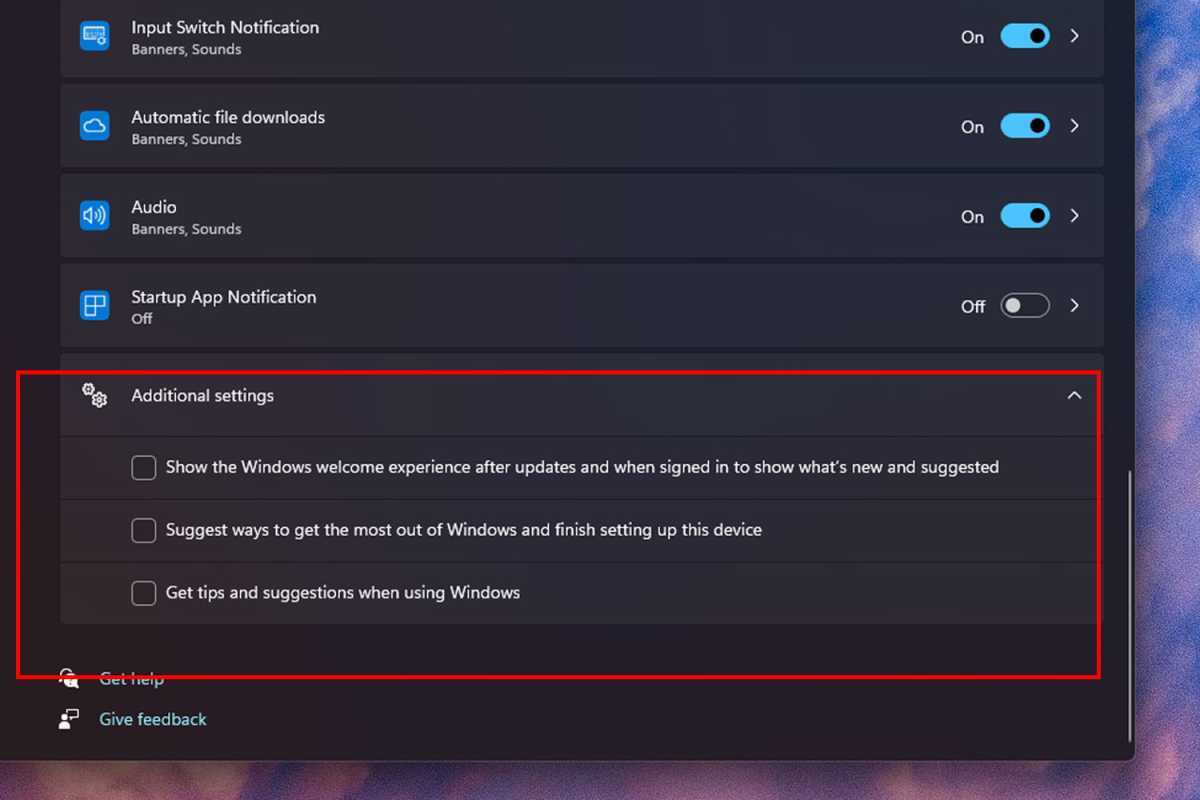
Notifications, intended for important system alerts, are increasingly being repurposed for promotional content and "finish setting up" prompts that encourage users to engage with Microsoft services or complete profile details.
- Action: Go to Settings > System > Notifications.
- Expand: Scroll down to the bottom and click to expand Additional settings.
- Uncheck: Deselect the following options:
- "Get tips and suggestions when using Windows."
- "Suggest ways to get the most out of Windows and finish setting up this device."
- "Show the Windows welcome experience after updates and when signed in to show what’s new and suggested."
3. Eliminating Settings App Suggestions:
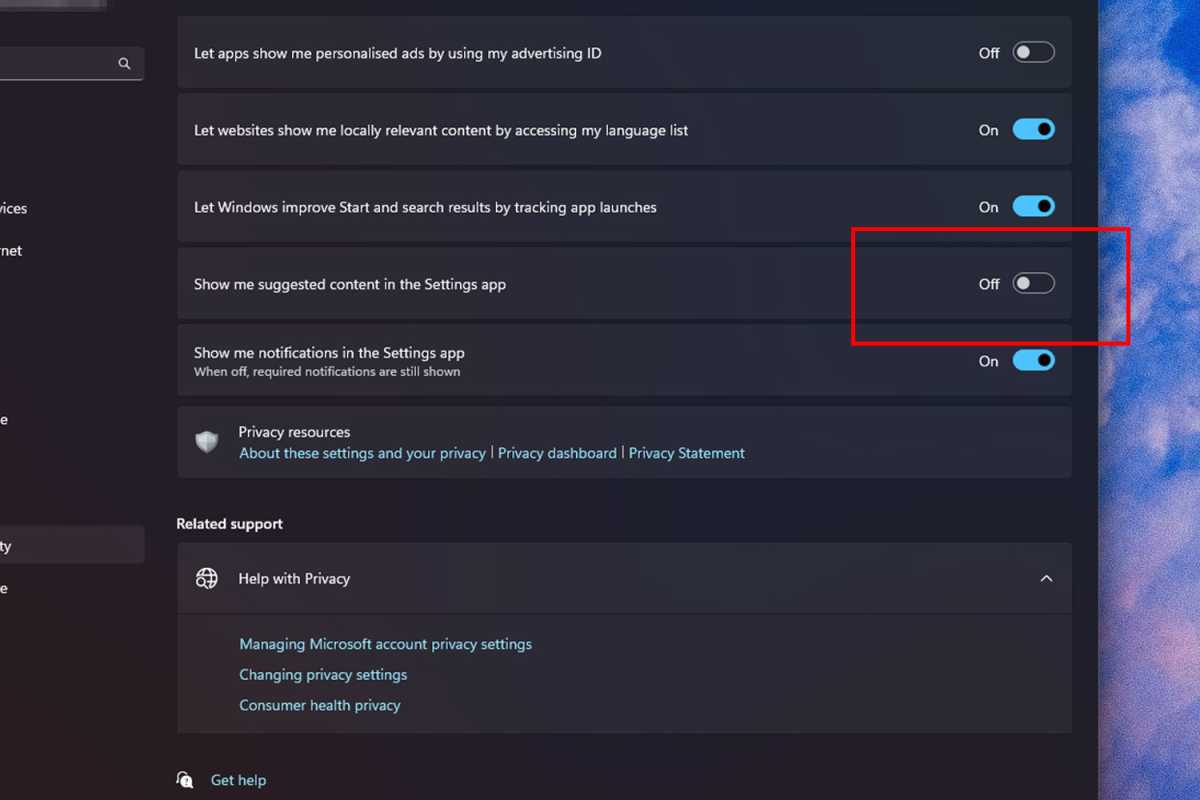
Even within the core Settings application, Microsoft injects suggestions, often promoting features like Copilot or other integrated services, which can clutter the interface and distract users.
- Action: Navigate to Settings > Privacy & security > General.
- Toggle: Switch the option "Show me suggested content in the Settings app" to Off.
4. Combating File Explorer Promotions:
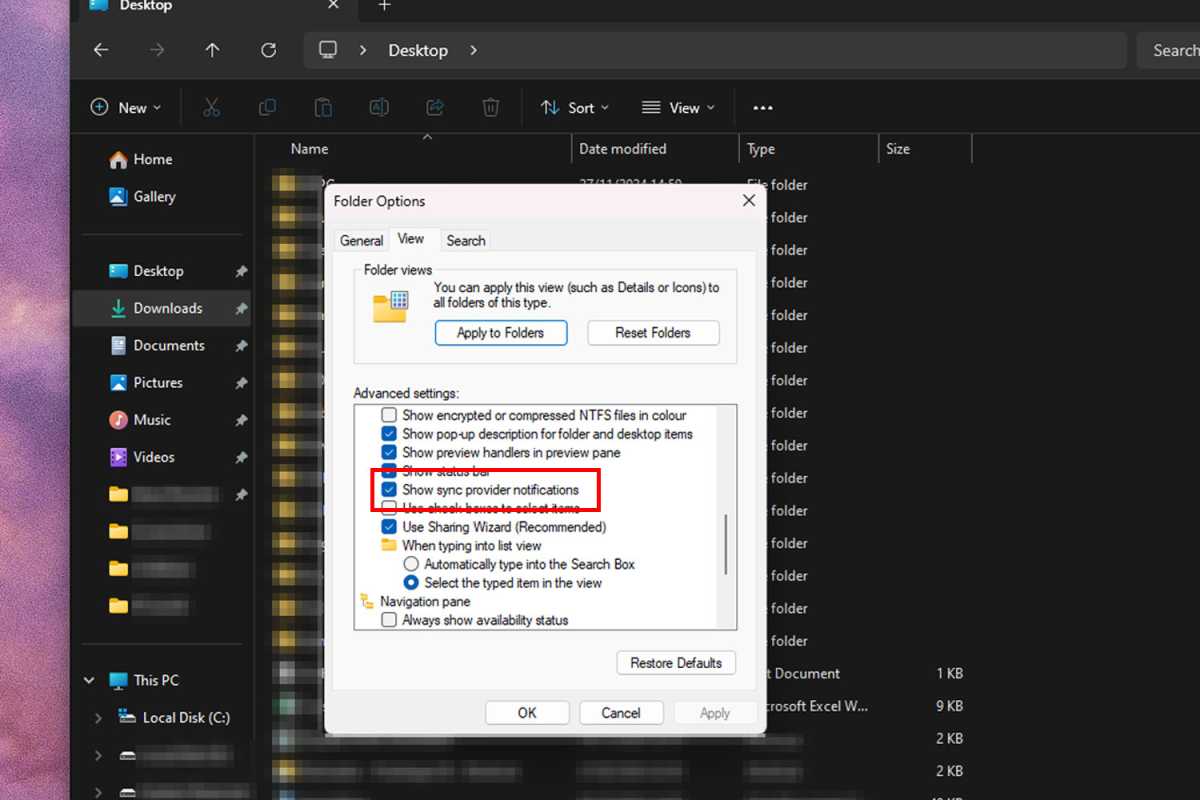
File Explorer, a fundamental component of the Windows experience, has not been immune. Users frequently encounter ads or suggestions for Microsoft OneDrive, even if they use alternative cloud storage solutions.
- Action: Open File Explorer.
- Menu: Select the three-dot menu in the actions toolbar and choose Options.
- Tab: Go to the View tab.
- Uncheck: Scroll down the list and uncheck "Show sync provider notifications."
- Confirm: Click OK to apply the changes.
5. Managing Widget Feed Content:
Windows Widgets, designed to offer quick glances at information, have become another vector for pushing "breaking stories," stock updates, and other potentially irrelevant content, often with a promotional slant.
- To remove individual widget feeds:
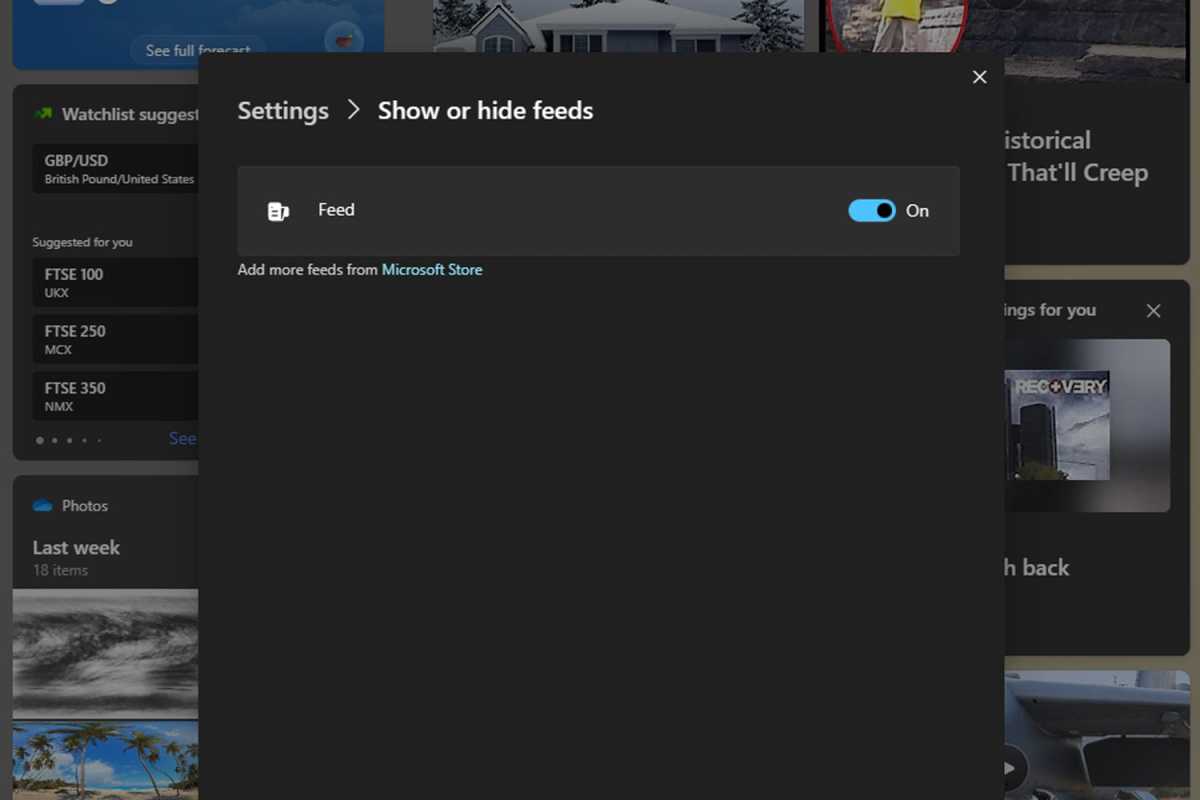
- Action: Select the widget icon at the bottom-left of your screen.
- Cog Icon: Click the cog icon at the top-right of the widget window.
- Hide Feeds: Select "Show or hide feeds" and switch the unwanted feed(s) to Off.
- To remove widgets entirely:
- Action: Right-click on your taskbar.
- Settings: Select Taskbar settings.
- Toggle: Switch "Widgets" to Off.
6. Addressing Manufacturer Bloatware Ads:
Many PCs and laptops from major manufacturers (e.g., Dell, Lenovo, HP) come preloaded with proprietary applications ("bloatware") that often generate their own notifications and ads.
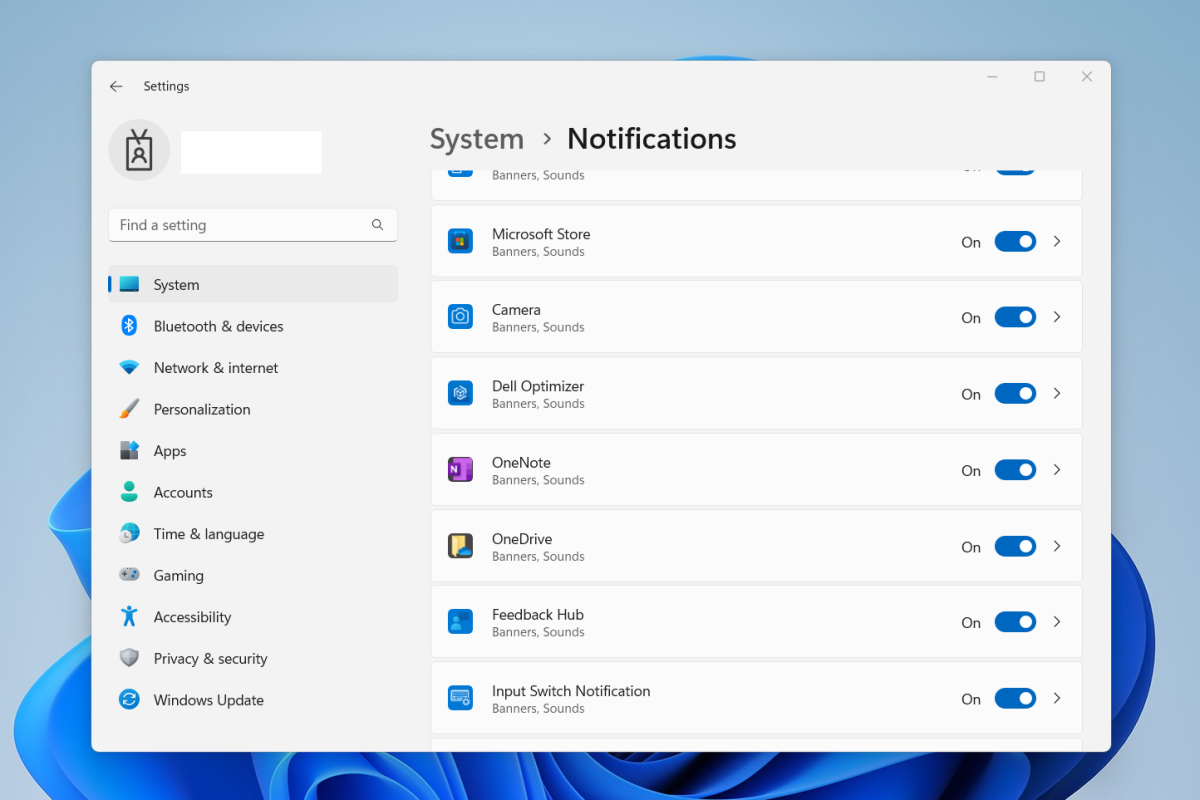
- Action: Navigate to Settings > System > Notifications.
- Review List: Scroll through the list of applications.
- Toggle: For any apps named after your PC’s manufacturer or any suspicious/unusual apps (a quick Google search can help identify them), toggle their notifications to Off.
7. Disabling Lock Screen and Background Advertisements:
The Windows Spotlight feature, which dynamically changes lock screen and desktop backgrounds, occasionally displays ads for games or offers "tips" that are essentially promotional content.
- To disable Spotlight for the background:
- Action: Navigate to Settings > Personalization > Background.
- Drop-down: Next to "Personalize your background," use the drop-down menu to select anything other than "Windows Spotlight" (e.g., Picture or Slideshow).
- To disable Spotlight for the lock screen:
- Action: Navigate to Settings > Personalization > Lock Screen.
- Drop-down: Next to "Personalize your Lock Screen," use the drop-down menu to choose any option that isn’t "Windows Spotlight."
8. Suppressing Search Highlights:
Windows Search, while useful for finding applications and files, can also display "search highlights" that include suggested shopping content or other advertisements.
- Action: Navigate to Settings > Privacy & security > Search permissions.
- Toggle: Scroll down to "Show search highlights" and switch it Off.
9. Curbing Personalized Ad Tracking and Data Collection:
Even if direct ads are disabled, Windows 11 continues to collect user data, which can then be used to serve personalized ads through other channels or in future updates. Disabling this tracking is crucial for privacy.
- Disable Windows device usage tracking:
- Action: Navigate to Settings > Personalization > Device Usage.
- Toggle: Switch Off all the options presented there.
- Disable diagnostic data gathering:
- Action: Navigate to Settings > Privacy & security > General.
- Toggle: Switch Off all the options in this section as well. This reduces the amount of diagnostic data sent to Microsoft, which can include usage patterns.
Broader Implications for the Future of Operating Systems
The increasing integration of advertising into Windows 11 highlights a fundamental tension in the modern software industry: the balance between offering powerful, accessible technology and the imperative for companies to generate revenue. As traditional software sales decline in favor of subscription models and "as-a-service" offerings, platforms like Windows are under pressure to find new ways to monetize their vast user bases. This trend is not unique to Microsoft; many mobile operating systems (iOS, Android) and web services have long relied on advertising and data monetization.
However, the operating system holds a uniquely intimate position with the user, acting as the foundational layer for all digital activity. Introducing pervasive advertising here can erode user trust, raise significant privacy concerns, and fundamentally alter the perceived value of the software. If users feel that they are merely data points for ad delivery, the relationship with the platform provider becomes adversarial rather than symbiotic. This could lead to a greater demand for open-source alternatives, more privacy-focused operating systems, or even regulatory intervention if advertising practices are deemed overly intrusive or deceptive.
Ultimately, while Microsoft currently provides mechanisms for users to disable most of these advertisements, the onus is placed on the user to actively seek out and configure these settings. This creates a friction point, where the default experience is monetized, and an "opt-out" mechanism is provided rather than an "opt-in." As technology evolves, the debate between user control, privacy, and corporate monetization strategies will undoubtedly continue to shape the digital landscape for years to come.