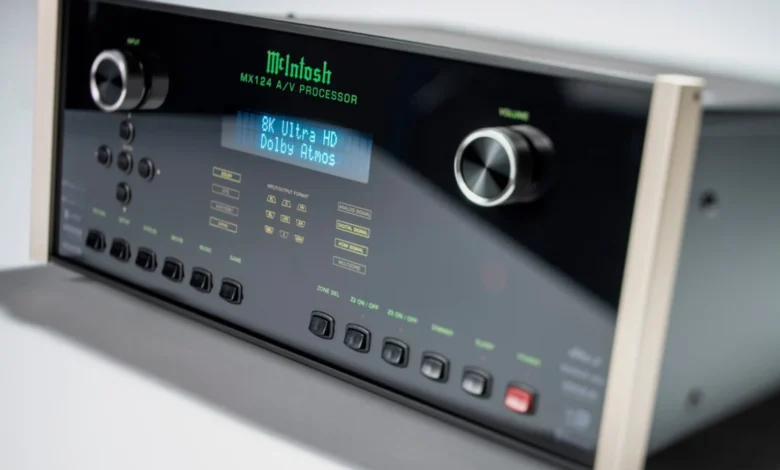
McIntosh, a brand synonymous with uncompromising audio quality and legendary build, has once again pushed the boundaries of home cinema with the introduction of its latest flagship A/V processor, the MX124. This formidable unit is not merely an upgrade; it represents a significant leap forward in immersive audio and video capabilities, designed to cater to the most discerning enthusiasts and professional-grade home theater installations. With its expansive 13.4-channel configuration and a host of cutting-edge features, the MX124 is engineered to be the central nervous system of today’s most advanced home entertainment systems, promising an unparalleled cinematic experience.
Engineering for the Ultimate Immersive Experience
The McIntosh MX124 is built upon an entirely new processing architecture, meticulously developed to handle the increasing demands of modern audio and video formats. At its core, the processor boasts an impressive 13 audio channels, enabling speaker configurations that can reach up to a breathtaking 7.4.6 or 9.4.4 setups. This level of channel count is crucial for delivering truly three-dimensional soundscapes, allowing for precise placement of overhead and surround speakers that are fundamental to formats like Dolby Atmos and DTS:X.
A standout feature of the MX124 is its quadrupled subwoofer output capacity compared to its predecessor, offering four dedicated subwoofer connections. This enhancement is not merely about quantity; it is a strategic design choice aimed at facilitating more sophisticated system layouts and enabling exceptionally precise bass management. For audiophiles and home cinema aficionados, this translates to tighter, more impactful, and more evenly distributed low frequencies throughout the listening space, a critical component of a truly visceral movie-watching experience.
Future-Proofing Home Cinema with 8K and Immersive Audio Support
In an era where visual fidelity is rapidly advancing, the McIntosh MX124 arrives future-ready with standard support for 8K video resolution at 60Hz, and 4K video at a silky-smooth 120Hz. This ensures that the processor can seamlessly handle the highest quality video content available today and for the foreseeable future. Complementing this visual prowess is an extensive array of video format support, including Dolby Vision, HDR10+, HLG, and IMAX Enhanced. For gamers, the inclusion of ALLM (Auto Low Latency Mode) and VRR (Variable Refresh Rate) signifies a commitment to delivering lag-free, responsive gameplay that perfectly synchronizes with on-screen action.
On the audio front, the MX124 is a powerhouse of immersive sound format compatibility. It fully embraces the latest object-based audio technologies, offering robust support for Dolby Atmos, DTS:X Pro, and the increasingly popular Sony 360 Reality Audio. Furthermore, its compatibility extends to MPEG-H Audio, indicating a forward-looking approach to spatial audio. This broad support ensures that users can experience the full artistic intent of filmmakers and sound designers, with audio cues precisely placed and moved around the listener, creating a truly enveloping sound field.
Precision Audio Processing and Room Optimization
The auditory excellence of the MX124 is underpinned by nine state-of-the-art 32-bit digital-to-analogue converters (DACs). These premium components are responsible for translating digital audio signals into analog form with extraordinary fidelity, promising exceptional detail, vast dynamic range, and unwavering sonic accuracy. McIntosh’s renowned commitment to sound quality is further evident in the inclusion of dedicated bass and treble controls, allowing users to fine-tune the audio to their specific preferences and room acoustics, ensuring a signature McIntosh musicality is maintained across all content.
Recognizing that even the finest audio hardware can be compromised by suboptimal room acoustics, McIntosh has equipped the MX124 with a sophisticated suite of room optimization technologies. This includes the highly regarded Dirac Live, renowned for its advanced acoustic correction capabilities. In addition, the processor incorporates Dirac Live Bass Control and Audyssey MultEQ XT32. This multi-pronged approach to room calibration ensures that the audio system performs at its absolute best, regardless of the listening environment. The result is optimized bass performance, precise imaging, a balanced tonal character, seamless speaker integration, and exceptional overall clarity, all while preserving the distinct sonic signature that McIntosh is celebrated for.
Connectivity and Streaming Versatility
The MX124 is designed to be the ultimate hub for all your audio-visual sources. It features a generous seven HDMI inputs and three HDMI outputs, with one of the outputs boasting eARC (Enhanced Audio Return Channel) for seamless audio integration with smart TVs. Beyond HDMI, the processor offers four digital audio inputs, a balanced and eight unbalanced analog stereo inputs, and component and composite video inputs, ensuring compatibility with a wide range of legacy and modern devices.
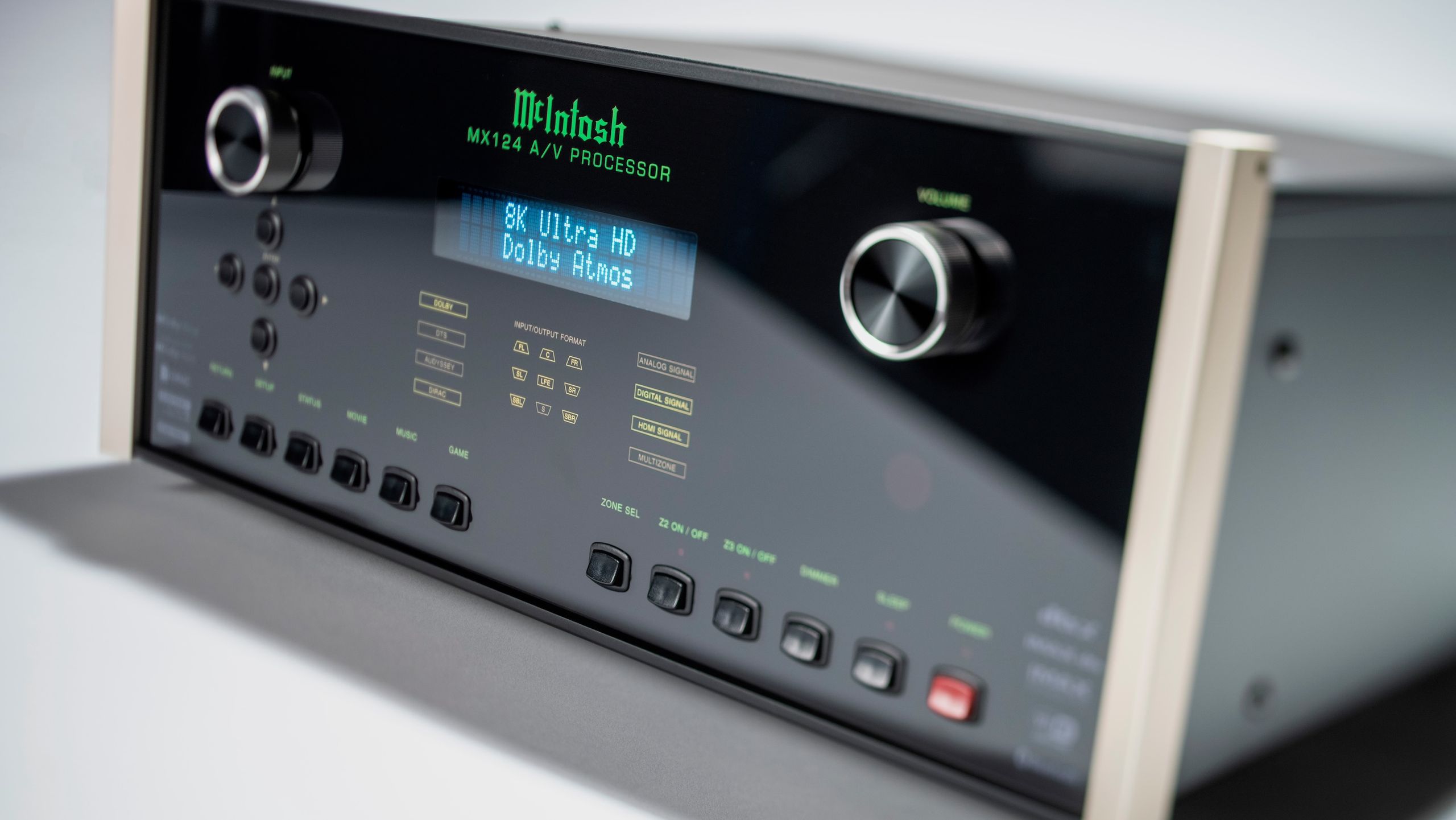
For multi-zone audio setups, the MX124 provides dual analog stereo outputs, allowing for a seamless audio experience in additional listening areas. Streaming capabilities are equally comprehensive. The processor supports Apple AirPlay, Bluetooth, and integrates with leading streaming services via Qobuz Connect, Spotify Connect, TIDAL Connect, and is Roon Ready. This extensive streaming support, combined with the ability to handle high-resolution audio streaming up to 32-bit/192kHz, positions the MX124 as a versatile platform for both home cinema and high-fidelity music playback. The inclusion of Bluetooth headphone support further enhances its flexibility, allowing for private listening without disrupting others.
Professional Integration and Customization
McIntosh understands that high-end home cinema systems are often integrated by professional installers. To that end, the MX124 has been engineered with custom integration in mind. It offers web-based configuration, pre-configuration capabilities, and file upload functionality, streamlining the setup process for custom installers. Furthermore, it provides robust backup and restore support for configurations, along with RS232 and IP control options. Its certification for Control4 Simple Device Discovery Protocol (SDDP) integration ensures seamless compatibility with popular smart home automation systems, making it an ideal choice for sophisticated, fully integrated home entertainment environments.
Background and Market Context
The introduction of the McIntosh MX124 arrives at a time when the home cinema market is experiencing a surge in demand for increasingly immersive and high-fidelity experiences. Consumers are investing more in dedicated home theaters and sophisticated entertainment spaces, driven by the proliferation of high-resolution content, advanced audio formats, and the desire for a cinematic experience at home that rivals, or even surpasses, commercial theaters. McIntosh, with its long-standing reputation for excellence dating back to 1949, has consistently catered to this premium segment.
The MX124 represents the evolution of McIntosh’s audio processing technology, building upon decades of expertise in amplifier design and signal processing. The brand’s commitment to longevity and upgradability is also a key factor. By supporting the latest immersive audio codecs and next-generation video standards, McIntosh aims to provide customers with a product that will remain relevant and perform at the highest level for many years, a crucial consideration for high-value AV components.
Pricing and Availability
The McIntosh MX124 is now available to consumers and professional installers. It is priced at a premium, reflecting its flagship status and the extensive technological advancements it incorporates. The suggested retail price is £16,900 (approximately $23,000 USD or AU$32,000). This pricing positions the MX124 firmly within the ultra-high-end segment of the AV receiver and processor market, targeting enthusiasts who prioritize absolute performance and build quality above all else.
Analysis of Implications
The launch of the McIntosh MX124 has several significant implications for the high-end home cinema market. Firstly, it sets a new benchmark for channel count and immersive audio support in a single-chassis processor, likely influencing competitor product development. The emphasis on quadruple subwoofer outputs, combined with advanced room correction, highlights a growing trend towards highly personalized and precisely calibrated audio experiences, moving beyond simply adding more speakers to optimizing the overall sound delivery.
Secondly, the MX124’s robust video capabilities, including 8K support and comprehensive HDR format compatibility, underscore the ongoing convergence of audio and video processing. As displays become more advanced, processors must keep pace to deliver a complete, uncompromised visual and auditory experience.
Finally, McIntosh’s continued investment in advanced processing and connectivity, coupled with their established reputation for reliability and enduring quality, reinforces their position as a leader in the premium AV market. For consumers seeking the pinnacle of home cinema performance, the MX124 presents a compelling, albeit significant, investment in an unparalleled entertainment future. Its advanced features and professional integration options also suggest a sustained commitment to the custom installation channel, a critical segment for high-value AV equipment. The inclusion of features like web-based configuration and SDDP certification demonstrates a keen understanding of the needs of professional integrators, aiming to simplify complex installations and ensure seamless operation within sophisticated smart home ecosystems. This strategic approach not only benefits installers but also assures end-users of a meticulously crafted and easily managed system.
Related posts: