Microsoft Issues Emergency Fixes for Dell Performance and Shutdown Glitches Linked to July 2026 Windows 11 Updates

Microsoft has officially deployed a series of emergency out-of-band updates to resolve a critical conflict affecting Dell hardware following the release of the July 2026 Windows 11 security patches. The software giant acted swiftly after reports surfaced that a significant number of Dell laptop and desktop users were experiencing severe performance degradation, excessive heat generation, and unexpected system shutdowns. These issues were traced back to an incompatibility between a newly introduced Windows interface and core Intel hardware drivers responsible for power and thermal management.
The emergency intervention comes as a relief to enterprise IT departments and individual consumers who found their systems increasingly unstable after the installation of the KB5101650 cumulative update. While the problem was initially identified during the rollout of the July security cycle, investigations revealed that the seeds of the conflict were sown in a preview update released in late June. By Saturday, Microsoft had finalized two specific fixes—KB5121767 and KB5121768—designed to restore stability to affected machines.
Technical Root Cause: The Intel IPF and USB-C Conflict
At the heart of the malfunction is a sophisticated conflict between the Windows operating system’s internal management of peripheral connections and the hardware’s thermal regulation system. Specifically, Microsoft’s June 2026 preview update (KB5095093) introduced a revised Windows USB-C Connection Manager interface. This interface was designed to improve the handshaking process between modern devices and high-speed USB-C peripherals, including docking stations and external displays.
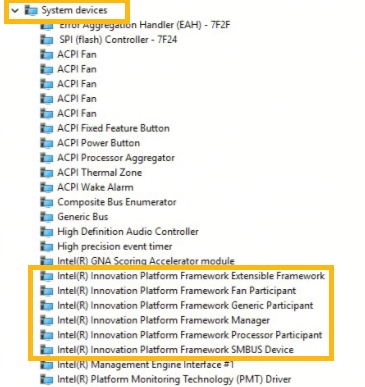
However, this new interface inadvertently clashed with the Intel Innovation Platform Framework (IPF) Processor Participant driver. The Intel IPF is a critical system-level component that acts as the "brain" for a computer’s environmental awareness. It monitors internal temperatures, calculates power draw, and communicates with the Windows power subsystem to throttle the processor when the device becomes too hot or when battery levels are critical.
When the new USB-C Connection Manager and the Intel IPF driver attempted to communicate with the same system resources, the driver effectively stalled. In Windows Device Manager, this manifested as a yellow exclamation mark next to the Intel Innovation Platform Framework Processor Participant entry, signaling that the driver had failed to load or was operating in an error state. Without a functioning IPF driver, the Dell systems lost their ability to regulate heat and power consumption effectively, leading to the reported symptoms of rapid battery drain and thermal-induced shutdowns.
Symptoms and User Impact
The impact on Dell users was immediate and multifaceted. Because the Intel IPF driver is responsible for "Processor Participation" in power management, its failure meant the CPU often defaulted to inefficient power states. Users reported that even basic tasks, such as web browsing or document editing, caused system fans to spin at maximum velocity. In more severe cases, the lack of thermal throttling meant the hardware reached its maximum safe temperature threshold, triggering a hard emergency shutdown to prevent permanent physical damage to the silicon.
Mobile users were particularly hard-hit. The driver conflict prevented the laptops from entering low-power sleep states correctly, leading to "bag-burn" scenarios where a laptop would remain at high power while stored in a carrying case, resulting in extreme heat and a completely drained battery within hours.
Microsoft’s internal telemetry and reports from Dell’s testing labs confirmed that the issue was localized to specific builds of Windows 11. Specifically, systems running Windows 11 versions 24H2 and 25H2 were the primary targets of the glitch. This suggests that the architectural changes in these newer versions of the Windows kernel—likely related to the integration of more advanced AI-driven power management features—were less tolerant of the driver mismatch than older versions of the OS.
Chronology of the 2026 Update Crisis
The timeline of the incident illustrates the complexities of the modern Windows-as-a-Service model, where preview updates are used to catch bugs before a wider release.

- June 23, 2026: Microsoft releases the optional preview cumulative update KB5095093. This update contains the new USB-C Connection Manager interface. While intended for testing, many "seekers" (users who manually check for updates) and IT professionals looking for early bug fixes install it.
- Early July 2026: Dell’s quality assurance teams, performing routine compatibility testing for the upcoming security cycle, identify a regression. They notice the yellow exclamation marks in Device Manager on newer Latitude and XPS models.
- July 14, 2026 (Patch Tuesday): Microsoft releases the mandatory security update KB5101650. Because this update builds upon the code changes introduced in June, the driver conflict begins to affect a much larger pool of users who skipped the June preview but are now receiving the July security patches.
- July 21, 2026 (Tuesday): Following a surge in support tickets, Microsoft officially acknowledges the issue. To prevent further damage, the company places a "compatibility hold" on the July update for Dell systems identified as high-risk, effectively blocking the update from being offered via Windows Update.
- July 25, 2026 (Saturday): Microsoft releases the emergency Out-of-Band (OOB) updates KB5121767 and KB5121768. These updates are specifically engineered to patch the USB-C Connection Manager to ensure it no longer interferes with the Intel IPF driver.
Deployment Strategies for IT Administrators
Recognizing the urgency of the situation, Microsoft has streamlined the deployment of the emergency fix. For organizations utilizing Windows Autopatch—a service that automates the update process for Windows Enterprise customers—the fix is being delivered automatically. If hotpatching is enabled, many systems may receive the fix without requiring a full system state change, though a reboot is still recommended to ensure the Intel driver re-initializes correctly.
For IT administrators using Microsoft Intune, the company has provided specific guidance on "expediting" the update. By using the Windows quality update policy in Intune, admins can override standard deferral settings to push KB5121767 to their fleet immediately. Microsoft has emphasized that this update is only intended for affected Dell devices. If a system is not displaying the driver error in Device Manager and is not experiencing performance issues, the update will likely not be offered, and no manual intervention is required.
For home users and small businesses without centralized management, the update is available through the standard Windows Update interface. Users are encouraged to go to Settings > Windows Update and click "Check for updates." If the system is identified as an affected Dell model, the emergency patch should appear as an "Update for Windows."
Analysis of the Broader Implications
This incident highlights the precarious nature of the hardware-software ecosystem in an era of rapid deployment. The conflict between a Windows interface and an Intel driver on Dell hardware involves three of the largest entities in personal computing. That a "limited number" of devices could experience such severe symptoms as unexpected shutdowns suggests that the integration between OS-level peripheral management and firmware-level thermal management has become incredibly tight.
The fact that the issue was caught by Dell during testing but still made it into a production security cycle raises questions about the "blocking" mechanism in Microsoft’s update pipeline. Ideally, a known incompatibility reported by a major OEM (Original Equipment Manufacturer) should trigger an automatic block before the Patch Tuesday rollout begins. In this instance, the block appears to have been implemented retroactively after the July update had already begun reaching users.
Furthermore, this event underscores the risks associated with Windows 11 24H2 and 25H2. These versions represent the "bleeding edge" of the Windows ecosystem, often containing new features designed for Copilot+ PCs and next-generation silicon. As Microsoft continues to push the boundaries of what the Windows kernel can manage—moving more hardware control into the OS layer—the potential for driver conflicts increases.
Future Outlook and Preventative Measures
In the wake of this emergency update, industry analysts expect Microsoft and Intel to refine the specifications for the Innovation Platform Framework. The goal will be to ensure that future iterations of the USB-C Connection Manager or other peripheral interfaces have "sandboxed" communication channels that cannot interfere with thermal safety drivers.
For Dell, the focus will likely shift to firmware updates. While Microsoft provided the software patch to fix the OS-level conflict, Dell may release BIOS/UEFI updates to further harden the Intel IPF driver against similar interruptions in the future.
Users are advised to keep their systems updated but to remain cautious regarding "Preview" updates (the C-week updates usually released at the end of the month). While these updates offer a glimpse of new features, they do not undergo the same level of exhaustive cross-hardware testing as the mandatory security updates. For mission-critical Dell workstations, staying on the "General Availability" channel and delaying non-security updates by a few days may be a prudent strategy to avoid similar regressions in the future.
As of Sunday morning, reports from the field indicate that the emergency patches are successfully resolving the driver errors. The yellow exclamation marks are disappearing from Device Manager, and thermal stability is returning to the affected Latitude, Precision, and XPS lines. Microsoft continues to monitor telemetry to ensure that no other hardware manufacturers are experiencing similar conflicts with the new USB-C interface.
Related posts: