MacOS 27.3 brings native Markdown rendering to Quick Look for improved developer and writer workflows

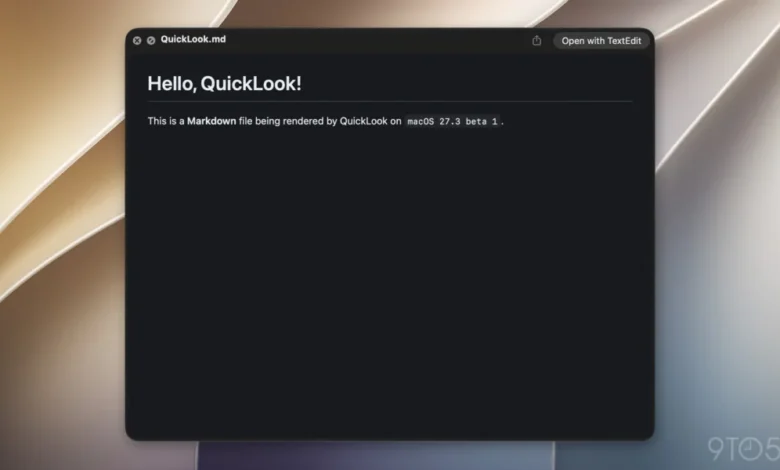
Apple has officially introduced native Markdown rendering within the Quick Look feature as part of the macOS 27.3 beta 1 release. This update marks a significant shift in how the macOS Finder handles plain-text documentation, moving away from raw syntax displays toward a visual, formatted preview environment. The change, while appearing minor in the context of a broad operating system update, represents a strategic alignment with the increasing ubiquity of Markdown across developer ecosystems, artificial intelligence frameworks, and content management systems.
The Technical Evolution of Quick Look
Quick Look has long served as one of the hallmark productivity features of the macOS experience. By allowing users to tap the spacebar to view the contents of a file without launching a dedicated application, Apple has streamlined file management for images, PDFs, and standard text documents. Historically, however, files with the .md extension—the standard file format for Markdown—were treated as generic plain-text documents. Users were forced to view the raw syntax, complete with hashtags for headers, asterisks for bolding, and bracketed syntax for hyperlinks.
With the rollout of macOS 27.3, the system now parses these files on the fly. When a user invokes Quick Look on a Markdown file, the system interprets the underlying syntax and displays a rendered, stylized version of the document. This change effectively bridges the gap between text-based storage and visual readability, allowing users to verify the content of documentation, project notes, or AI-generated instructions without the overhead of opening heavy IDEs or specialized Markdown editors.
A Chronology of Markdown Adoption at Apple
The integration of Markdown into the core of macOS is the culmination of a multi-year trend within Cupertino. While Markdown was originally created by John Gruber in 2004 as a "text-to-HTML conversion tool," its trajectory over the last two decades has moved from niche web-writing utility to the industry-standard language for technical documentation.
- 2004: John Gruber introduces Markdown, revolutionizing how web writers convert plain text to structurally valid HTML.
- 2025: Apple begins deepening the integration of Markdown within its ecosystem, most notably by enhancing Apple Notes in iOS 26 to support seamless import and export of Markdown-formatted text.
- 2026 (Early): As Apple accelerates its AI-centric software development, Markdown becomes the standard for instructional data sets.
- November 2026: macOS 27.3 beta 1 is released, featuring system-wide Quick Look support for .md files, effectively ending the era of raw-syntax viewing for the average user.
The Role of AI in Document Standardization
The impetus for this update is not merely to assist writers; it is driven by the rapid rise of AI agents. Modern AI frameworks often utilize Markdown files as the primary vessel for system instructions, context retrieval, and developer-defined behavioral constraints.
As noted by industry observers, including Federico Viticci, the new "skills" feature in Apple’s Siri AI relies heavily on Markdown-based SKILL.md files. These files allow third-party developers to package complex instructions and logic that enable Siri to execute tasks within third-party applications. By standardizing the way the operating system renders these files, Apple is ensuring that developers can audit their own AI skill sets directly within the Finder, improving transparency and debugging capabilities for the next generation of application extensions.

Analysis: Implications for Workflow and Productivity
The transition to native Markdown rendering has several implications for macOS users, particularly those in the technical, academic, and creative sectors.
1. Reduced Context Switching:
The primary benefit is the reduction of "context switching." Previously, developers or researchers managing large repositories of documentation were forced to keep multiple applications—such as Obsidian, Typora, or VS Code—open to maintain readability. By moving the preview layer to the OS level, Apple allows users to stay within the Finder, significantly speeding up file browsing and information retrieval.
2. Standardizing AI Interoperability:
As AI agents become more prevalent, the ability for the operating system to natively read the "language" of these agents (Markdown) is a strategic move. By treating .md files as first-class citizens, Apple is essentially creating a bridge between the human-readable document and the machine-readable instruction set. This parity is essential as Apple continues to push its Siri AI capabilities deeper into the third-party developer ecosystem.
3. Accessibility and Universal Formatting:
Markdown is inherently accessible because it is human-readable even in its raw form. However, rendering it makes the content accessible to non-technical users who may need to read technical documentation, logs, or README files without requiring knowledge of the underlying syntax. This democratization of technical files aligns with Apple’s long-standing design philosophy of hiding complexity behind intuitive user interfaces.
Industry Context and Related Ecosystem Changes
The macOS 27.3 update is part of a broader "Golden Gate" release cycle. Beyond the Quick Look enhancements, the update includes substantial infrastructure changes, such as the introduction of Vertical Tabs in Safari and Adaptive Dark Mode, which adjusts UI contrast based on ambient lighting sensors rather than just the system-wide time settings.
Furthermore, the expansion of Siri AI capabilities suggests that Apple is positioning the Mac as a local hub for AI processing. The reliance on Markdown for these AI "skills" serves as a form of "configuration as code," a common practice in modern DevOps that Apple is now bringing to the consumer desktop.
Official and Community Response
While Apple generally does not comment on granular feature updates during the beta process, the response from the developer community has been overwhelmingly positive. Developers have long advocated for better system-level handling of text-based formats that define their workflows. The move is seen as a signal that Apple is listening to power users who require a more fluid, document-centric operating system.

Observers suggest that this update may also signal a shift in how Apple treats proprietary vs. open-standard formats. By adopting Markdown as a system-native format, Apple acknowledges that the future of document management lies in lightweight, interoperable text files rather than heavy, proprietary binary formats.
Looking Ahead: The Future of Document Management
As the macOS 27.3 beta progresses toward a stable public release, the implementation of Markdown support will likely be monitored for stability and performance. Currently, the rendering engine appears to handle standard CommonMark and GitHub Flavored Markdown (GFM) elements, such as tables, code blocks, and syntax highlighting.
Future iterations may include the ability to edit Markdown directly within the Quick Look window, though for now, the feature is strictly a viewing utility. This limitation preserves the "quick" nature of the tool, ensuring that the system remains responsive while providing the necessary visual clarity.
For those interested in the technical underpinnings of this format, John Gruber’s original documentation remains the definitive source. As macOS continues to evolve, the integration of such foundational web standards into the desktop experience suggests that the line between web-based content and local file management will continue to blur. Users looking to leverage these features should ensure they are running the latest developer or public beta of macOS 27.3, as the feature is currently confined to that build cycle.
In conclusion, the native support for Markdown in Quick Look is a high-value, low-friction update. It reflects a sophisticated understanding of the modern user’s needs: a requirement for speed, a reliance on AI-driven workflows, and a preference for open, human-readable documentation standards. By standardizing this interaction, Apple has significantly polished the macOS experience for developers and technical users alike.