Google DeepMind Unveils Nano Banana 2 Lite and Gemini Omni Flash to Accelerate Generative Media Development

Google DeepMind is significantly enhancing the capabilities for developers and creators in the generative media space with the introduction of two powerful new models: Nano Banana 2 Lite and Gemini Omni Flash. These advancements aim to streamline the process of experimenting, refining, and scaling innovative multimedia experiences, marking a substantial step forward in making generative AI more accessible and efficient for a wide range of applications.
The release addresses the growing demand for tools that can handle both rapid image generation and sophisticated video creation and editing. Developers can now build more comprehensive, end-to-end multimedia workflows, seamlessly connecting the creation of thousands of images with the dynamic possibilities of video generation and conversational editing. This dual release empowers creators to iterate faster, bring their creative visions to life with greater fidelity, and develop more complex generative media projects with enhanced efficiency.

Nano Banana 2 Lite: A New Benchmark in Speed and Cost-Efficiency for Image Generation
At the forefront of this announcement is Nano Banana 2 Lite, positioned as Google DeepMind’s fastest and most cost-efficient Gemini Image model to date. This model, accessible via the identifier gemini-3.1-flash-lite-image, is specifically engineered for high-velocity developer pipelines where speed and economic feasibility are paramount. It represents a direct upgrade path for developers currently utilizing the first iteration of Nano Banana (gemini-2.5-flash-image), offering immediate performance benefits across key metrics.
The core advantage of Nano Banana 2 Lite lies in its optimized architecture, designed to deliver rapid image generation without significant compromises in quality. Performance benchmarks highlight its superior speed and cost-effectiveness when compared to competitor AI image models. These benchmarks, which evaluate trade-offs between generation and editing quality (measured by Elo scores), processing latency, and cost per 1K-resolution image, illustrate Nano Banana 2 Lite’s competitive edge. The accompanying visual data demonstrates how this model achieves a favorable balance, making it an attractive option for applications requiring large-scale image production or frequent creative iteration.

Despite its emphasis on speed, Nano Banana 2 Lite maintains robust capabilities in several critical areas. Developers can rely on its strong prompt adherence, ensuring that generated images closely match descriptive inputs. Furthermore, the model exhibits consistent character rendering and the ability to produce legible text within images, crucial for applications ranging from marketing materials to interactive storytelling. This combination of speed, cost-efficiency, and reliable output quality positions Nano Banana 2 Lite as a foundational tool for a multitude of generative image tasks.
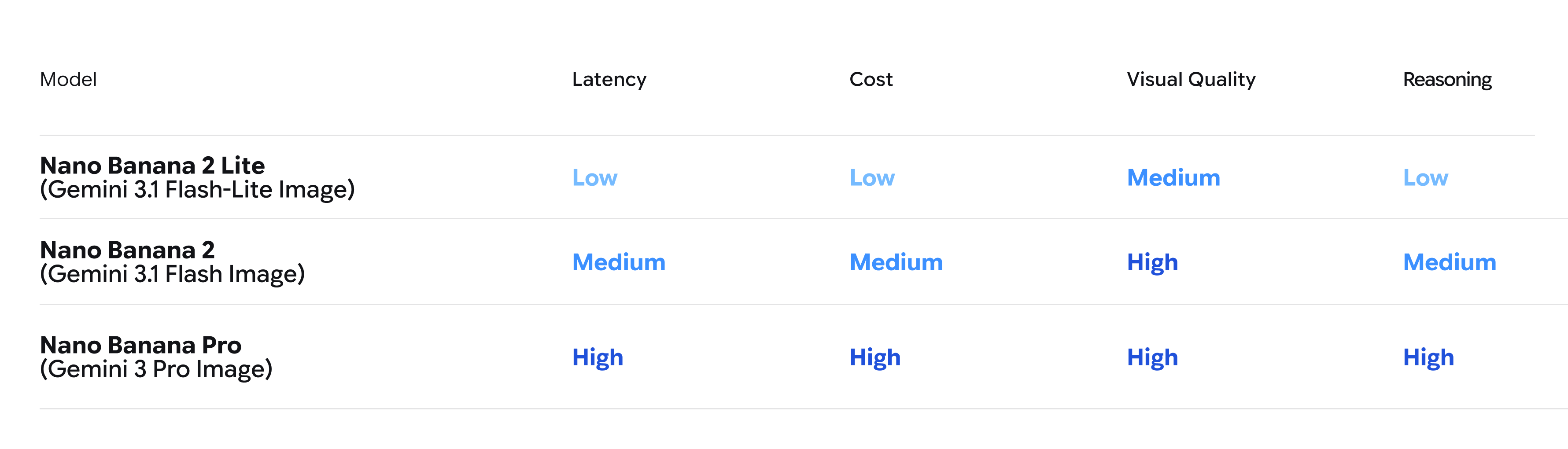
The Nano Banana family of models offers a tiered approach to image generation, catering to different developer needs. Nano Banana 2 Lite excels in scenarios prioritizing speed and cost. Nano Banana 2 offers a balance of quality and speed, while Nano Banana Pro provides the highest level of image quality and creative control. This spectrum allows developers to select the optimal model for their specific project requirements and budget constraints.
Beyond its availability on developer platforms, Nano Banana 2 Lite is slated for integration into several prominent Google consumer surfaces. These include AI Mode in Search, the Gemini app, NotebookLM, Google Photos, Stitch, Google Flow, and Google Ads. This widespread deployment signals Google’s commitment to making advanced generative image capabilities accessible to a broad user base, driving innovation across its product ecosystem.
Gemini Omni Flash: Revolutionizing Video Generation and Conversational Editing
Complementing the advancements in image generation, Google DeepMind is also rolling out Gemini Omni Flash (gemini-omni-flash-preview) to developers via the Gemini API and Google AI Studio. This model represents a significant leap forward in multimodal AI, specifically designed for high-quality video generation and sophisticated conversational editing. Gemini Omni Flash natively supports the creation and manipulation of video content using a combination of text, image, and existing video inputs.
The pricing structure for Gemini Omni Flash is highly competitive, set at $0.10 per second of video output. This pricing is directly comparable to existing fast video generation models, such as Veo 3.1 Fast, further enhancing its appeal for developers seeking cost-effective video solutions.
Gemini Omni Flash distinguishes itself through its ability to handle complex video editing tasks through natural language conversations. This conversational editing capability allows users to refine video sequences iteratively, making adjustments and requesting modifications in a fluid, dialogue-driven manner. The model’s proficiency extends to a wide array of video-centric applications, including generating dynamic animations, creating cinematic sequences, and performing intricate edits based on user prompts.
At Google I/O, Gemini Omni was first introduced as a powerful tool where Gemini’s multimodal reasoning capabilities intersect with advanced video generation and editing. The "Flash" variant specifically emphasizes speed and efficiency, making it ideal for applications that require rapid video production or interactive editing sessions.
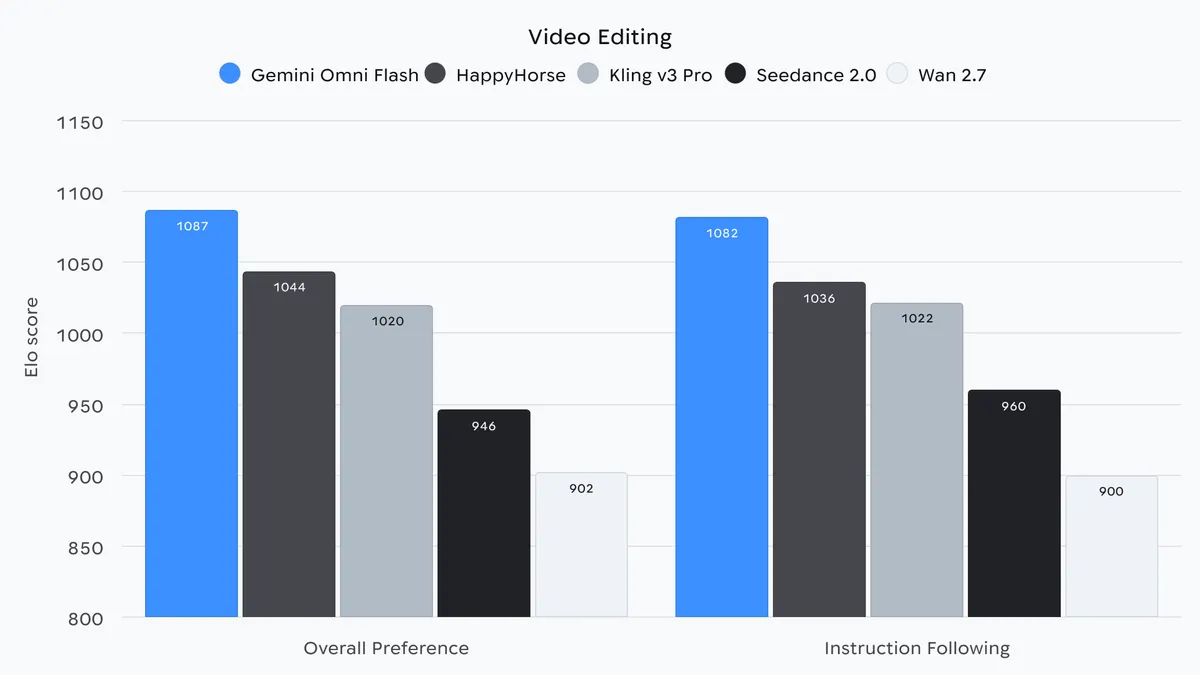
Comprehensive benchmarking data for Gemini Omni’s video editing capabilities is available through Google DeepMind’s dedicated Gemini Omni webpage, providing developers with detailed insights into its performance across various metrics. This data is crucial for understanding the model’s strengths and limitations in real-world video production scenarios.
Synergistic Potential: Chaining Nano Banana 2 Lite and Gemini Omni Flash
The true power of these new releases is unlocked when they are used in conjunction. Developers can create a streamlined workflow by leveraging Nano Banana 2 Lite for rapid, high-volume image generation. The output from Nano Banana 2 Lite can then serve as a foundational element for Gemini Omni Flash, which can animate these static images into high-quality videos. This integration allows for the creation of dynamic visual content that begins with precise image generation and culminates in engaging video narratives.
Furthermore, the integration of the Interactions API with these models enhances multi-turn generative experiences. This API enables the maintenance of session history and context, allowing users to perform up to three sequential edits on a video. This capability is invaluable for iterative creative processes, where users can refine a video over multiple steps without losing the established context.

To facilitate adoption and demonstrate the synergistic potential, Google has developed several demo applications that developers can remix and build upon. These examples showcase how Nano Banana 2 Lite and Gemini Omni Flash can be seamlessly integrated into a single, cohesive workflow.
Demo Applications Showcasing Integrated Workflows:
-
Anywhere: This demo application is designed to highlight the combined strengths of both models. Users can take a selfie or upload a photo, and Nano Banana 2 Lite instantly places them in various iconic landmarks. Subsequently, clicking on a generated image triggers Gemini Omni Flash to transform it into an animated clip of the location, offering an immersive visual experience. The application is accessible for exploration and remixing via Google AI Studio.

-
Space Lift: This interior design application demonstrates how Nano Banana 2 Lite and Gemini Omni can revolutionize room reimagining. By uploading a photo of a room, users can instantly generate fully realized design concepts across different aesthetics. Once a preferred look is chosen, a video button activates Gemini Omni to bring the design to life with a cinematic showcase, allowing users to visualize their new space in motion.
-
Omni Product Studio: This demo app focuses on e-commerce applications. It converts static images, often generated by Nano Banana 2 Lite, into cinematic product videos using Gemini Omni. This showcases the creation of interactive media by merging multimodal inputs through a quick image-to-video output process, ideal for enhancing product presentations.
Building with Safety and Transparency:

Google DeepMind emphasizes that both Gemini Omni and Nano Banana 2 Lite are built on the company’s secure infrastructure. A key feature of these models is the integration of SynthID watermarking, designed to identify AI-generated content. Users can verify the origin of AI-generated media through the Gemini app, Gemini in Chrome, or Search. Google is actively expanding its verification tools to provide greater transparency regarding how content is created and edited across the web, reinforcing its commitment to responsible AI development.
Developer Resources and Next Steps:
Developers looking to leverage these new capabilities will find extensive resources available. For Nano Banana 2 Lite, detailed documentation and integration guides are provided on the Google AI developer platform. Similarly, comprehensive information on Gemini Omni Flash, including model capabilities and regional limitations, can be accessed through the Gemini API documentation.
The introduction of Nano Banana 2 Lite and Gemini Omni Flash marks a significant moment for generative media development. By providing tools that are both powerful and accessible, Google DeepMind is empowering a new wave of creativity and innovation, enabling developers and creators to build the next generation of immersive and interactive multimedia experiences. The ability to seamlessly integrate rapid image generation with sophisticated video creation and editing opens up unprecedented possibilities for storytelling, design, and digital expression.