AMD Challenges Nvidia Dominance with Helios AI Rack System and Bold 1.4 Trillion Dollar Market Forecast

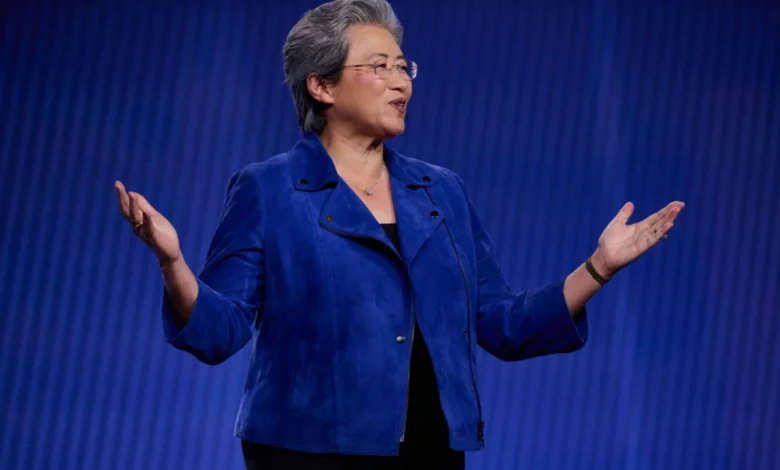
Advanced Micro Devices (AMD) has officially escalated its competitive strategy against Nvidia by unveiling a sophisticated rack-scale computing system designed specifically to handle the immense workloads of the world’s most advanced artificial intelligence laboratories. During the company’s sold-out Advancing AI conference held in San Francisco on Thursday, AMD Chair and CEO Dr. Lisa Su introduced the "Helios" AI rack system, a comprehensive hardware solution that signals AMD’s transition from a component supplier to a full-stack infrastructure provider. As the AI industry shifts from experimental models to massive-scale deployment, AMD is positioning itself as the primary alternative to Nvidia’s current market hegemony, backed by a growing roster of Tier-1 cloud providers and AI developers.
The Helios system represents a significant milestone in AMD’s hardware evolution. Unlike standalone GPUs, a rack-scale system integrates hundreds or thousands of processors into a single, high-powered unit, optimized for the thermal and power demands of modern data centers. Su characterized Helios as the highest-performance AI rack in the technology industry, specifically engineered to train and execute "frontier models"—the most complex and capable AI systems currently in development. According to company statements, the system is designed for deployment at "gigawatt-scale," a term that underscores the massive energy and compute requirements of the next generation of artificial intelligence.
Technical Specifications and the Battle for Performance Supremacy
The introduction of Helios is a direct challenge to Nvidia’s dominant Grace Blackwell and Vera Rubin architectures. For years, Nvidia has maintained a near-monopoly on the high-end AI training market by offering integrated systems that combine GPUs, CPUs, and proprietary networking. AMD’s Helios aims to disrupt this by offering superior performance metrics in several key areas. Early reports indicate that Helios outperforms Nvidia’s Vera Rubin architecture across several critical benchmarks, particularly in memory bandwidth and data throughput, which are essential for the "compute-hungry" nature of large language models (LLMs).
Central to the Helios system’s performance is its ability to handle "compute-intensive workloads" that involve trillions of parameters. By utilizing an integrated approach, AMD minimizes the latency typically found when data moves between separate hardware components. This "full-stack" approach is critical for the current era of AI development, where the speed of data transfer is often as important as the raw processing power of the individual chips.
In addition to the Helios rack, Dr. Su introduced the Venice-X CPU, a next-generation processor designed for data centers. Scheduled for a 2027 launch, the Venice-X is built on the Zen 6 architecture and features an impressive 1152 MB of 3D V-Cache, 96 cores, and a 5.15 GHz boost clock. This CPU is intended to work in tandem with AMD’s GPUs to provide a balanced ecosystem for high-performance computing (HPC) and AI training, ensuring that the company has a roadmap that extends well into the late 2020s.
Strategic Partnerships and Customer Adoption
The success of any hardware platform in the enterprise space is dictated by its adoption by major cloud service providers (CSPs). AMD has secured a formidable list of partners for the Helios rollout, including Microsoft, Meta, Oracle, Anthropic, and OpenAI. These companies represent the vanguard of the AI revolution, and their commitment to AMD hardware suggests a growing desire within the industry to diversify away from a single-vendor (Nvidia) ecosystem.
Microsoft CEO Satya Nadella recently confirmed that the tech giant would expand its Azure infrastructure using the Helios system. This move is part of Microsoft’s broader strategy to provide a variety of compute options for its Azure AI customers, which includes its partnership with OpenAI. By integrating Helios into Azure, Microsoft provides its developers with a high-performance alternative for training GPT-class models.
Perhaps the most striking partnership announced was with Anthropic, the AI safety and research company. The two firms have entered into a strategic partnership to deploy up to two gigawatts of AMD Instinct MI450-series GPUs via the Helios rack system. To put this in perspective, a two-gigawatt power requirement is roughly equivalent to the output of two large nuclear power plants, illustrating the sheer physical and electrical scale at which modern AI companies are operating. This partnership not only validates AMD’s hardware but also its ability to scale to the demands of "frontier" AI development.
The Shift to Agentic AI and the 1.4 Trillion Dollar Forecast
A central theme of Dr. Su’s keynote was the changing nature of AI workloads. She highlighted the rise of "agentic AI" as the primary driver for the "step change in compute demand" that the industry is currently experiencing. Unlike standard chatbots that provide a single response to a prompt, agentic AI systems are designed to act as autonomous agents. These systems can reason through multi-step problems, call upon external tools, access real-time data, and iterate on their own processes until a task is completed.
"When you ask the agent to do something, it actually has dozens of steps," Su explained. "It has to reason, it has to call tools, it has to access data, and it has to keep doing it over and over until it solves the problem. You need lots of GPUs to do all that."
This shift from simple inference to complex, iterative reasoning requires a massive increase in total compute capacity. Based on this trajectory, AMD has significantly revised its market outlook. Su projected that the AI accelerator market will reach approximately $1.4 trillion by the year 2030. This would mean that the market for AI chips alone will approach the size of the entire global semiconductor market as it exists today.
AMD expects GPUs to maintain the lion’s share of this market. Su argued that because AI algorithms are still in their "infancy," the workloads are constantly changing. This volatility favors "programmability" in silicon—a strength of general-purpose GPUs compared to more rigid, application-specific integrated circuits (ASICs).
Chronology of Development and Market Entry
The path to the Helios launch has been several years in the making, reflecting the long lead times required for semiconductor innovation.
- 2025: Initial reveal of the Helios concept and the underlying Instinct MI400-series architecture.
- January 2026: AMD showcases the physical Helios rack at the Consumer Electronics Show (CES), demonstrating its physical footprint—comparable in weight to two compact cars—and its liquid-cooling requirements.
- July 2026: The "Advancing AI" conference serves as the formal commercial launch, with detailed performance benchmarks and the announcement of the 2GW Anthropic partnership.
- Late 2026: Initial shipping of Helios units to early-access partners and major cloud providers.
- 2027: Scheduled launch of the Venice-X CPU to further bolster the data center ecosystem.
- 2030: The target year for AMD’s $1.4 trillion market maturity forecast.
Analysis of Economic and Industry Implications
The emergence of AMD as a viable "rack-scale" competitor has profound implications for the global economy and the tech industry. For the past two years, the primary bottleneck in the AI sector has been the availability of Nvidia H100 and B200 GPUs. By introducing a competitive alternative that meets or exceeds Nvidia’s performance in specific metrics, AMD is effectively increasing the global supply of high-end AI compute. This could lead to a stabilization of prices for AI training and inference, potentially lowering the barrier to entry for smaller startups and research institutions.
Furthermore, the focus on gigawatt-scale deployments highlights a looming challenge for the industry: energy. As AMD and its competitors push for higher performance, the power consumption of these data centers is reaching unprecedented levels. The partnership with Anthropic for 2GW of power suggests that the future of the AI race will be won not just by those with the best code, but by those who can secure the necessary energy infrastructure and land to house these massive rack systems.
AMD’s "full-stack" strategy also places pressure on the software side of the equation. While Nvidia’s CUDA platform has long been the industry standard for AI development, AMD has been aggressively improving its ROCm (Radeon Open Compute) software stack to ensure compatibility and ease of migration. The fact that Meta and Microsoft—companies with immense software engineering resources—are adopting Helios suggests that the software gap is closing.
Conclusion
The unveiling of the Helios system and the Venice-X CPU roadmap demonstrates that AMD is no longer content to be a secondary player in the AI space. Under Dr. Lisa Su’s leadership, the company has transformed into a powerhouse capable of challenging Nvidia at the highest levels of data center infrastructure. With a projected $1.4 trillion market on the horizon and the rise of agentic AI driving insatiable demand for compute, the competition between these two silicon giants will likely define the technological landscape for the remainder of the decade. As Helios begins shipping later this year, the industry will be watching closely to see if AMD can translate its impressive benchmarks into a meaningful shift in market share.