Apple Enhances Global Communication with Integrated Real-Time Translation Features in iOS

The integration of real-time, automated translation within the iPhone Messages app represents a significant leap forward in Apple’s efforts to leverage artificial intelligence for practical, everyday communication. By allowing users to enable seamless translations for 20 different languages directly within a chat thread, Apple is effectively removing the linguistic barriers that have historically hindered cross-border and cross-cultural digital interactions. This feature, while deeply embedded in the iOS ecosystem, operates with a level of transparency and efficiency that ensures translations appear instantly alongside both sent and received messages. Unlike previous iterations of translation software that required users to copy and paste text into a separate application, this native integration allows for a fluid conversation that feels natural to both parties involved.
The utility of this feature extends beyond simple convenience. For individuals communicating with family members in their native tongues, or for professionals collaborating with international partners, the ability to see translations in real-time serves as a vital bridge. Furthermore, the feature serves as a pedagogical tool for language learners, providing a gentle, context-aware method of reinforcing vocabulary and grammar through the medium of daily social interaction. Crucially, the system is designed to be inclusive of the broader mobile market; because the translation processing occurs entirely on the user’s iPhone, it functions perfectly regardless of whether the recipient is using an iPhone or an Android device. This "sender-side" processing ensures that the benefits of Apple’s advanced machine learning are available to the user even when communicating across different operating systems.
Hardware Requirements and Technical Prerequisites
To access these advanced real-time translation capabilities, Apple has established specific hardware requirements that reflect the intensive computational demands of on-device machine learning. Currently, the feature is exclusive to the iPhone 15 Pro and iPhone 15 Pro Max, as well as all iPhone models released in 2024 and beyond, including the iPhone 16 series. The necessity for these specific models is driven by the underlying silicon. These devices are equipped with Apple’s A17 Pro chip or later, which features a significantly enhanced Neural Engine capable of performing the trillions of operations per second required to process natural language in real-time without draining the battery or relying on external servers.
This move toward hardware-specific AI features is a cornerstone of the "Apple Intelligence" era. By restricting these features to devices with sufficient RAM and NPU (Neural Processing Unit) capacity, Apple ensures that the user experience remains snappy and that the privacy of the conversation is never compromised by the need to send data to the cloud. For users with older hardware, the standalone Translate app remains available, but the seamless, integrated experience in Messages is reserved for the latest generation of Apple silicon.
Step-by-Step Implementation in Messages
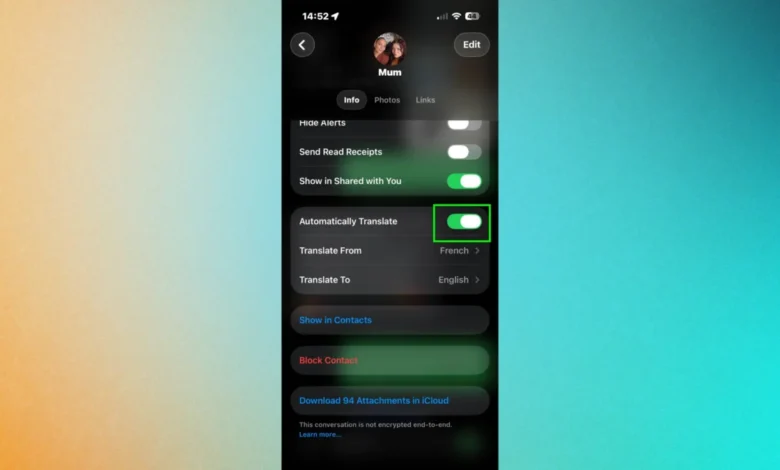
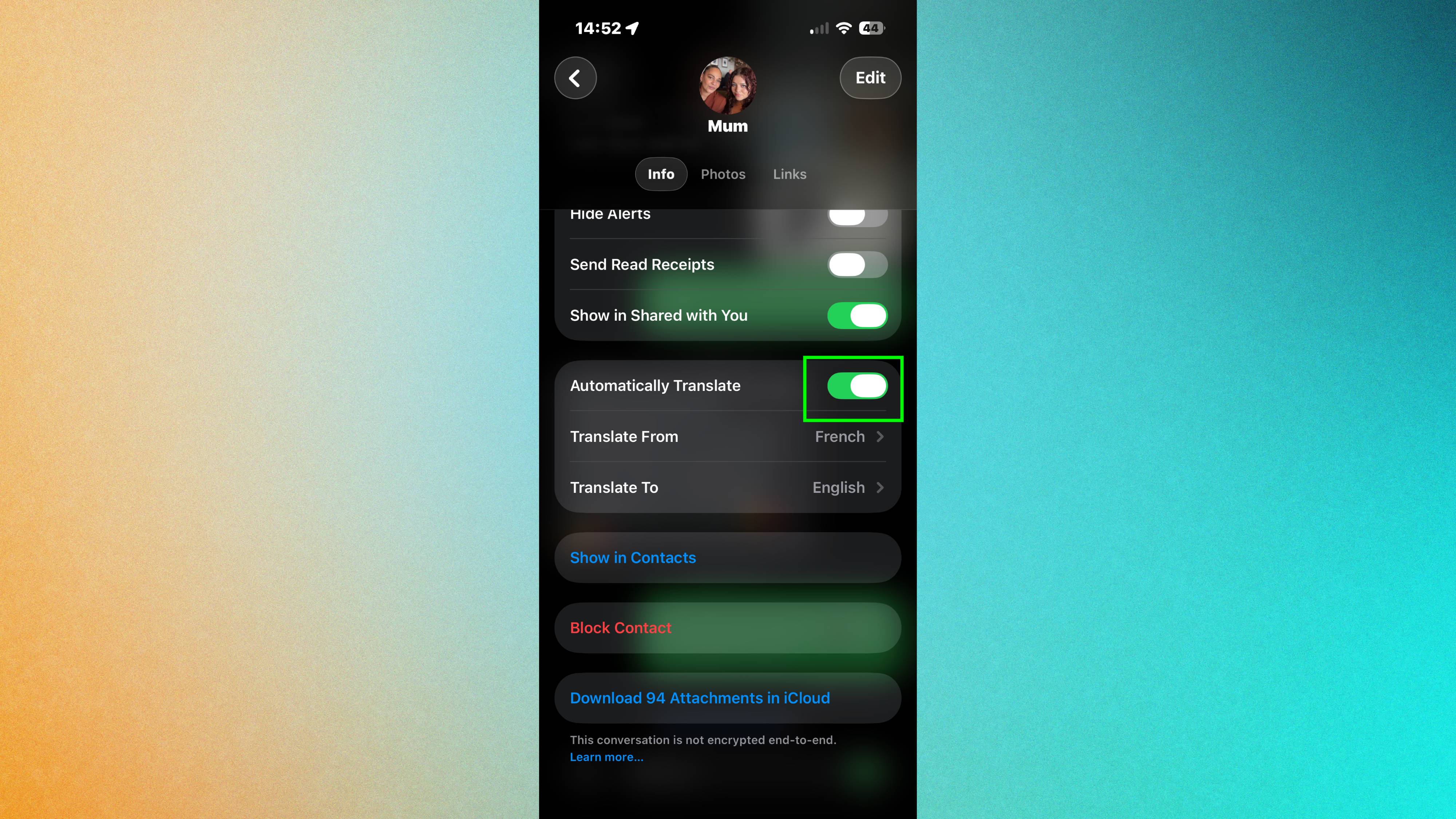
Enabling the translation feature is a straightforward process, though it remains tucked away in the contact settings, which explains why many users have yet to discover it. To activate the service, a user must open the Messages app and select a specific conversation thread. By tapping the contact’s name or profile picture at the top of the screen, the user enters the conversation’s settings menu. Within this menu, a new toggle labeled "Automatically Translate" is available for compatible devices.
Upon toggling this feature on, the user is prompted to select their preferred language from a list of 20 supported options, including major global languages such as Spanish, French, Mandarin Chinese, Japanese, German, and Arabic. Once the selection is finalized, the Messages interface adapts immediately. Every message the user types is instantly translated, with the translated text appearing in a subtle sub-text format beneath the original message. Conversely, when an incoming message is received in the target language, the iPhone automatically renders a translation directly below the bubble. This dual-sided translation ensures that both the original intent and the translated meaning are visible, reducing the risk of machine-translation errors leading to misunderstandings.
A Chronology of Apple’s Translation Evolution
The arrival of integrated message translation is the culmination of a multi-year development cycle aimed at making the iPhone a universal translator.
- 2020: Apple introduced the standalone Translate app with iOS 14. This was the company’s first major foray into direct competition with Google Translate, focusing heavily on offline capabilities and conversational UI.
- 2021: With iOS 15, Apple expanded translation to "Live Text," allowing users to translate text found within photos or through the Camera app’s viewfinder. System-wide translation was also introduced, allowing users to select text in almost any app and choose a "Translate" option.
- 2022-2023: The company focused on refining the accuracy of its neural machine translation (NMT) engines and expanding the number of supported languages. During this period, Apple also began integrating translation more deeply into Safari, allowing for full-page web translations that maintained the site’s original layout.
- 2024: The launch of Apple Intelligence marked the transition from "on-demand" translation to "proactive" translation. The "Automatically Translate" feature in Messages represents this shift, where the device anticipates the user’s needs based on the context of the conversation.
Supporting Data and Industry Context
The push for integrated translation comes at a time when the global smartphone market is increasingly focused on "AI-Phone" branding. According to industry data from International Data Corporation (IDC), AI-capable smartphones are expected to see a compound annual growth rate of over 20% through 2027. Apple’s strategy differs from its competitors, such as Google and Samsung, by emphasizing that its translation features are "on-device by default."
While Google Messages offers similar translation features through its "Magic Compose" and Google Assistant integration, much of that processing has historically relied on Google’s cloud servers. Apple’s insistence on local processing is a response to growing consumer concerns regarding data privacy. By keeping the "keys" to the translation on the device, Apple mitigates the risk of private conversations being intercepted or used for data profiling.
Market research suggests that approximately 22% of the United States population speaks a language other than English at home, a figure that is significantly higher in European and Asian markets. For a global brand like Apple, providing a frictionless way to navigate these linguistic overlaps is not just a luxury feature but a necessity for maintaining brand loyalty in diverse markets.
Expansion into Audio and Wearables
The translation ecosystem extends far beyond text-based messaging. Apple has synchronized this technology across its hardware lineup, most notably with the AirPods Pro. Users wearing the latest generation of AirPods Pro can access live, face-to-face translation. In this mode, the iPhone’s microphone picks up the speech of a person standing in front of the user, and the translated audio is streamed directly into the user’s ears in near real-time.
Furthermore, this technology has been integrated into the core telephony stack of the iPhone. During FaceTime calls or standard cellular phone calls, users can enable live captions and translations. This is particularly transformative for the hearing impaired or for international business calls where a shared language may be spoken with varying degrees of fluency. The ability to see a live transcript of a phone call translated into one’s native language in real-time significantly reduces the cognitive load of cross-lingual communication.
Privacy Implications and Fact-Based Analysis
The most significant implication of Apple’s translation strategy is the preservation of the "Privacy Sandbox." In a traditional translation workflow, text is sent to a server, processed by a large language model (LLM), and sent back. This creates a digital trail of the conversation. Apple’s use of the A-series Neural Engine allows the iPhone to store the linguistic models locally. When a user downloads a language pack (e.g., "Spanish-US"), the entire dictionary and syntax engine reside on the phone’s NAND flash memory.
From a security standpoint, this means that even if a user is in an area with no cellular service—such as while traveling internationally or in a remote location—the translation feature remains fully functional. This offline capability is a critical differentiator for travelers who may not have immediate access to affordable data roaming but require translation for navigation, safety, or basic communication.
However, there are trade-offs to this approach. On-device models are typically smaller than their cloud-based counterparts to fit within the constraints of mobile hardware. This can occasionally result in translations that are less "nuanced" than those provided by massive server-side models like GPT-4 or Google’s Gemini. Nevertheless, for the purpose of SMS and instant messaging, the accuracy of Apple’s on-device NMT has been rated by tech analysts as highly reliable for the 20 supported languages.
The Broader Impact on Digital Communication
As Apple continues to roll out these features, the long-term impact on digital communication is likely to be a reduction in "language silos." Historically, social media and messaging have been divided by language, with users primarily interacting within their own linguistic groups. By making translation an "always-on" background process, Apple is encouraging a more globalized form of digital interaction.
This development also places pressure on other manufacturers to match Apple’s integration. As consumers become accustomed to their devices automatically handling the complexities of language, it will become a standard expectation for all premium mobile devices. The "Automatically Translate" feature is more than just a software update; it is a preview of a future where the device acts as a constant, invisible interpreter, allowing for a world where what you say is no longer limited by who can understand it. In the coming years, as Apple Intelligence matures, it is expected that the number of supported languages will grow, and the depth of integration will likely expand into third-party applications through new developer APIs, further solidifying the iPhone’s role as a central hub for globalized communication.