Ulysses receives major update with Siri AI integration and interface refinements for macOS 27 and iOS 27


Following the wide-scale deployment of macOS 27 Golden Gate and iOS 27, the long-standing writing application Ulysses has received a significant update designed to align with the latest Apple operating systems. This release marks a pivotal shift in the software’s utility, integrating advanced artificial intelligence capabilities while simultaneously enhancing user interface customization. The update represents the most substantial revision to the platform in recent years, reflecting the broader industry trend toward embedding generative AI directly into productivity workflows.
The Evolution of the Ulysses Platform
Since its debut, Ulysses has maintained a reputation as a clean, distraction-free environment for long-form writers, journalists, and researchers. By utilizing Markdown, the application has successfully bridged the gap between raw text editing and professional publishing. For over a decade, the software has resisted the "feature creep" that often plagues professional writing tools, focusing instead on stability, cross-device synchronization via iCloud, and file organization.
The current update arrives at a time when the competitive landscape for writing software is intensifying. With the integration of AI-driven writing assistants in platforms like Microsoft Office and Google Workspace, Ulysses’ decision to adopt Apple’s native Siri AI framework is a strategic move to maintain relevance for its professional user base. By leveraging the system-level AI tools provided by Apple’s latest operating systems, Ulysses avoids the overhead of building a proprietary large language model, instead opting for a native, privacy-focused implementation.

Siri AI Integration and On-Screen Awareness
The centerpiece of the update is the integration of Siri AI. This feature allows users to invoke the system’s intelligence directly from within the application, providing capabilities such as text generation, rewriting, proofreading, and structural editing.
A key component of this implementation is "on-screen awareness," a feature that allows the AI to analyze the context of the document currently open in the editor. This contextual understanding enables the AI to provide suggestions that are tailored to the specific tone and content of the user’s draft. For macOS users, a dedicated button has been added to the primary toolbar, providing a quick-access point for these AI-driven functions.
However, the rollout of these features is not universal. Due to ongoing regulatory discussions and compliance requirements regarding artificial intelligence within the European Union, the Siri AI functionality is currently restricted in those territories. This reflects a growing trend where software developers must navigate fragmented global regulations, often resulting in staggered feature releases based on geographic location.
Enhanced Toolbar Customization and UI Refinements
Beyond the introduction of AI, the development team has focused on granular control over the user experience. The latest version of Ulysses allows for complete customization of the application’s toolbar. Users can now rearrange, add, or remove buttons to create a workspace that reflects their individual writing habits.
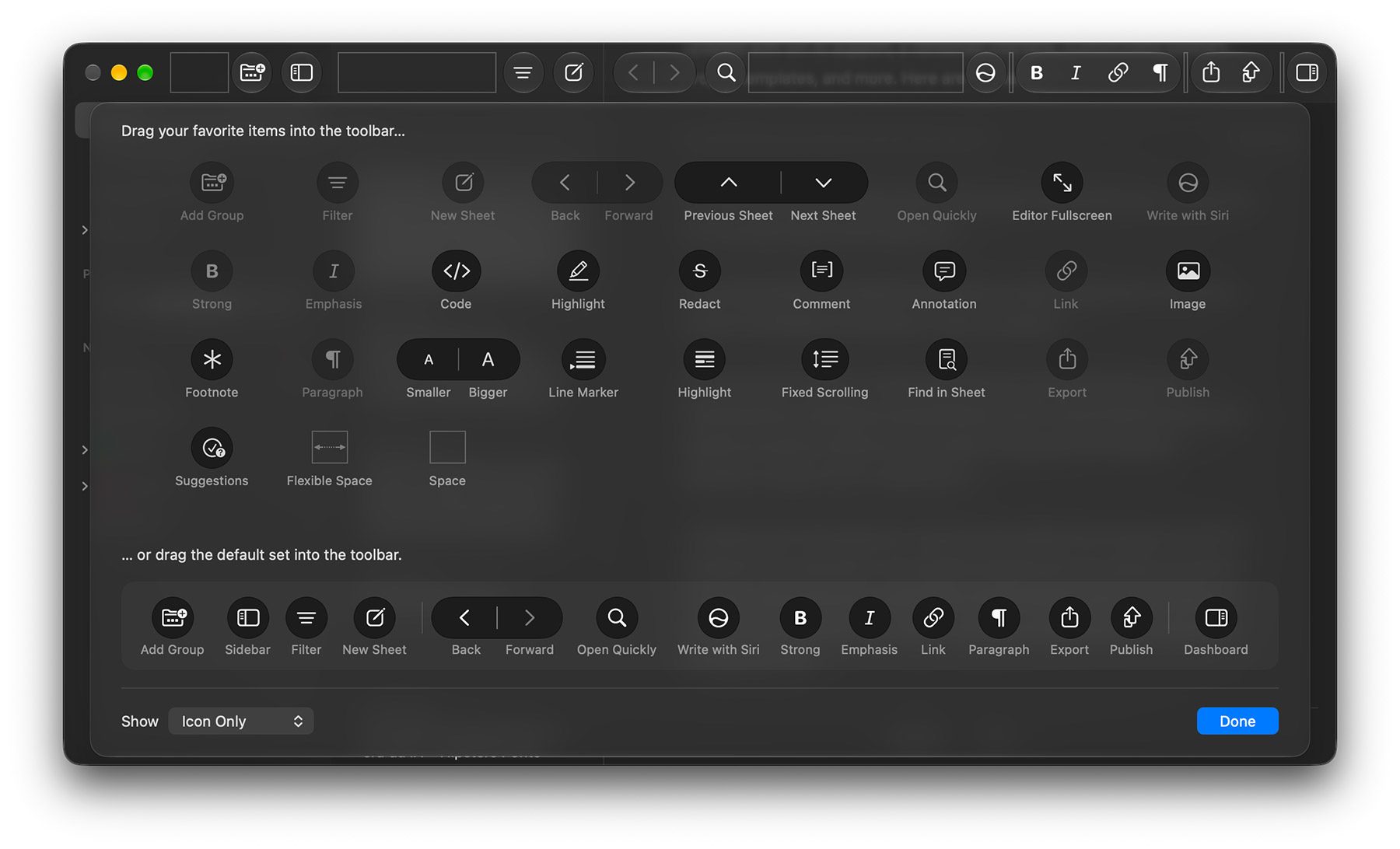
This level of customization includes:
- Navigation Buttons: Streamlining movement between folders and nested groups.
- Block Controls: Providing direct access to Markdown formatting blocks.
- Workflow Suggestions: Context-aware buttons that shift based on the task at hand.
The update also addresses aesthetic and accessibility concerns. New group icons and pictograms have been introduced, providing more visual clarity for users managing complex project hierarchies. Furthermore, the development team has refined the application’s accessibility support, particularly when editing filter conditions and managing group iconography. These changes ensure that the software remains compliant with evolving accessibility standards, which is a critical factor for enterprise and institutional users.
Project Templates: Streamlining the Writing Process
A notable addition for power users is the introduction of project templates. Historically, starting a new project in Ulysses required users to manually configure their file structure. With this update, users can select from a pre-defined set of templates that automatically initialize the document hierarchy with dummy groups and sheets.
This functionality is designed to reduce the friction associated with beginning a new writing project, such as a book, a series of blog posts, or academic research. By standardizing the initial workspace, Ulysses aims to help users maintain consistency across their projects, a feature that aligns with the software’s focus on long-form content production.

Chronology of the 2026 Updates
The release of these features follows a structured development timeline set by Apple’s recent OS cycles:
- Early 2026: Initial testing of integration points for Siri AI within third-party development kits.
- September 14, 2026: Official release of macOS 27 Golden Gate and iOS 27 to the general public.
- Mid-September 2026: Deployment of the Ulysses update, ensuring Day-1 compatibility with the new Apple frameworks.
This rapid adoption of new system-level features is consistent with Ulysses’ history of being a "platform-first" application, frequently utilizing the latest features from Apple’s SDKs (Software Development Kits) to ensure seamless performance and aesthetic integration with the host operating system.
Broader Impact and Industry Implications
The integration of AI into a specialized writing tool like Ulysses raises questions about the future of professional writing. By embedding these tools directly into the editing process, the barrier to entry for drafting, editing, and refining content is significantly lowered. However, it also introduces challenges regarding data privacy and the integrity of the writing process.
Ulysses has traditionally marketed itself on privacy, with all documents stored locally or synced via the user’s private iCloud account. The implementation of Siri AI, which operates under Apple’s privacy protocols, represents a middle ground where users can access advanced AI tools without necessarily compromising the privacy of their documents.

Industry analysts suggest that this move is essential for the longevity of independent productivity applications. As the "AI-native" era begins, tools that fail to provide intelligent assistance risk becoming obsolete. By integrating these features without sacrificing the core Markdown-based experience, Ulysses is positioning itself as a hybrid tool—balancing the traditional, manual control that writers demand with the efficiency of modern machine learning.
Accessibility and Availability
Ulysses continues to be available through a direct subscription model, as well as via the Setapp service. The application remains available across the Apple ecosystem, including Mac, iPad, and iPhone, maintaining its signature cross-platform synchronization.
For existing users, the update is available immediately through the Mac App Store and iOS App Store. The company has emphasized that while the interface has been refreshed to better match the visual language of macOS 27 and iOS 27, the underlying architecture remains committed to the principles of plain text and Markdown, ensuring that users can continue to rely on the software for long-term document archiving and retrieval.
As the software continues to mature, the development team has indicated that further refinements to the AI toolset will be forthcoming, likely focusing on more granular control over AI output and deeper integration with existing library management features. For now, the latest update serves as a major milestone, effectively bridging the gap between legacy writing workflows and the future of AI-assisted productivity.