Asus Secures FCC Conditional Approval to Keep Selling Routers in the U.S. Amid Strict Regulatory Crackdown


The landscape of consumer networking hardware in the United States has undergone a seismic shift, driven by stringent federal regulations aimed at mitigating perceived national security vulnerabilities. Amid a challenging regulatory climate for foreign-manufactured telecommunications equipment, major technology companies have found themselves grappling with strict oversight, import bans, and intense scrutiny from federal agencies. The Federal Communications Commission (FCC) has taken aggressive measures to restrict consumer routers that do not meet strict domestic security criteria, leaving hardware manufacturers scrambling to comply. As part of this evolving regulatory framework, the commission has established a pathway for qualifying manufacturers to secure "conditional approvals," granting them temporary clearance to continue supplying hardware to the American market.
Asus, a prominent Taiwanese hardware manufacturer renowned for its extensive lineup of high-performance networking products, has emerged as the latest industry leader to successfully navigate this intricate bureaucratic maze. According to an official regulatory notice issued by the FCC, Asus has secured formal conditional approval for its comprehensive portfolio of wireless networking devices. This critical regulatory clearance ensures that the company can continue importing and selling its popular routers and mesh systems within the United States, providing a substantial sigh of relief for both the enterprise and consumer divisions of the brand.
Background and Context of the FCC’s Regulatory Crackdown
The regulatory pressures facing Asus and its industry peers are part of a broader, government-wide initiative to safeguard critical infrastructure and consumer data against potential foreign cyber threats. Over the past several years, U.S. policymakers and defense agencies have increasingly scrutinized the supply chains of consumer electronics, particularly communication hardware designed to handle household and corporate data traffic. Routers and switches, serving as the primary gateways for local networks and internet access, have become focal points for national security concerns.
In response to these perceived risks, the FCC and related defense authorities expanded the parameters of the "Covered List," an inventory of communications equipment and services deemed to pose an unacceptable risk to U.S. national security. While the immediate targets of these rules historically included specific enterprise-level telecommunications vendors, the enforcement scope gradually widened to encompass a broader spectrum of consumer-facing networking devices. Manufacturers whose supply chains or corporate structures involve foreign entities outside of vetted allied nations have faced rigorous audits, leading to temporary import suspensions and, in some cases, outright prohibitions on new product introductions.
For Asus, a company deeply integrated into the global technology ecosystem with manufacturing hubs spanning across East Asia, maintaining uninterrupted access to the lucrative U.S. market required intensive engagement with federal regulators. The conditional approval serves as an official determination by the Department of War and the FCC that Asus’s currently submitted hardware models do not present an immediate or unacceptable risk to American national security.
Chronology of Regulatory Milestones and Approvals
The pathway to securing conditional regulatory clearance has been marked by a series of high-stakes deadlines and corporate negotiations. Throughout the initial phases of the federal crackdown, router manufacturers faced mounting uncertainty as supply chains hung in the balance. The implementation of tighter import controls disrupted product rollouts and forced companies to reevaluate their compliance strategies.
As the regulatory framework matured, the FCC introduced a temporary relief mechanism: conditional approvals. These provisions allow qualifying firms to maintain operations and distribute products within the United States while undergoing continuous compliance monitoring. Netgear became one of the early beneficiaries of this framework, securing conditional approval to continue importing its foreign-manufactured hardware through October 2027. Shortly thereafter, Amazon’s Eero division and other smart home networking brands successfully petitioned the commission, securing similar 18-month grace periods to stabilize their domestic supply chains.
With the recent issuance of the latest FCC notice, Asus has officially joined this select group of compliant manufacturers. The conditional approval grants Asus legal clearance to market and sell its entire consumer wireless networking portfolio. However, this clearance operates under a strict timeline, currently authorized until March 6, 2018 (representing the agency’s structured 18-month review window from the date of issuance). During this period, the company must maintain strict adherence to federal oversight protocols and demonstrate ongoing compliance with security mandates to secure a permanent exemption or future extensions.
Implications for the Transition from Wi-Fi 7 to Wi-Fi 8
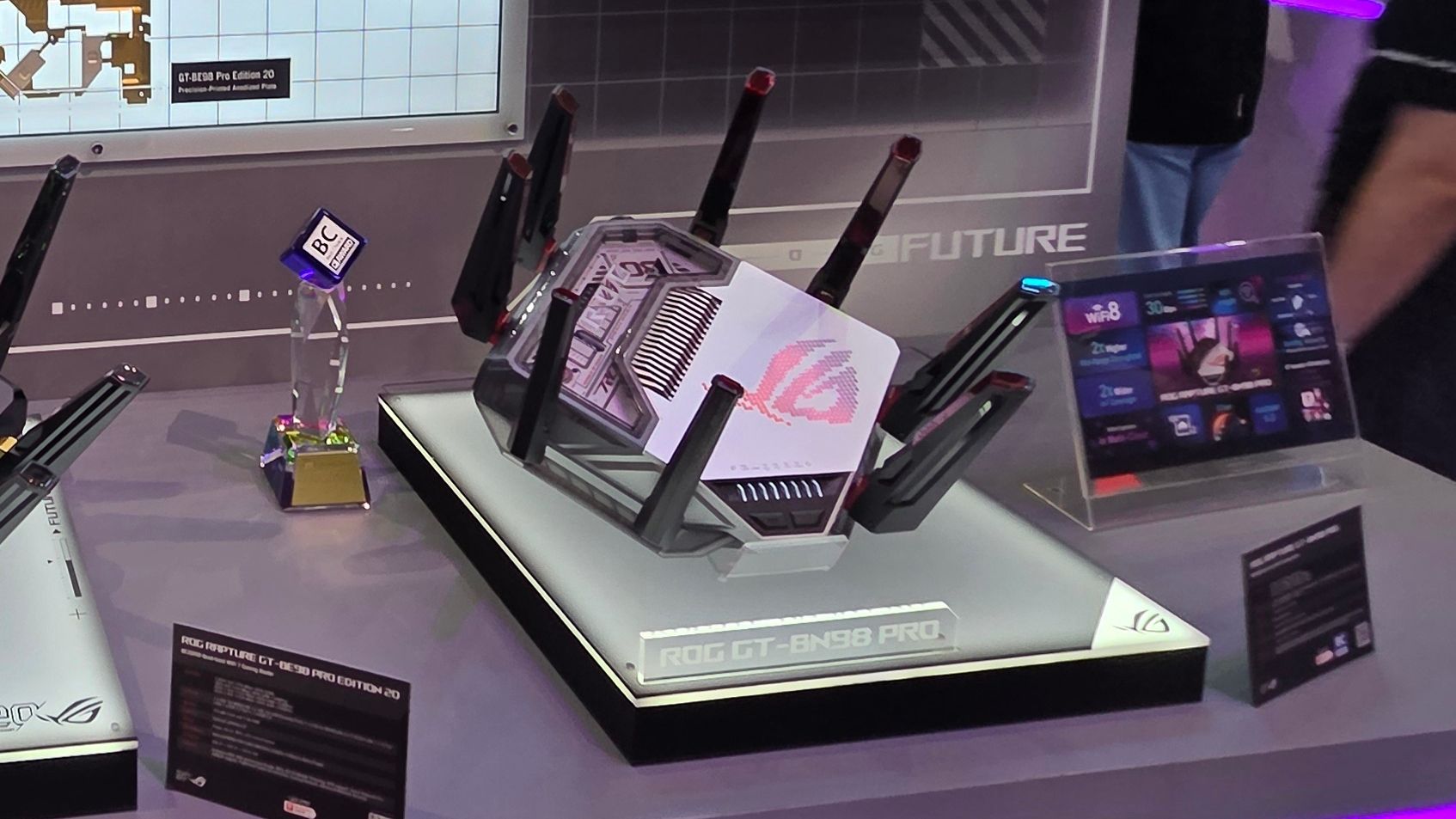
The timing of the FCC’s conditional approval is particularly critical for Asus, as the consumer networking industry stands on the precipice of a major technological generation shift. Over the next year, the market is expected to witness the gradual commercial rollout of Wi-Fi 8 architecture. Designed to address the escalating demands of smart homes, high-density environments, and competitive online gaming, Wi-Fi 8 promises significant performance enhancements, including dramatically lower latency, improved spatial efficiency, and superior range compared to its predecessor.
Asus has positioned itself at the forefront of this next-generation transition. Earlier this year at the Consumer Electronics Show (CES), the company debuted the ROG NeoCore, a conceptual Wi-Fi 8 router engineered to deliver optimized throughput and ultra-low latency for demanding digital environments. This momentum continued into the summer with the official unveiling of the company’s first consumer-ready Wi-Fi 8 hardware: the ROG Rapture GT-BN98 Pro. According to preliminary manufacturer data and industry benchmarks, the ROG Rapture GT-BN98 Pro is projected to offer up to a twofold real-world throughput uplift over existing top-tier Wi-Fi 7 products.
Had the FCC denied Asus conditional approval, the company’s ability to introduce these advanced technologies to the American consumer base would have been severely compromised. Being locked out of the U.S. market during a generational transition would have resulted in substantial market share losses and impeded the adoption of next-generation networking standards. With the regulatory hurdle cleared, Asus is uniquely positioned to capitalize on early consumer demand for Wi-Fi 8 infrastructure.
Competitive Landscape and Market Disparities
While Asus, Netgear, and Amazon have successfully navigated the compliance process to secure conditional approvals, the broader networking market remains fractured due to uneven regulatory enforcement. The disparity in how different manufacturers are treated highlights the complex geopolitical dynamics influencing consumer electronics imports.
TP-Link, recognized as the single largest player in the United States consumer wireless router market by volume, remains conspicuously absent from the FCC’s list of approved vendors. The federal government’s reluctance to grant clearance to TP-Link stems from ongoing uncertainty regarding the company’s corporate governance and its disputed claims of independence from foreign state influence. Unlike Asus, which has satisfied federal investigators regarding its operational autonomy and supply chain security, TP-Link continues to face regulatory roadblocks.
Consequently, TP-Link has been unable to establish a firm release schedule for its newly announced line of Wi-Fi 8 "Ultra" routers within the United States. This regulatory limbo creates a significant market vacuum. With one of the dominant budget-friendly and mid-tier suppliers sidelined, competitors like Asus, Netgear, and various domestic brands have a unique window of opportunity to capture displaced consumer demand. Analysts suggest that if the regulatory deadlock persists, market share distribution within the domestic networking sector could experience a permanent realignment, favoring brands that successfully align with federal security directives.
Official Reactions and Industry Outlook
Industry observers and market analysts have responded to the FCC’s latest ruling with cautious optimism. For manufacturers, the conditional approval process provides a predictable, albeit demanding, roadmap for compliance. Representatives from the networking sector have emphasized the importance of transparent communication and rigorous auditing standards in maintaining consumer trust.
Security experts note that while conditional approvals offer short-term relief, they also signal a permanent change in how consumer electronics are regulated. Going forward, hardware manufacturers can expect continuous evaluation of their firmware updates, data handling practices, and component sourcing. The requirement to prove that consumer devices pose zero risk to national security has effectively transformed the networking industry, binding commercial product development closely to national defense priorities.
As Asus prepares to scale its operations for the upcoming deployment of Wi-Fi 8 hardware, the immediate threat of supply chain disruption has been averted. The company can now focus on manufacturing, marketing, and distributing its flagship products to American consumers. However, with the conditional approval tied to a strict timeline, the long-term viability of foreign-manufactured networking equipment in the U.S. will depend entirely on how effectively manufacturers adapt to an increasingly regulated global technology marketplace.