Apple’s ‘Lil’ Finder Guy’ Mascot: A Behind-the-Scenes Look at Its Creation and Cultural Impact

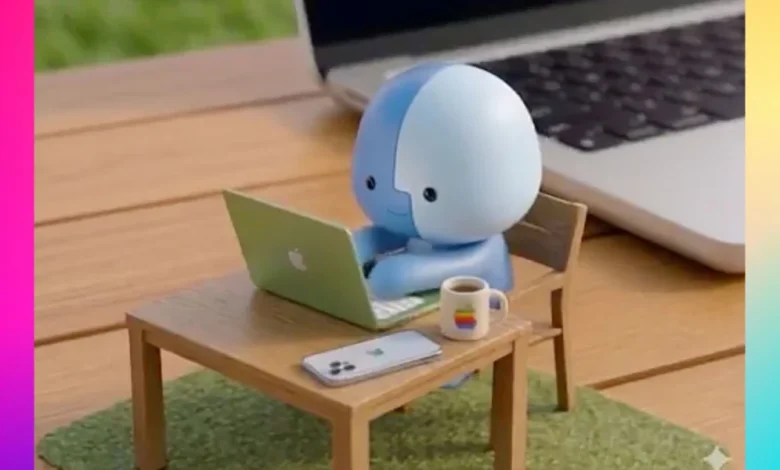
Apple’s celebrated art director, Sofia Coelho, has provided an unprecedented glimpse into the intricate creative process behind the "Lil’ Finder Guy," the charismatic mascot that became the face of the groundbreaking MacBook Neo campaign. Her recent revelations offer a rare window into the conceptualization and visual design that transformed a digital icon into a tangible, universally adored character, underscoring Apple’s evolving approach to brand engagement and marketing in the digital age.
The journey of Lil’ Finder Guy, described by Coelho as a "dream design project," began long before its widespread public debut. In a post shared on LinkedIn, Coelho, who spearheaded the visual design and conceptual framework for the character, revealed a collection of behind-the-scenes materials. These included early sketches detailing various expressions, meticulous studies of its proportions, and the overall shape, alongside what appeared to be an airbrushed physical prototype. This detailed progression from abstract concept to physical manifestation highlights the rigorous design philosophy that underpins Apple’s product and marketing initiatives, emphasizing a commitment to detail and emotional resonance. The character’s whimsical yet precise descriptor, "measuring exactly one apple tall," encapsulates the playful yet deliberate nature of its design, rooted deeply in Apple’s brand identity.
The Genesis of an Icon: From System Utility to Beloved Mascot
The original Finder icon, a smiling blue face, has been an integral part of the Macintosh operating system since its inception in 1984. It represents the gateway to a user’s files and applications, symbolizing accessibility and control. Over decades, while its design has evolved subtly with each new macOS iteration, its core identity has remained consistent. The decision to anthropomorphize this familiar icon into "Lil’ Finder Guy" for the MacBook Neo campaign marked a significant strategic shift, moving beyond abstract brand representation towards a character-driven narrative designed to foster deeper emotional connection with consumers.
Sofia Coelho’s role as the lead art director for this initiative placed her at the helm of transforming a functional graphic into a personality. Her LinkedIn post, framed as a tongue-in-cheek birthday announcement for the character, credited her colleagues for their collaborative efforts on the Cannes Lions-shortlisted campaign. This acknowledgment underscores the collaborative ecosystem within Apple’s design teams, where cross-functional expertise converges to bring complex creative visions to life. The detailed sketches she shared illustrate the iterative process of character design, where countless variations are explored to achieve the perfect balance of approachability, expressiveness, and brand alignment. These studies delve into subtle nuances of facial expressions—from curious to determined, playful to thoughtful—ensuring the character could convey a broad spectrum of emotions within the campaign’s narrative. The creation of a physical prototype further exemplifies Apple’s dedication to understanding the character’s form in three dimensions, crucial for its eventual appearances in diverse media, from digital animations to physical merchandise.

The MacBook Neo Campaign: A New Era of Apple Marketing
The MacBook Neo, for which Lil’ Finder Guy served as the primary mascot, represented a significant product launch for Apple. While specific details of the MacBook Neo itself are beyond the scope of this article, its marketing campaign, fronted by the diminutive character, signaled a departure from some of Apple’s more traditional, product-centric or lifestyle-focused advertising. Historically, Apple’s marketing has often centered on showcasing sleek design, powerful performance, and the seamless integration of its ecosystem, epitomized by campaigns like "Think Different" or the "Get a Mac" series, which featured human actors personifying Mac and PC.
The adoption of a dedicated, animated mascot like Lil’ Finder Guy suggests a strategic move towards humanizing technology further and appealing to a broader, potentially younger demographic accustomed to character-driven content across digital platforms. This approach aims to make advanced technology feel more approachable, friendly, and even endearing. The campaign’s shortlisting for a Cannes Lions award—one of the most prestigious accolades in the global advertising and creative communications industry—validates the strategic foresight and creative execution behind the MacBook Neo’s marketing. A Cannes Lions shortlisting signifies that a campaign has been recognized by industry leaders for its outstanding creativity, innovation, and effectiveness, placing it among the world’s best. This recognition not only burnishes Apple’s reputation for innovative marketing but also highlights the impactful role Lil’ Finder Guy played in achieving this distinction.
From Campaign Star to Internet Phenomenon: A Timeline of Cultural Integration
The rollout of the MacBook Neo campaign saw Lil’ Finder Guy quickly transition from a mere advertising prop to a bona fide cultural icon. Its journey unfolded across multiple digital touchpoints, demonstrating a carefully orchestrated multi-platform strategy designed for maximum reach and engagement:
- Initial Campaign Launch (Early 2026): Lil’ Finder Guy was prominently introduced as the face of the MacBook Neo, appearing in initial promotional materials and key art.
- Livestream Feature (March 10, 2026): Apple featured the character extensively in a dedicated livestream event, likely introducing the MacBook Neo and showcasing Lil’ Finder Guy’s personality and interactions with the new device. Livestreams provide an immersive, real-time platform for product reveals, allowing for dynamic storytelling around the mascot.
- TikTok Video Series (April 2, 2026): Recognizing the immense power of short-form video content and its viral potential, Apple launched a series of TikTok videos starring Lil’ Finder Guy. This move was particularly strategic, targeting a younger, digitally native audience on a platform known for trend-setting and rapid content dissemination. The character’s expressive animations and relatable scenarios quickly resonated with users, leading to widespread sharing and engagement.
- Rapid Memeification (Ongoing, Spring 2026): The character’s inherent charm and distinct visual identity made it ripe for internet meme culture. Within weeks of its widespread exposure, Lil’ Finder Guy transcended its marketing origins, becoming a subject of fan-made artwork, custom wallpapers, 3D-printable models, and various humorous appropriations across social media platforms. This organic virality is a testament to the character’s strong design and universal appeal, transforming it from a brand asset into a shared cultural artifact.
- WWDC 2026 Integration (June 2026): The ultimate seal of internal and external approval came with Lil’ Finder Guy’s appearances at Apple’s annual Worldwide Developers Conference (WWDC). It made an easter egg-style appearance in at least one WWDC 2026 session, a subtle nod often appreciated by Apple enthusiasts and developers. More significantly, the character was featured on an enamel pin included in attendees’ swag bags, cementing its status as an officially recognized and beloved part of the Apple universe, extending its presence beyond purely promotional contexts into commemorative merchandise.
This chronological progression illustrates a meticulously planned campaign that skillfully leveraged traditional and new media, culminating in the character’s organic adoption by the internet community.

The Strategy Behind the Charm: Analyzing Character-Based Marketing
The success of Lil’ Finder Guy is not merely a testament to creative design but also to a shrewd marketing strategy. In an increasingly saturated tech market, differentiation often hinges on more than just specifications. Emotional connection and brand affinity play a crucial role. Character-based marketing, while not new (think of Michelin Man, Ronald McDonald, or even Android’s Bugdroid), offers several distinct advantages:
- Humanization of Technology: Mascots make complex technology more approachable and less intimidating. Lil’ Finder Guy, with its friendly demeanor, makes the Mac experience feel personal and welcoming.
- Brand Loyalty and Recall: A memorable character can significantly boost brand recall and foster a sense of loyalty. Consumers are more likely to remember and feel positively towards a brand associated with a beloved character.
- Versatility in Storytelling: Characters provide endless opportunities for narrative development. They can embody brand values, interact with products, and adapt to various campaign themes across different media.
- Social Media Virality: As demonstrated by Lil’ Finder Guy’s memeification, well-designed characters can tap into the power of user-generated content, turning passive consumers into active brand advocates who create and share content.
- Cross-Generational Appeal: A charming character can resonate across different age groups, from young children who find it "cute" to adults who appreciate the nostalgia or cleverness.
Marketing analysts often highlight that successful brand mascots serve as powerful emotional anchors. They imbue an inanimate product with personality, fostering a deeper, more relatable connection with the audience. For Apple, a company often perceived as premium and sophisticated, introducing a playful character like Lil’ Finder Guy could also be seen as an effort to broaden its appeal, making the brand feel more accessible and fun without compromising its core identity of innovation and design excellence. The "one apple tall" detail is particularly effective, tying the character directly to the brand’s iconic fruit logo while giving it a tangible, relatable scale.
Sofia Coelho’s Vision and the Creative Process
Sofia Coelho’s assertion that Lil’ Finder Guy was a "dream design project" speaks volumes about the creative freedom and passion invested in its development. Her leadership in visual design and concept involved navigating the delicate balance between brand heritage and innovative expression. The shared behind-the-scenes images—from initial sketches exploring diverse expressions to the physical prototype—reveal a meticulous, iterative design process. This process is characteristic of Apple’s product development, where form, function, and user experience are refined through countless revisions.
The transformation of a flat, two-dimensional operating system icon into a three-dimensional, animated character required not only artistic skill but also a deep understanding of animation principles and brand guidelines. The challenge lay in maintaining the essence of the original Finder icon while imbuing it with a distinct personality that could carry an entire marketing campaign. The expressions, proportions, and overall shape were carefully calibrated to evoke specific emotions and ensure the character was instantly recognizable and endearing. This level of detail in character development is crucial for creating a mascot that can transcend advertising and become a genuine cultural phenomenon.

Implications for Apple’s Future Marketing Landscape
The resounding success of Lil’ Finder Guy carries significant implications for Apple’s future marketing strategies. It demonstrates the profound impact that a well-executed character-driven campaign can have on brand perception, engagement, and cultural relevance.
- Potential for More Mascots: The positive reception might encourage Apple to explore creating more brand mascots or character-based narratives for future product launches or even for other aspects of its software ecosystem. This could lead to a broader universe of Apple-related characters, each embodying different facets of the brand.
- Shift Towards Playfulness: While Apple has always maintained a sophisticated image, Lil’ Finder Guy suggests a willingness to embrace more playful and lighthearted marketing. This could be a strategic move to appeal to younger demographics and inject a sense of fun into a brand often associated with serious innovation and productivity.
- Leveraging Community Engagement: The rapid memeification and fan art generation around Lil’ Finder Guy highlight the power of user-generated content. Apple may increasingly design campaigns with an eye towards fostering such organic community engagement, providing tools or platforms that encourage creative interaction with their brand assets.
- Integration of Digital and Physical: The journey from digital icon to physical prototype and eventually to WWDC swag (enamel pin) demonstrates a seamless integration of digital and physical brand touchpoints. This holistic approach enhances the character’s tangibility and reinforces its presence in the real world, deepening consumer connection.
- Evolving Brand Identity: Lil’ Finder Guy represents an evolution in how Apple communicates its brand identity. It shows that even a tech giant can leverage emotional storytelling through characters to connect with audiences on a more personal level, potentially making its products feel more accessible and user-friendly.
In conclusion, the story of Lil’ Finder Guy is more than just an account of a successful marketing campaign; it is a case study in effective brand building through character design and strategic digital engagement. Sofia Coelho’s behind-the-scenes reveal illuminates the meticulous artistry and thoughtful strategy that transformed a simple operating system icon into a beloved cultural figure. Its journey from design sketch to internet meme and official Apple swag underscores the power of emotional resonance in an increasingly digital world, setting a new benchmark for how technology brands can connect with their audiences. Lil’ Finder Guy has not only championed the MacBook Neo but has also carved out a unique place in Apple’s rich legacy, signaling a vibrant and potentially more whimsical direction for the company’s future branding endeavors.
Related posts: