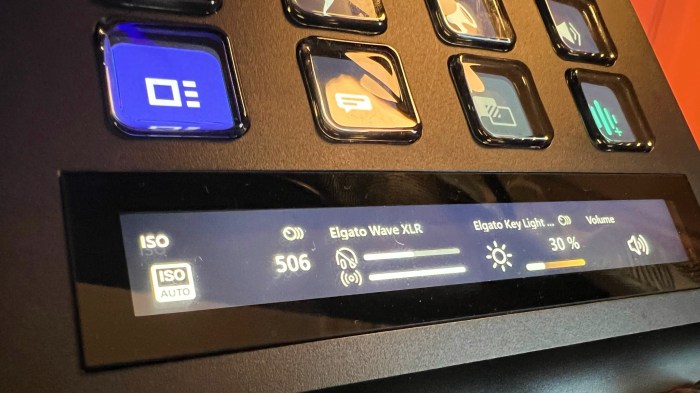
Elgato is bringing a virtual stream deck to desktops, promising a powerful new way to control software and automate tasks. This innovative device, based on the popular Stream Deck line, aims to bring the same intuitive control to desktop users. Expect features like customizability, streamlined workflows, and seamless integration with various software. This desktop-based Stream Deck could redefine how we interact with our computers.
The potential for a virtual Stream Deck extends far beyond streaming. Imagine controlling complex software, automating tasks, and even interacting with external sensors. This could revolutionize productivity for streamers, content creators, and even everyday computer users.
Introduction to Elgato’s Stream Deck for Desktops
Elgato’s Stream Deck line has revolutionized content creation workflows for streamers and other digital creators. These customizable, physical control surfaces allow for rapid access to a wide array of software functions, effectively streamlining tasks and boosting productivity. This new desktop-based Stream Deck promises to bring this power to a broader range of desktop users.The current Stream Deck line caters to a diverse range of needs, offering varying numbers of keys and customizable functionalities.
This new desktop iteration, however, could offer unique advantages, potentially changing the way users interact with their computers.
Elgato Stream Deck Product Overview
Elgato Stream Decks are essentially programmable keypads designed for instant access to applications, media players, and more. Their strength lies in their ability to be tailored to specific needs. Current models include varying key counts, from compact single-row units to more expansive multi-row options, each with a different number of keys for specific functionalities. The current line includes both small, portable models and larger, more robust options, catering to different budgets and needs.
Key Features and Functionalities of Current Models
Current Stream Deck models boast impressive customizability. Users can map specific actions to each key, creating macros and shortcuts for various software and applications. This enables users to quickly launch applications, adjust settings, or execute complex commands. Features like dynamic lighting and a responsive layout further enhance the user experience.
User Workflows and Examples
Stream Decks are widely used by streamers to control lighting, music, social media interactions, and game settings. In a typical setup, a streamer might map a button to switch between multiple camera angles, adjust their microphone volume, or quickly change music tracks during a broadcast. These same principles extend to other creative professionals, from video editors to music producers, streamlining their workflow and allowing for more efficient and focused work sessions.
Potential Market for a Desktop Stream Deck
A desktop Stream Deck could appeal to a broader market beyond streamers. Graphic designers, video editors, musicians, and even everyday computer users could benefit from a physical control surface for repetitive tasks or quick access to frequently used programs. The appeal would lie in streamlining complex workflows and reducing the cognitive load of navigating multiple programs or settings.
Think of a designer quickly adjusting font styles, color palettes, or other visual elements, all from a single intuitive interface.
Comparison of Stream Deck Models
| Feature | Current Stream Deck Mini | Current Stream Deck XL | Predicted Desktop Stream Deck |
|---|---|---|---|
| Form Factor | Compact, portable | Larger, multi-row | Desktop-sized, potentially modular |
| Connectivity | USB-C | USB-C | USB-C, potentially with additional wireless options |
| Key Count | Low (typically 15-20 keys) | High (typically 40-60 keys) | Variable, likely higher than current XL models; potentially customizable layouts |
| Customizability | Extensive | Extensive | Extensive, potentially with advanced scripting capabilities |
| Additional Features | Basic lighting, simple macro recording | Advanced lighting, dedicated macro recording, potentially more dedicated buttons | Advanced lighting, customizable layouts, advanced macro recording, potential integration with other Elgato software |
Potential Features and Functionality
A desktop Stream Deck opens exciting possibilities beyond the realm of streaming. Imagine a single, intuitive interface for controlling various desktop applications, automating complex tasks, and enhancing workflow efficiency. This article explores potential features and functionalities of such a device, moving beyond its current streaming-centric role.The desktop Stream Deck, unlike its streaming counterpart, is poised to become a central hub for desktop automation.
Its potential extends far beyond simple hotkeys, offering a powerful, visual way to interact with your computer’s various functions and applications.
Unique Features for Desktop Use
The desktop Stream Deck could differentiate itself by offering granular control over specific software. Instead of just launching applications, it could allow users to adjust settings, initiate specific actions within the application, or even manipulate data streams. This level of precision could streamline workflows and eliminate the need for repeated keyboard or mouse commands. For instance, a graphic designer could quickly adjust layer opacity or initiate a specific filter application.
Elgato’s new virtual Stream Deck for desktops is a pretty cool idea. While I’m excited about the potential for customizability, I can’t help but wonder if the innovative design might be influenced by recent leaks surrounding the Xperia XZ1, a Sony phone. Checking out the details on xperia xz1 leak sony phone reveals some interesting design cues, though.
Ultimately, though, Elgato’s virtual Stream Deck still looks like a game-changer for desktop streamers.
Beyond Streaming: General Control and Automation
A desktop Stream Deck could act as a central control panel for your entire computing environment. Instead of just triggering actions, it could automate entire sequences of commands. Imagine a workflow where the Stream Deck triggers a series of actions—importing data, processing it through multiple software applications, and finally exporting the results—all with a single button press. This type of automation significantly reduces the time required for complex tasks.
Software Integration
This device could support a wide range of software applications, each with unique configurations. A powerful integration feature is crucial for broader adoption.
| Software Category | Potential Integrations |
|---|---|
| Photo Editing | Adjusting brightness, contrast, applying filters, batch processing |
| Video Editing | Applying transitions, adding text overlays, adjusting audio levels, exporting different formats |
| Data Analysis | Running specific calculations, generating reports, creating visualizations |
| Web Browsing | Opening specific tabs, bookmarking pages, navigating complex websites |
| Productivity Suites | Creating new documents, formatting, saving, scheduling tasks |
Input Options
The desktop Stream Deck should offer diverse input options, allowing for customized workflows.
- Keyboard Shortcuts: Integrating with existing keyboard shortcuts provides seamless transitions for users familiar with their current workflows.
- Custom Scripts: The ability to write custom scripts (e.g., using Python or similar languages) unlocks immense potential. This allows users to create highly personalized automation processes that cater to specific needs.
- External Sensors: Imagine connecting external sensors, such as a light sensor or a pressure pad, to trigger specific actions on the Stream Deck. This opens up possibilities for interactive and responsive automation.
Complex Task Automation
A desktop Stream Deck could handle intricate workflows by chaining multiple actions together. Consider a graphic designer needing to prepare an image for print. The Stream Deck could trigger actions like opening the image file, applying a color correction profile, resizing the image, and finally saving the output in the correct format. The Stream Deck could initiate each of these actions through dedicated buttons or a sequence of actions within a single macro.
Design Considerations and Target Audience
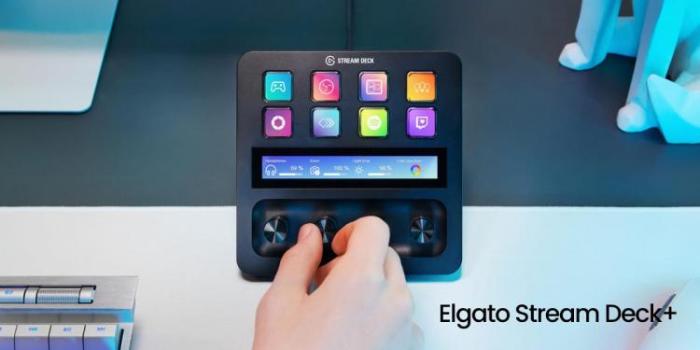
Elgato’s Stream Deck for desktops promises a powerful new tool for content creators and everyday users. Beyond the core functionality of macro creation and control, the design of this peripheral needs to be carefully considered to ensure it seamlessly integrates into existing workflows and appeals to a broad range of users. This section explores the design considerations and potential target audiences for this innovative product.A key aspect of the Stream Deck’s success will hinge on its design.
Its form factor needs to be attractive and functional, catering to both the specific needs of streamers and the general user base. It must be compatible with a wide variety of setups and offer customization options that satisfy a broad range of creative and functional needs.
Comparing Stream Deck Design to Existing Gaming Peripherals
Elgato’s Stream Deck has already established a strong presence in the streaming community. A desktop version will need to be carefully positioned within the existing ecosystem of gaming peripherals. Comparing the Stream Deck to other keyboard, mouse, and controller options helps to identify potential design differentiators. A desktop Stream Deck should leverage the strengths of existing peripherals while introducing unique features and benefits.
For instance, it should offer a streamlined and visually appealing layout, contrasted with the often more complex design of gaming keyboards. It should also emphasize intuitive button layouts and customization, unlike some controllers. The desktop version might also need to address the potential for clutter in a desktop environment, offering solutions like cable management and adaptable mounting options.
Stream Deck User Interface Design
A user-friendly interface is crucial for the Stream Deck’s success. Intuitive navigation and customization are essential for both technical users and casual ones. The interface should be clean, uncluttered, and responsive, with clear visual cues for actions and options.
- Navigation: The interface should employ a simple, hierarchical structure, allowing users to quickly locate and access desired functions. A logical tab system or a visually intuitive layout will be key.
- Customization: The ability to customize button functions, colors, and layouts is paramount. Drag-and-drop functionality, preset templates for common tasks (e.g., social media posting), and the option to save custom profiles are important features.
- Visual Feedback: Clear visual feedback mechanisms (e.g., highlighting selected buttons, visual cues for active macros) are essential for maintaining user awareness and streamlining workflows.
Accessibility Considerations
Addressing accessibility is vital for inclusivity. The Stream Deck should be designed to accommodate users with disabilities.
- Adjustable Brightness and Contrast: Customizable brightness and contrast settings can help users with visual impairments adjust the interface to their needs. Users with low vision may find varying levels of contrast and light intensity crucial.
- Keyboard Navigation Options: The interface should support keyboard navigation, allowing users with mobility impairments to use the device with ease. The navigation scheme should be intuitive and easy to learn.
- Customizable Key Assignments: Users should be able to easily customize key assignments to their specific needs and preferences. This flexibility accommodates a wider range of accessibility requirements.
Target Audience and Market Segments, Elgato is bringing a virtual stream deck to desktops
The target audience for the Elgato Stream Deck Desktop should be broad, encompassing both niche and general user groups.
Elgato’s new virtual Stream Deck for desktops is a pretty cool move. It’s like having all those customizable buttons right on your screen, and that’s fantastic for streamers. You know, if you’re looking to dive deeper into the world of streamlined streaming, check out our in-depth look at optimizing your setup – it’s all about learning new tricks and tools to elevate your game.
We’ve got some great advice on that at come on over to the dark side , and this new virtual Stream Deck is a key element in making that happen. This will really transform how people control their streams and enhance their workflow.
- Streamers and Content Creators: The Stream Deck’s potential to streamline content creation and automate tasks makes it a highly attractive tool for streamers, YouTubers, and other content creators. This group values efficiency and the ability to customize their workflow.
- General Desktop Users: The Stream Deck’s functionality extends beyond the streaming world. General desktop users can use it for tasks like controlling smart home devices, launching applications, or automating repetitive tasks. This versatility is key to expanding its appeal.
- Professional Users: Professionals in various fields, from graphic designers to data analysts, can benefit from the Stream Deck’s macro capabilities to improve productivity. These individuals are drawn to the efficiency and time-saving aspects of automation.

Competitive Landscape and Differentiation

The desktop control device market is increasingly crowded, with a variety of options catering to different needs and budgets. Understanding the competitive landscape is crucial for Elgato to position its Stream Deck for desktops effectively. This analysis examines existing competitors, their strengths and weaknesses, and potential strategies for differentiation.The existing market is diverse, ranging from simple keyboard macros to sophisticated software automation tools.
This presents a challenge, but also an opportunity to identify niches where Elgato’s Stream Deck can excel. Successful differentiation requires a clear understanding of the unique value proposition of the desktop Stream Deck.
Existing Competitors and Their Strengths and Weaknesses
Several companies offer desktop control devices, each with its own strengths and weaknesses. Key competitors include dedicated macro software, programmable keyboards, and other specialized hardware controllers.
- Dedicated Macro Software: These programs often provide extensive customization options and can integrate with various applications. However, they frequently lack the physical tactile feedback and intuitive interface of dedicated hardware devices.
- Programmable Keyboards: These offer a balance between affordability and functionality, often including programmable keys and macros. Their limitations typically lie in limited customization options and a less sophisticated layout compared to Stream Decks.
- Specialized Hardware Controllers: Products like MIDI controllers or gamepads offer specific functionalities, often within a particular industry (like music production or gaming). These devices often lack the broad application compatibility of a general-purpose Stream Deck.
Potential Differentiation Strategies
Elgato can differentiate its Stream Deck for desktops by focusing on several key areas:
- Intuitive Interface and Design: A clean, user-friendly interface is critical for attracting a broad user base. Clear visual cues and logical layout can reduce the learning curve and increase user satisfaction.
- Enhanced Customization Options: Offering extensive customization possibilities, beyond basic macro assignment, will set the Stream Deck apart. Think custom layouts, advanced scripting, and integration with various software platforms.
- Broad Application Compatibility: Ensuring seamless integration with a wide array of applications will attract a broader range of users. Elgato should prioritize support for popular streaming software, content creation tools, and productivity suites.
- Premium Hardware Quality: The tactile feel, build quality, and responsiveness of the Stream Deck are crucial factors. High-quality components and a durable design will enhance user experience and perceived value.
Competitive Advantages of a Desktop Stream Deck
| Feature | Competitive Advantage |
|---|---|
| Intuitive Interface | Streamlined workflow, reduces learning curve, improves user experience. |
| Extensive Customization | Supports diverse use cases, enables advanced automation and control. |
| Broad Application Compatibility | Attracts a wider audience, caters to various needs and workflows. |
| Premium Hardware | Enhanced user experience, improved durability, and perceived value. |
| Customizable Layout | Adapts to individual user preferences, optimizes workflow. |
Unique Needs Addressed by a Desktop Stream Deck
A desktop Stream Deck can fulfill unique needs not addressed by existing alternatives. For instance, the need for streamlined workflows in diverse applications, like video editing, music production, or even game development, can be significantly improved by a Stream Deck. It can consolidate complex control functions into a single, easily accessible interface, thus enhancing productivity.
Potential Marketing Strategies and Messaging
Elgato’s desktop Stream Deck promises to revolutionize how users interact with their digital workflows. A compelling marketing strategy is crucial to capture the attention of the target audience and position the product as a game-changer. The messaging must resonate with the needs and aspirations of creators, professionals, and power users, emphasizing the product’s unique value proposition.
Marketing Campaigns
A multi-faceted marketing campaign will be vital for driving awareness and excitement. This should include pre-launch buzz, targeted social media campaigns, and compelling content highlighting the Stream Deck’s unique benefits. The campaign should focus on showcasing how the desktop Stream Deck streamlines workflows and enhances productivity, directly addressing the pain points of the target audience.
Elgato’s new virtual Stream Deck for desktops is pretty cool, right? It’s a neat way to control your streaming setup. However, it’s interesting to consider how this kind of technology could also potentially be used in cases like the Apple/FBI San Bernardino iPhone case, where the lack of leads from the iPhone’s contents is quite frustrating for investigators.
apple fbi san bernardino iphone contents no leads Regardless, Elgato’s virtual Stream Deck seems like a handy tool for anyone who streams or uses lots of software, which is something I’m excited to see more of.
Ideal Tone and Messaging
The messaging should be professional, yet approachable, highlighting the Stream Deck’s intuitive design and powerful functionality. The tone should emphasize the product’s practicality and efficiency, appealing to the target audience’s desire for streamlined workflows and increased productivity. Avoid overly technical jargon, instead focusing on the tangible benefits the Stream Deck brings to the user’s daily tasks. For example, instead of “optimized for parallel processing,” the messaging could be “double your productivity with simultaneous actions.”
Social Media Strategies
Targeted social media campaigns are essential for engaging with the target audience. These campaigns should showcase the Stream Deck’s versatility and appeal to a broad range of users.
| Platform | Strategy | Content Examples |
|---|---|---|
| YouTube | Create tutorials, demonstrations, and behind-the-scenes content showcasing real-world use cases. | “Stream Deck for Content Creators,” “Stream Deck for Graphic Designers,” “Stream Deck for Video Editing” |
| Showcase visually appealing content, including short video clips and images highlighting the Stream Deck’s design and functionality. | “Stream Deck aesthetic,” “Stream Deck in action,” “Stream Deck user spotlights” | |
| Share quick tips, updates, and engage in conversations with potential customers. | “Stream Deck tip of the day,” “Stream Deck Q&A,” “Retweet user testimonials” | |
| Run targeted ads and create engaging posts, highlighting the Stream Deck’s advantages in various professional fields. | “Stream Deck for professionals,” “Stream Deck in different industries,” “Stream Deck user stories” | |
| Twitch | Partner with streamers to showcase the Stream Deck’s use in live streaming. | “Stream Deck live streaming showcase,” “Stream Deck integration with streaming software” |
Influencer Collaborations
Partnering with relevant influencers can significantly boost the product’s visibility and credibility. This could include streamers, content creators, or professionals who use similar software or workflows. Influencer collaborations should focus on showcasing the Stream Deck’s practical applications and its ability to streamline their specific workflow.
Showcasing Real-World Use Cases
Real-world use cases are crucial for demonstrating the Stream Deck’s value proposition. Highlighting specific scenarios, such as a graphic designer using the Stream Deck to automate tasks or a streamer using it to control multiple software applications, will resonate with potential customers. These use cases should be presented in a compelling and easily understandable manner. The marketing should focus on the Stream Deck’s potential to increase productivity and efficiency, not just its features.
For example, a video showing a musician using the Stream Deck to control MIDI software and other instruments demonstrates a practical use case that speaks to the user’s needs.
Potential Technical Specifications: Elgato Is Bringing A Virtual Stream Deck To Desktops
The Stream Deck for desktops presents a compelling opportunity for a versatile input device, but its success hinges on strong technical underpinnings. Careful consideration of screen size, button count, connectivity options, and performance is crucial to ensuring a smooth user experience and appealing to a broad range of users. The design must strike a balance between power and usability, and should offer flexible configurations to cater to various needs.
Screen Size and Resolution
A key consideration is the screen size and resolution. A larger screen size will allow for more real-estate to display complex commands or graphical information, which is important for users requiring a more comprehensive visual interface. Conversely, a smaller, more compact design might be preferable for users who prioritize a streamlined setup and a less visually obtrusive interface.
Resolution should be sufficient for crisp text display and clear icons across the different hardware configurations.
Button Count and Layout
The button count and layout are vital for determining the Stream Deck’s utility and ease of use. A substantial button count offers more flexibility and allows for a wider range of customisation options, whereas a smaller count might be suitable for users with more limited needs. The layout should also be carefully considered, with options for customizable rows and columns to accommodate diverse workflows.
A modular design, which allows users to reconfigure the layout as their needs evolve, would be beneficial.
Connectivity Options
Connectivity options will play a crucial role in integrating the Stream Deck seamlessly into existing workflows. Support for various USB-C and USB-A ports, as well as potentially wireless connectivity (e.g., Bluetooth or Wi-Fi), will enable users to connect the device to a wider array of systems. Consideration should also be given to compatibility with different operating systems.
Hardware Configurations
| Configuration | Screen Size (inches) | Button Count | Connectivity | Estimated Price (USD) |
|---|---|---|---|---|
| Basic | 7 | 32 | USB-C | $150 |
| Pro | 10 | 64 | USB-C, Bluetooth | $250 |
| Ultra | 12 | 128 | USB-C, Wi-Fi, Thunderbolt 4 | $400 |
These are just examples, and the actual specifications can vary depending on the final design and target market.
Performance and Responsiveness
For a Stream Deck to function effectively, its performance and responsiveness are paramount. Fast processing speeds, low latency, and a smooth user interface are essential for an intuitive and productive experience. Using high-quality components and optimizing the device’s software are critical to achieving this. Consideration should be given to how the device handles high input rates to avoid lag or stuttering.
Hardware Options for Optimal Performance
Various hardware options exist to achieve optimal performance, including the use of advanced processors, efficient memory management, and optimized software algorithms. Using faster processors like ARM-based systems with custom implementations can drastically improve responsiveness. This approach would allow for a smoother and more interactive experience for users.
Software Development Kits (SDKs)
The provision of a robust SDK is crucial for third-party integration and app development. The SDK should provide clear and comprehensive documentation, allowing developers to easily integrate their applications with the Stream Deck. Open SDKs are ideal for encouraging a vibrant community of developers and third-party applications, which will enhance the Stream Deck’s overall appeal and functionality. Providing examples and comprehensive documentation are critical for encouraging developers to build integrations.
Last Recap
Elgato’s virtual Stream Deck for desktops looks poised to be a game-changer in desktop control. It’s a fascinating blend of existing Stream Deck technology and the demands of the desktop market. The potential for customization and automation is exciting, and the future of desktop control might just look a lot like a Stream Deck.