Google VR View 360 degree content embed sets the stage for immersive web experiences. This guide dives deep into the world of embedding 360° content, from understanding the basics to mastering advanced techniques for showcasing captivating tours, products, and events within VR View.
We’ll explore various content formats, embedding methods, and crucial technical considerations for optimal display on different devices. Learn how to enhance the user experience with interactive elements and ensure accessibility for all users. Plus, we’ll examine real-world applications and future trends in this exciting field.
Introduction to Google VR View 360° Content Embedding: Google Vr View 360 Degree Content Embed
Google VR View is a powerful tool for seamlessly integrating immersive 360° experiences into websites. It allows users to explore interactive environments without needing specialized VR headsets, making engaging 360° content accessible to a wider audience. This technology bridges the gap between traditional web browsing and the exciting world of virtual reality.VR View leverages the power of web browsers to render 360° content.
Users can navigate these spaces by moving their mouse or using touch controls, effectively transforming static images into dynamic, explorable environments. This interactive nature fosters deeper engagement with the displayed content.
Understanding 360° Content
° content, as used in VR View, is essentially a spherical representation of a scene or location. It’s composed of multiple images stitched together to create a complete, panoramic view. This is achieved through specialized photography techniques and image processing, which results in an immersive and realistic experience. The panoramic view allows users to look around in a 360-degree sphere, creating a sense of presence.
Embedding 360° Content on Websites
The process of embedding VR View content is straightforward and utilizes standard HTML5 elements. This integration allows website owners to seamlessly integrate immersive experiences into their existing platforms, enhancing user engagement. The key is understanding the specific HTML code necessary to successfully embed the content.
HTML Structure for Basic VR View Embedding
The following HTML structure exemplifies a basic VR View embedding:“`html
“`This code snippet utilizes a simple container `div` to hold the VR View. The `data-url` attribute points to the 360° image file (usually a .jpg or .png). This `data-url` parameter is crucial for directing the VR View to the specific image file, ensuring smooth loading and functionality.The `.vr-view` class will typically be styled with CSS to give the viewer a good visual experience.
An example would be setting dimensions for the `div` or adding any other necessary styles to ensure the VR View is integrated correctly within the webpage’s design.This straightforward approach ensures that the VR View is displayed and interactive. The `data-url` value needs to be correctly specified, as any error will result in the viewer not seeing the image.
Different Types of 360° Content
Immersive 360° content is rapidly evolving, offering a powerful way to engage audiences and deliver information in a captivating format. This evolution is largely driven by the increasing accessibility of high-quality cameras and the development of user-friendly platforms for viewing and sharing these experiences. Understanding the various types of 360° content and their technical requirements is crucial for creating compelling and effective VR experiences.Different 360° content formats, each with unique characteristics, cater to diverse needs and applications.
Some are ideal for virtual tours, while others excel at showcasing products or events. Comprehending these distinctions allows creators to select the most suitable format for their specific project, optimizing the viewer experience.
Formats Compatible with Google VR View
Various formats support 360° content playback within Google VR View. These formats encompass a range of technical specifications and capabilities, which directly impact the quality and performance of the immersive experience.
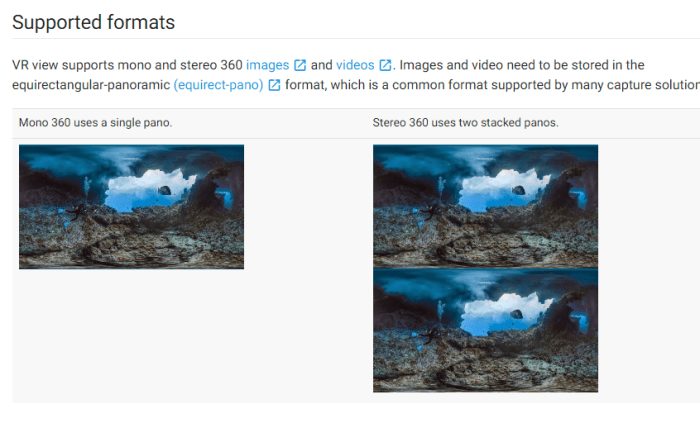
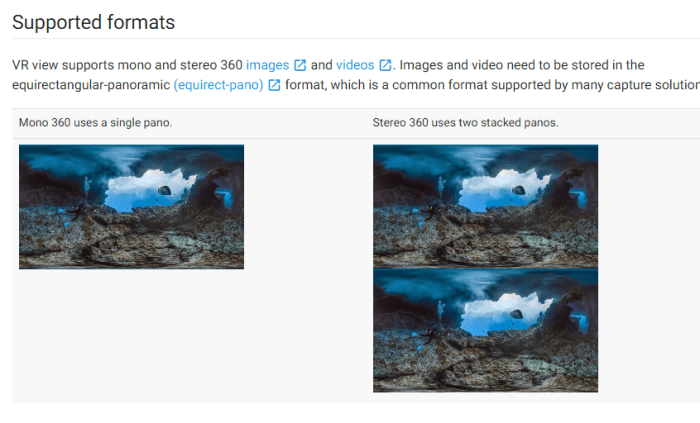
- Equirectangular Images: These images capture a full 360° scene, often employing a wide-angle lens to capture the entire environment. They are a fundamental format for 360° photography, offering a wide field of view and are relatively straightforward to create. The key is to ensure high resolution for optimal clarity within VR headsets.
- Cubemaps: Composed of six individual images, each representing one side of a virtual cube encompassing the 360° scene. Cubemaps are frequently used in game engines due to their ability to efficiently render 3D scenes. The advantage lies in their ability to provide accurate perspective and depth cues. These can be challenging to produce due to the technical aspects of image stitching and perspective alignment.
- Stereoscopic 360° Images: These formats capture two separate views of the scene, mimicking the human eye’s perspective. This stereoscopic approach enhances the sense of depth and immersion. They are suitable for experiences that require a highly realistic representation of space. The higher the resolution, the better the visual quality and depth perception within the viewer.
- Video 360°: This format captures moving images within a 360° sphere. These videos can be interactive, showcasing dynamic events or allowing users to explore the environment. They are excellent for virtual tours, product demonstrations, and event coverage. The quality and frame rate are vital for smooth playback and a fluid viewing experience.
Suitability for Different Use Cases
The choice of 360° content format directly impacts its effectiveness in different applications. Consider the specific needs of your project to select the optimal format.
- Virtual Tours: Equirectangular images or video 360° are excellent for virtual tours, allowing users to navigate and explore an environment. The user-friendliness of the navigation is a crucial factor to consider when creating virtual tours.
- Product Demonstrations: Stereoscopic 360° images or videos offer a compelling way to showcase products from all angles. This allows users to examine the details and features in a realistic manner. High-quality, detailed product presentations are important.
- Event Coverage: Video 360° captures the dynamic nature of events, allowing viewers to experience the atmosphere and interactions in a comprehensive way. This can provide an unparalleled overview of the event, allowing the viewer to immerse themselves in the experience.
Technical Specifications for Optimal Display
High-quality 360° content necessitates specific technical specifications to ensure optimal display within Google VR View. This includes factors such as resolution, format compatibility, and file size.
- Resolution: Higher resolutions lead to sharper images and a more immersive experience. The higher the resolution, the more detailed the view will be. The resolution should be high enough to ensure the content is not pixelated.
- File Size: Large files may impact loading times and overall user experience. Efficient compression techniques are crucial to reduce file sizes without compromising image quality.
- Format Compatibility: Ensure the chosen format is compatible with Google VR View to guarantee seamless playback.
Examples of Diverse 360° Content
Various forms of 360° content are transforming industries.
- Real Estate Virtual Tours: Real estate agents use 360° tours to showcase properties to potential buyers, allowing them to explore the interior and exterior of a home before a physical visit.
- Product Showcases: Companies use 360° images and videos to present products from multiple perspectives, providing a detailed and engaging way to show off features.
- Event Reenactments: Event organizers can capture and share 360° footage of significant events, allowing attendees to relive the experience in a highly immersive way.
Embedding Methods and Best Practices
Embedding 360° content using Google VR View offers a powerful way to engage users and immerse them in interactive experiences. Proper embedding techniques are crucial for a smooth user experience across various devices and browsers. This section details the methods and best practices for optimizing the embedding process.Effective embedding goes beyond simply placing the code on a webpage.
It involves understanding how different devices handle 360° content and optimizing the display for optimal viewing. Responsive design plays a key role in ensuring a seamless transition between screens.
Embedding Methods
Google VR View provides several methods for embedding 360° content. These methods differ in their level of interactivity and the amount of control over the user experience. A critical consideration is the appropriate choice for the intended application.
- Using the iframe tag: This is the standard method for embedding content, providing a container for the 360° experience. The iframe allows for basic control of the display and interaction with the embedded content. It is widely supported by browsers and offers a simple integration process.
- Using the VR View API: This method provides greater control over the user experience. Developers can implement custom interactions and tailor the display to specific needs. It is more complex to implement but enables highly interactive and engaging 360° experiences.

Optimizing for Different Devices
The viewing experience for 360° content significantly varies depending on the device. Optimizing for different screen sizes and resolutions is crucial for a positive user experience.
- Mobile devices: Mobile users might have slower internet connections or smaller screens. The embedding code should be optimized to load quickly and display effectively on various mobile screen sizes. Consider using responsive design principles to adapt the content to the device’s resolution.
- Desktop computers: Desktop users often have faster internet connections and larger screens. The embedding code can be optimized for a higher level of detail and interactivity, potentially allowing for more complex user interactions.
Responsive Design
Responsive design is paramount for 360° content embedding. It ensures that the content adapts to different screen sizes, maintaining optimal viewing and interaction regardless of the device.The ability of the content to resize and adapt to various screen resolutions is essential for providing a consistent and immersive experience for all users.
HTML Attributes for Embedding
The following table demonstrates different HTML attributes used for embedding Google VR View content.
| Attribute | Description | Example |
|---|---|---|
data-vr-view-url |
Specifies the URL of the 360° content. | data-vr-view-url="https://example.com/360content.html" |
width |
Specifies the width of the embedding container. | width="800" |
height |
Specifies the height of the embedding container. | height="600" |
data-vr-view-options |
Specifies advanced options, such as user interactions. | data-vr-view-options='"fieldOfView": 70' |
Technical Considerations for Embedding
Embedding 360° VR content seamlessly into your website requires careful consideration of several technical factors. Optimizing file size, ensuring browser compatibility, and proactively addressing potential embedding errors are crucial for a positive user experience. Poorly implemented embedding can lead to slow loading times, broken visuals, or even a complete failure to display the content, negatively impacting user engagement and your site’s reputation.
File Size and Resolution Impact
Large file sizes and high resolutions can significantly impact embedding performance. High-resolution 360° images require more storage space and processing power, resulting in slower loading times. A user experiencing a long loading time is likely to abandon the page, impacting engagement. Optimizing the file size without compromising the visual quality is essential. Techniques like image compression and adjusting the resolution to fit the intended display are important steps.
A good rule of thumb is to select a resolution that balances quality and performance, and test on various devices and network conditions.
Browser Compatibility Issues
Different web browsers handle VR content differently, potentially leading to display problems or a complete failure to load. Inconsistent support for VR APIs and different rendering engines can cause compatibility issues. It is crucial to test your embedded content across various browsers to identify potential compatibility problems. For example, one browser may render the content correctly, while another might display a blank space or encounter errors.
Thorough testing on the target audience’s most commonly used browsers is essential.
Common Embedding Errors and Troubleshooting
Several issues can arise during the embedding process. Errors may include incorrect syntax in the embed code, incorrect file paths, or compatibility issues with the hosting environment. Debugging these errors requires a systematic approach. Understanding the specific error message is the first step in troubleshooting. If the embed code is incorrect, the problem can be fixed by checking the code for any syntax errors or incorrect references.
Troubleshooting Table
| Error | Possible Cause | Troubleshooting Tip |
|---|---|---|
| Content not displaying | Incorrect embed code, incorrect file path, compatibility issues | Verify embed code for syntax errors, check file paths, test in different browsers |
| Slow loading times | Large file size, poor network connection, inadequate server resources | Optimize file size, ensure adequate server resources, use a content delivery network (CDN) |
| Blank screen | Incorrect embed code, compatibility issues, missing dependencies | Review embed code, check for missing libraries, test in a different browser, ensure correct file paths |
| Unresponsive or lagging | High resolution images, poor device hardware, network latency | Reduce resolution if possible, ensure the device has sufficient processing power, check network conditions |
Interactive Elements and Customization
Adding interactive elements transforms static 360° views into engaging experiences. Users can explore, learn, and interact with the content in a more meaningful way. Customization allows for tailored experiences that match the specific needs and goals of the content creator. This section delves into the methods for making 360° content more dynamic and user-friendly.Interactive elements, such as hotspots and clickable areas, make 360° content more user-centric.
Ever tried embedding Google VR View 360-degree content? It’s a cool way to share immersive experiences, but did you know your iPhone might unexpectedly freeze up if you type certain characters? For example, check out this article on your iPhone might crash if you type these characters to learn about some of those problematic ones. Understanding these quirks is key to ensuring smooth playback and a seamless user experience when you’re dealing with Google VR View 360-degree content embed.
This feature is crucial for guiding users through a virtual space, delivering information, and enhancing overall engagement. Users gain a sense of control and agency, leading to a more positive interaction with the 360° environment.
Adding Hotspots and Clickable Areas
Hotspots are clickable areas within a 360° view that trigger specific actions. They are fundamental to creating interactive experiences within a 360° environment. Adding hotspots is crucial for guiding users through the content and providing additional information or actions.Creating hotspots involves defining a specific area within the 360° scene. Tools typically allow specifying coordinates, shapes (e.g., circles, rectangles), or even using pre-existing image recognition to define clickable areas.
A well-designed hotspot will lead to a natural flow for the user within the scene. For example, a hotspot over a building in a virtual tour might trigger a pop-up with more details about that structure.
Customizing Appearance and Functionality
Customization options offer significant flexibility in tailoring the visual and functional aspects of embedded 360° content. The flexibility allows creators to match the content with a specific brand or theme. This ensures consistency and enhances the user experience.Different platforms offer various customization options. These options may include color palettes, fonts, and even custom CSS styling. By allowing customization, creators can align the experience with the overall aesthetic of the project.
A museum exhibit, for instance, can use a color palette that matches its logo and branding.
Different Enhancement Methods
Several methods can enhance the user experience in 360° content. The choice of method often depends on the nature of the content and the desired user interaction.
- 360° Video Integration: Embedding video within the 360° environment allows for dynamic content delivery. This integration is particularly useful for demonstrating processes or providing guided tours. For example, a video showcasing a product’s assembly process can be seamlessly integrated into a 360° tour of a factory.
- Adding Interactive Elements: This is a key element to transform static views into interactive experiences. Clickable areas and hotspots are essential components of this approach. The integration of interactive elements is particularly effective in guiding users through the content and offering additional details. Imagine a hotspot on a historical artifact triggering a pop-up with the artifact’s description.
- Customizable UI: Platforms often offer options to customize the user interface (UI) elements, such as buttons, menus, or information overlays. This level of control is essential for matching the embedded content to the overall branding and user interface style of the website. For instance, a museum website can match the embedded tour UI elements to its overall brand.
Examples of Interactive Content
Examples of interactive 360° content range from virtual tours of historical sites to interactive product demonstrations. These experiences often combine visuals with other forms of media. Such examples showcase the depth of possibilities within the 360° format.
Google VR View’s 360-degree content embedding is super cool, right? But while we’re waiting for the latest updates, it got me thinking about other tech delays. For example, the Nikon D6 release has been pushed back due to the coronavirus, with a new date announced on nikon d6 delay coronavirus new date. Hopefully, this won’t affect the availability of awesome VR content on Google VR View! Still, I’m excited to see how this technology evolves.
- Virtual Museum Tours: Users can explore exhibits in a virtual museum, clicking on hotspots to access details about specific artifacts or artworks. This approach allows for an immersive experience that complements traditional museum visits.
- Product Demonstrations: Companies can use 360° videos to showcase products in a more engaging manner. Users can virtually rotate and examine products from all angles, experiencing a tangible feel for the product without needing to handle the physical item.
User Experience and Accessibility
Immersive 360° experiences hold immense potential, but accessibility must be paramount. Ensuring inclusivity means considering diverse user needs and abilities. This section dives into strategies for crafting a seamless and intuitive user experience for all, regardless of physical limitations or technical proficiency.A well-designed 360° experience should be intuitive and engaging for all users, promoting a sense of exploration and discovery.
Accessibility features, such as alternative text descriptions and keyboard navigation, are crucial for users with disabilities. Providing clear instructions and visual cues will also significantly enhance the overall experience.
Accessibility Considerations for Diverse Users
Accessibility in 360° content extends beyond simple visual elements. Users with visual impairments, hearing impairments, motor impairments, and cognitive differences all require specific considerations. Providing alternative text descriptions, audio narrations, and closed captions is vital for a comprehensive and inclusive experience. Additionally, keyboard navigation must be fully functional to allow users to explore the content independently.
Creating a Seamless User Experience, Google vr view 360 degree content embed
A seamless user experience is crucial for engaging users with 360° content. Intuitive controls, clear visual cues, and a logical layout are essential components. Navigation should be intuitive, with clear indicators of movement and exploration options. Simple, clear instructions, and well-placed interactive elements contribute to a smooth user journey.
Usability for Users with Disabilities
Ensuring content usability for users with disabilities requires a multifaceted approach. This includes providing alternative text for images, captions for audio elements, and clear and concise instructions. The design should accommodate diverse input methods, such as screen readers and alternative control mechanisms. Consideration for users with cognitive disabilities includes providing clear and concise information, avoiding overly complex layouts, and using easily understood language.
Best Practices for Accessible 360° Content
| Aspect | Best Practice | Rationale |
|---|---|---|
| Alternative Text | Provide detailed descriptions for all visual elements, including objects, locations, and actions. | Allows users with visual impairments to understand the content through screen readers. |
| Audio Description | Offer audio descriptions for 360° environments and interactive elements. | Provides an alternative auditory experience for users with visual impairments. |
| Keyboard Navigation | Ensure all interactive elements are accessible through keyboard navigation. | Allows users who cannot use a mouse or trackpad to fully interact with the content. |
| Clear Visual Cues | Use clear and distinct visual cues to indicate interactions and navigation options. | Improves understanding for users with cognitive or learning differences. |
| Simple Language | Use clear and concise language in any accompanying text or instructions. | Increases comprehension for users with cognitive or learning differences. |
| Closed Captions | Include closed captions for any audio content. | Enables users with hearing impairments to access the content’s auditory elements. |
Examples of Real-World Applications
Immersive 360° experiences are no longer a futuristic concept; they’re rapidly transforming various industries. Businesses are leveraging Google VR View to create engaging and informative virtual tours, showcasing products, services, and destinations in a way that traditional methods simply can’t match. This section dives into practical applications across diverse sectors.
Real Estate
Real estate agents are utilizing Google VR View to provide prospective buyers with unparalleled property previews. Imagine a potential homebuyer experiencing the living room’s ambiance, the sunlight filtering through the windows, or the spaciousness of the backyard, all from the comfort of their own home. This immersive experience transcends the limitations of static images and videos, allowing clients to visualize themselves in the space, fostering a stronger connection and increasing engagement.
This virtual walkthrough facilitates a more intuitive understanding of the property, ultimately enhancing the buying process.
Tourism
Virtual tours are transforming the tourism industry. Travel agencies and destinations can showcase landmarks, historical sites, and cultural attractions in a truly captivating way. Potential tourists can explore ancient ruins, climb majestic mountains, or relax on pristine beaches without ever leaving their homes. Google VR View empowers users to experience the destination’s atmosphere and charm, fostering excitement and interest in visiting the location in person.
This heightened engagement translates into a more successful marketing strategy and improved travel planning.
Google VR View 360-degree content embedding is a cool way to showcase products, and the VW ID.7 EV sedan is a prime example. Want to see the sleek lines and impressive interior design? Check out detailed photos, specs, and range information at vw id 7 ev sedan photos specs range. It’s a fantastic way to engage viewers and provide immersive experiences, and the technology behind VR View makes this type of content easy to integrate into websites.
Retail
Retailers are leveraging virtual showrooms to offer customers a unique shopping experience. Customers can virtually “try on” clothes, visualize furniture in their homes, or explore a store’s layout before physically visiting. This immersive approach allows customers to make informed decisions, reducing the risk of returns and enhancing customer satisfaction. The interactive nature of VR View further encourages engagement, potentially leading to increased sales conversions.
Automotive Industry
Auto manufacturers can provide comprehensive vehicle demonstrations via VR View. Customers can explore the car’s interior, test-drive it virtually, and even visualize it in various environments. This immersive experience fosters a stronger connection between the customer and the vehicle, potentially leading to higher sales and increased customer loyalty.
Education
Educational institutions can use 360° content to enhance learning experiences. Students can virtually tour historical sites, dissect virtual organisms, or explore distant galaxies. This immersive approach can significantly enhance learning engagement and comprehension, particularly in subjects that benefit from visualization.
Table: Diverse Use Cases and Their Benefits
| Use Case | Benefits |
|---|---|
| Real Estate | Enhanced property visualization, increased engagement, intuitive understanding, improved buying process |
| Tourism | Captivating destination showcases, increased interest, improved travel planning, enhanced marketing |
| Retail | Interactive shopping experience, informed decisions, reduced returns, increased engagement, higher sales |
| Automotive | Comprehensive vehicle demonstrations, stronger customer connection, higher sales, increased customer loyalty |
| Education | Enhanced learning experiences, increased engagement, improved comprehension, visualization of complex concepts |
Future Trends in 360° Content Embedding
The 360° content landscape is rapidly evolving, driven by advancements in technology and increasing user demand for immersive experiences. This dynamic environment presents both opportunities and challenges for businesses and creators looking to leverage this powerful medium. Understanding the emerging trends and anticipating future developments is crucial for staying ahead of the curve and maximizing the potential of 360° content embedding.The future of 360° content embedding will likely be shaped by a confluence of factors, including the continued refinement of VR/AR technology, advancements in processing power, and the growing availability of high-bandwidth internet access.
These advancements will fuel more sophisticated and interactive experiences, moving beyond simple visual tours to more dynamic and engaging scenarios.
Enhanced Interactivity and User Control
The current state of 360° content often lacks the dynamic interactivity of traditional websites or applications. Future trends will prioritize enhancing user control and engagement. Users will expect to interact with the environment in more intuitive ways, such as manipulating objects, accessing information, or triggering specific actions. This will involve developing more sophisticated user interfaces and incorporating haptic feedback to enhance the sense of presence.
For example, virtual museums may allow users to zoom in on exhibits, interact with 3D models of artifacts, and even virtually “touch” them.
Integration with AI and Machine Learning
AI and machine learning are poised to revolutionize 360° content creation and embedding. AI can automate aspects of content creation, such as generating 360° panoramas, creating realistic 3D models, and personalizing user experiences. Machine learning algorithms can analyze user behavior to tailor the content presented to individual preferences, enhancing engagement and retention. For instance, a real estate agent could use AI-powered tools to create virtual tours that dynamically adapt to a buyer’s preferences based on their browsing history and feedback.
Immersive Storytelling and Narrative Design
Future 360° content will go beyond static visuals and simple tours. Narrative design will play a more prominent role, creating immersive storytelling experiences that transport users to different locations, times, or scenarios. Interactive elements will be woven into the narrative, allowing users to influence the storyline and make choices that impact the outcome. Imagine a historical simulation where users can explore a historical event by virtually stepping into the shoes of a participant, making decisions that alter the course of history.
Greater Accessibility and Inclusivity
Future 360° content will prioritize accessibility for users with disabilities. This includes supporting diverse sensory needs, offering text descriptions for visually impaired users, and providing alternative control methods for users with motor impairments. The design of user interfaces and navigation will be crucial for creating a truly inclusive experience. For example, a virtual museum experience could include audio descriptions of exhibits, allowing visitors with visual impairments to participate fully.
The Role of 5G and Cloud Computing
G networks and cloud computing will play a pivotal role in supporting the delivery and processing of high-resolution 360° content. High bandwidth and low latency will enable more realistic and responsive interactions within virtual environments. Cloud-based platforms will provide scalable infrastructure for hosting and managing large volumes of 360° content. Streaming of 360° content will become more seamless, allowing users to access and engage with rich experiences without significant buffering or lag.
Concluding Remarks
In conclusion, Google VR View 360° content embedding opens a world of possibilities for interactive and engaging web experiences. By understanding the intricacies of embedding, optimizing for diverse devices, and prioritizing user experience, you can create compelling and accessible 360° content that captivates your audience.